

Pixtel: Capture, Share, and Manage Your Screens Like a Pro
Pixtel combines screen capture, annotation, sharing, and capture management into one Windows application. This overview covers what each pillar does and which features belong to it — useful as a starting point before diving into feature-specific guides.
Capture
Pixtel supports 12 capture modes covering every common scenario:
- Region — draw a custom selection area
- Full Screen — grab the entire display
- Active Window — capture only the focused application window
- Scrolling Window / Scrolling Region — auto-scroll and stitch long pages into one image
- Timed / Delayed — countdown buffer for capturing hover states and dropdowns
- Last Region — instantly re-capture the previous selection coordinates
- Video & Audio Recording — screen + webcam, with audio
- Camera — capture directly from your device webcam
- Web Capture — capture by URL without manually navigating to the page
- Region to Clipboard — capture directly to clipboard, no tab opened
- Region Text (OCR) — extract text from any screen area directly to clipboard
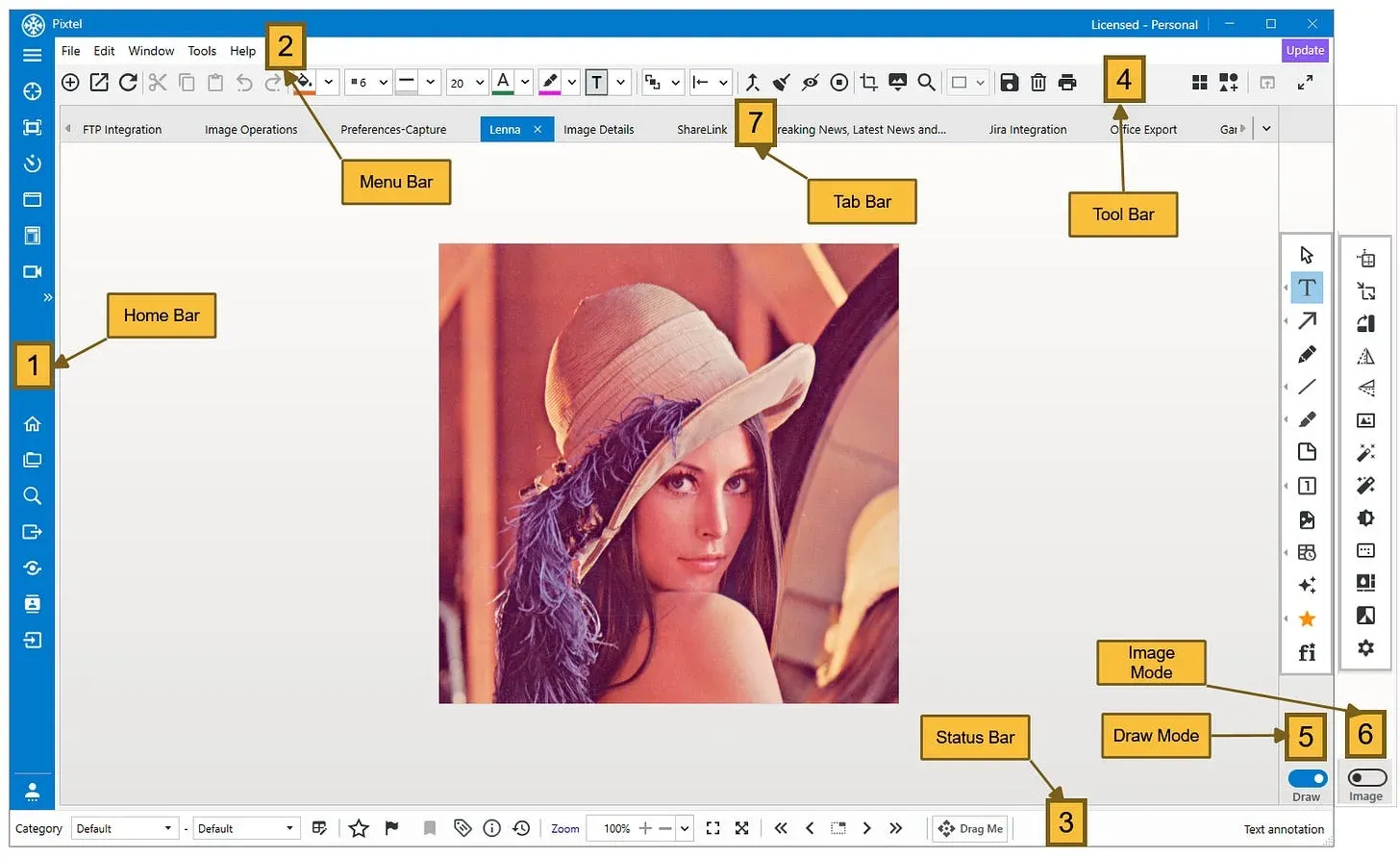
Every capture opens in a new tabbed workspace, organized automatically by source application or website.
Annotate
After capture, Pixtel's Draw Mode gives access to a full annotation toolkit — all vector-based, so nothing is permanently flattened:
- Arrows, lines, shapes, callouts, text boxes, sticky notes
- Smart Pencil for freehand-to-clean-shape conversion
- 20,000+ vector icons and clip-art
- Timestamps, clickable links, and embedded images
- Virtual Canvas that extends beyond image boundaries
Annotations remain live and re-editable after saving. Reopen any capture to move, recolor, or delete individual elements.
Share
Pixtel connects directly to the platforms your team uses — no manual download/upload step:
- Jira — push annotated screenshots directly into new or existing tickets
- Cloud storage — Google Drive, OneDrive, Dropbox, Box
- Microsoft Office — embed into Word, PowerPoint, or Excel
- Email — via customizable templates with contact list support
- FTP — direct upload to FTP servers
- Share Link — generate a shareable URL for any capture
- Drag Me — drag a capture directly from Pixtel into any app that accepts images
Manage
Pixtel's multi-tab interface keeps captures organized without requiring a separate file system:
- Tabbed workspace — browser-like tabs, each capture in its own tab
- Auto-organization — captures tagged by source application or website automatically
- Browse & search — find captures by name, tag, date, or source
- Backup & restore — full backup of the capture library and associated metadata
- Recycle bin — recover accidentally deleted captures
- Collage & collate — combine multiple captures into a single composite image
Where to Go Next
The articles below cover each area in depth:
Capture
- 4 Easy Ways to Capture Screenshots in Pixtel →
- How to Capture Scrolling Window with Pixtel →
- Capture the Same Screen Area Instantly with Last Region →
Annotate
- How to Annotate Images in Pixtel →
- Pixtel Callouts — Complete Guide →
- Clear Visual Communication with Pixtel Arrows →
Share
- Jira Integration with Pixtel →
- How to Share Captures Effortlessly with Pixtel →
- Upload Media Files to Google Drive Seamlessly Using Pixtel →
Manage
- Work Faster with Pixtel's Tabbed Approach →
- Browse Option in Pixtel — Easily Find Your Captures →
- How to Manage Data in Pixtel →
Related reading:
- 4 Easy Ways to Capture Screenshots in Pixtel →
- How to Annotate Images in Pixtel →
- How to Share Captures Effortlessly with Pixtel →
Capture once and use it forever. It isn't just a tool — it's Pixtel.*
'%3e%3cpath%20d='M6.49988%200.862305L0.380969%206.98121C-0.127315%207.4895%20-0.127315%208.31107%200.380969%208.81936C0.889253%209.32764%201.71083%209.32764%202.21911%208.81936L5.19992%205.83855V15.7C5.19992%2016.4176%205.781%2017%206.49988%2017C7.21875%2017%207.79984%2016.4176%207.79984%2015.7V5.83855L10.7806%208.81936C11.0341%209.07285%2011.3669%209.20024%2011.6997%209.20024C12.0325%209.20024%2012.3653%209.07285%2012.6188%208.81936C13.1271%208.31107%2013.1271%207.4895%2012.6188%206.98121L6.49988%200.862305Z'%20fill='white'/%3e%3c/g%3e%3cdefs%3e%3cclipPath%20id='clip0_1_2'%3e%3crect%20width='13.0002'%20height='16.8995'%20fill='white'%20transform='translate(-0.000244141%200.100533)'/%3e%3c/clipPath%3e%3c/defs%3e%3c/svg%3e)