

Upload Media Files to Google Drive Seamlessly Using Pixtel
Need to upload screenshots, images, or media files to Google Drive without switching between apps?Pixtel lets you upload media files directly to Google Drive — whether it’s a single file or multiple files — right from one platform. Capture, manage, and upload your files without breaking your workflow.
Upload a Single File to Google Drive Using Pixtel
Step 1: Capture or Import Media Files
Capture a screenshot using Pixtel, or bring in an existing media files using the Import option.
Step 2: Click Share
From the menu bar, click Share.You’ll see multiple sharing options.
Step 3: Choose Google Drive
Under Cloud Upload options, select Google Drive.
Step 4: Link Your Google Drive Account (First-Time Users)
If you’re uploading for the first time:
- Click Add Account
- Select your Google account email
- Grant the required access permissions to Pixtel
- Click Select to load your account
Your Google Drive account is now securely linked.
Step 5: Upload the File
Once linked, click Upload, and your file is instantly uploaded to Google Drive.
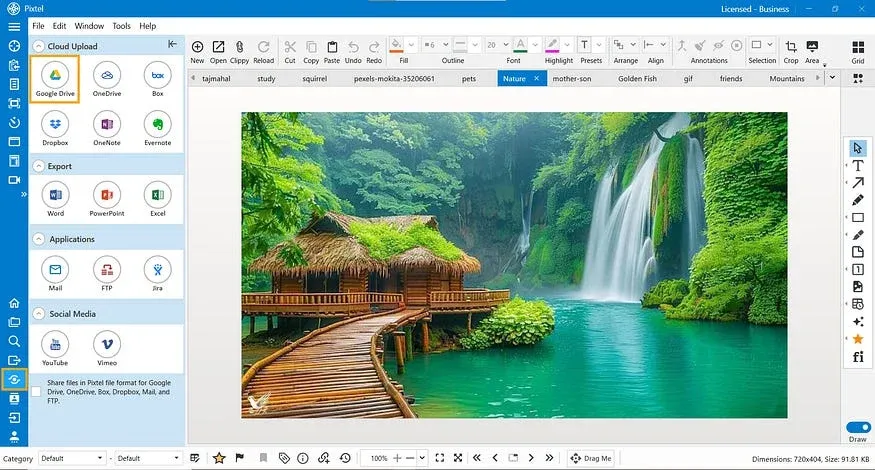
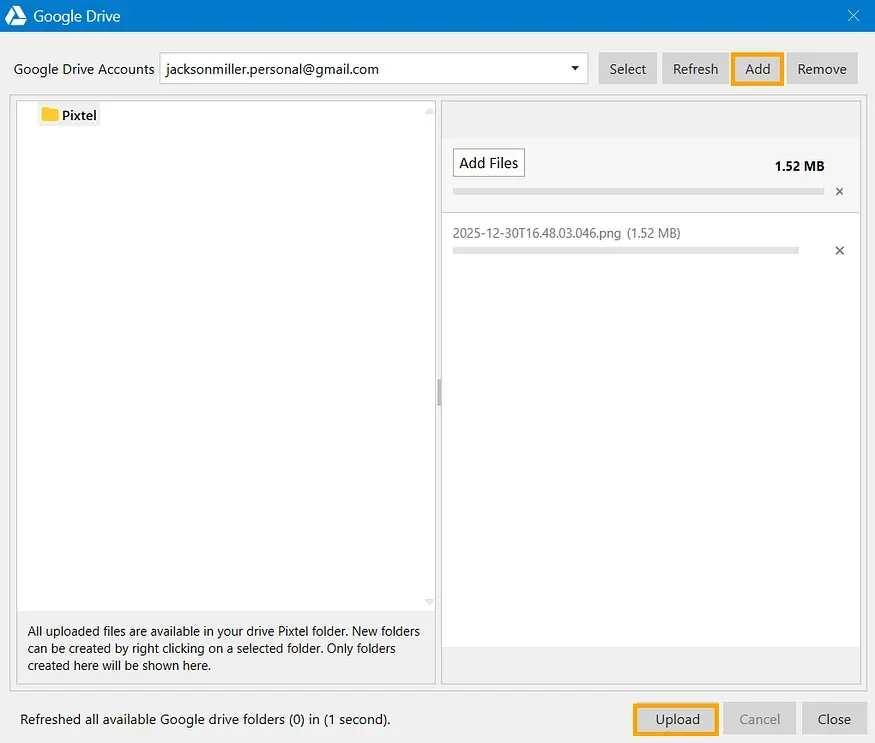
Upload Multiple Files at Once Using Grid View
Step 1: Switch to Grid View
Open Grid View to see all your captured and imported media files in one place.
Step 2: Select Multiple Files
Click on the files you want to upload.Selected files are highlighted and ready for sharing.
Step 3: Upload to Google Drive
- Click Share
- Choose Google Drive
- Click Upload
All selected files are uploaded to your Google Drive in one go.
Why Use Pixtel for Google Drive Uploads?
- Upload single or multiple files effortlessly
- No need to switch between apps or browsers
- Secure account linking with permission control
- Capture, manage, and upload — all from one platform
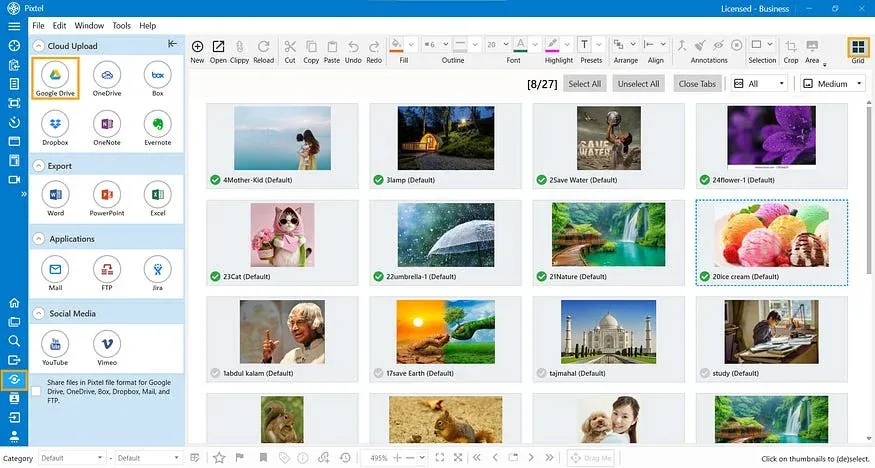
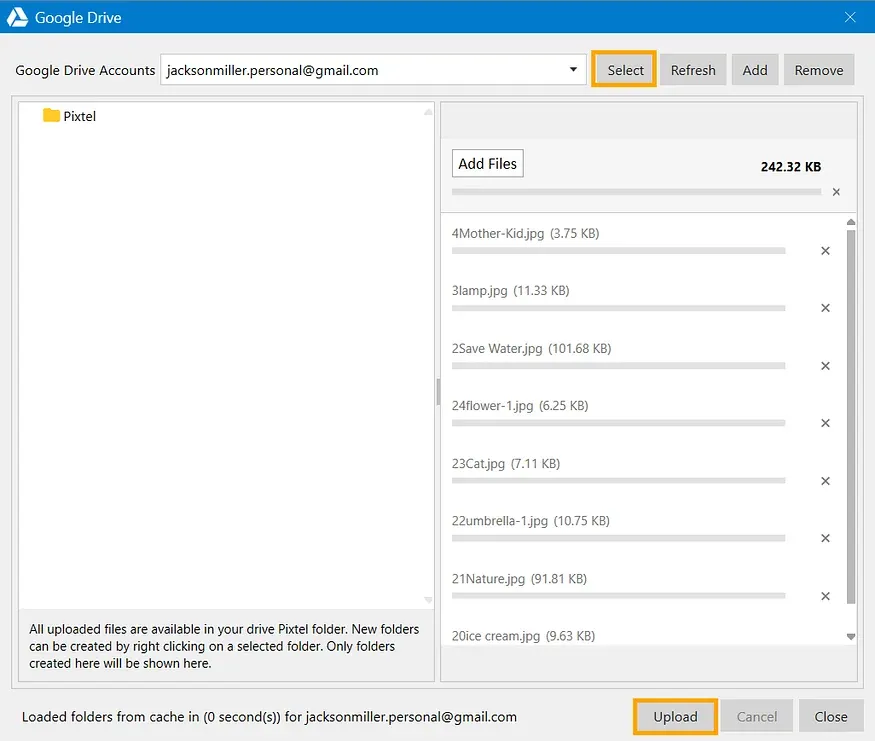
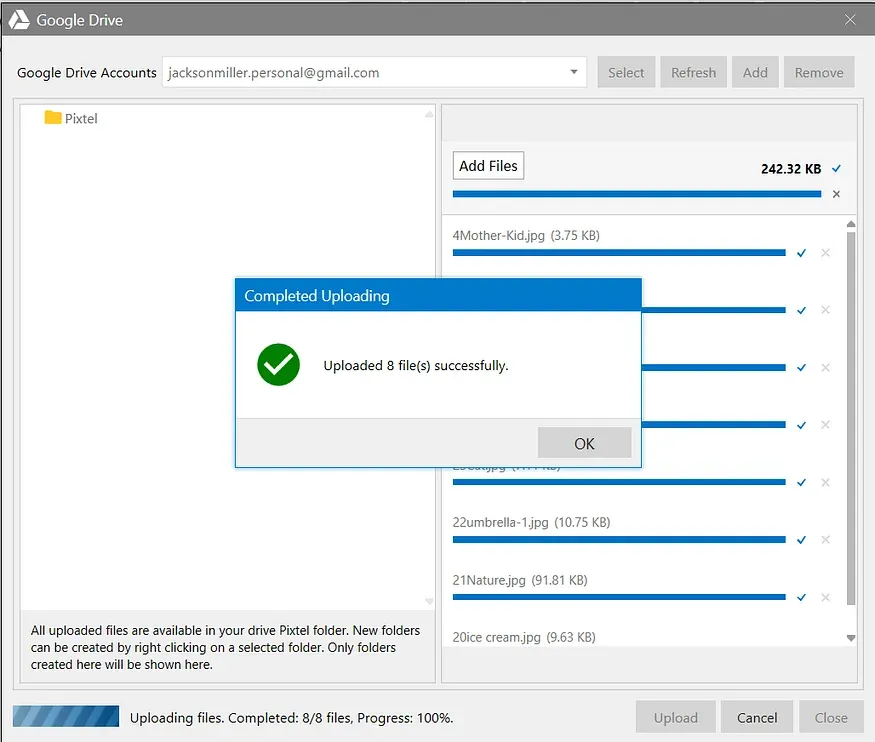
With Pixtel, uploading media files to Google Drive is fast, simple, and seamless. Whether you’re sharing a single screenshot or uploading multiple files in bulk, Pixtel keeps everything in one place — saving time and improving productivity.
No switching. No interruptions.
Related reading:
- From Screenshot to Cloud: Uploading to Dropbox with Pixtel →
- Upload Screenshots & Media to OneDrive Without Switching Apps →
- Upload Media Files to Box Using Pixtel →
Capture once and use it forever. It isn’t just a tool — it’s Pixtel.
👉 Download Pixtel · 🎥 Follow us on YouTube · 📘 Read Detailed Documentation
'%3e%3cpath%20d='M6.49988%200.862305L0.380969%206.98121C-0.127315%207.4895%20-0.127315%208.31107%200.380969%208.81936C0.889253%209.32764%201.71083%209.32764%202.21911%208.81936L5.19992%205.83855V15.7C5.19992%2016.4176%205.781%2017%206.49988%2017C7.21875%2017%207.79984%2016.4176%207.79984%2015.7V5.83855L10.7806%208.81936C11.0341%209.07285%2011.3669%209.20024%2011.6997%209.20024C12.0325%209.20024%2012.3653%209.07285%2012.6188%208.81936C13.1271%208.31107%2013.1271%207.4895%2012.6188%206.98121L6.49988%200.862305Z'%20fill='white'/%3e%3c/g%3e%3cdefs%3e%3cclipPath%20id='clip0_1_2'%3e%3crect%20width='13.0002'%20height='16.8995'%20fill='white'%20transform='translate(-0.000244141%200.100533)'/%3e%3c/clipPath%3e%3c/defs%3e%3c/svg%3e)