

Capture the Same Screen Area Instantly with Pixtel’s Last Region
When you need to take screenshots of the same screen area repeatedly, it quickly becomes frustrating.Every time, you have to manually drag and adjust the capture box to match the exact region. This is not only time-consuming but also interrupts your workflow — especially for tasks like testing, reporting, or documentation.
How Pixtel Solves This with Last Region
Pixtel simplifies this process with its Last Region feature.It remembers the region you captured earlier and allows you to reuse it instantly — without selecting the area again.
Step 1: Capture the Region Once
- Launch Pixtel Application
- From the **menu bar,**Go to More Captures
- Select Last Region
- Capture the screen area you want
This first capture sets the Last Region.
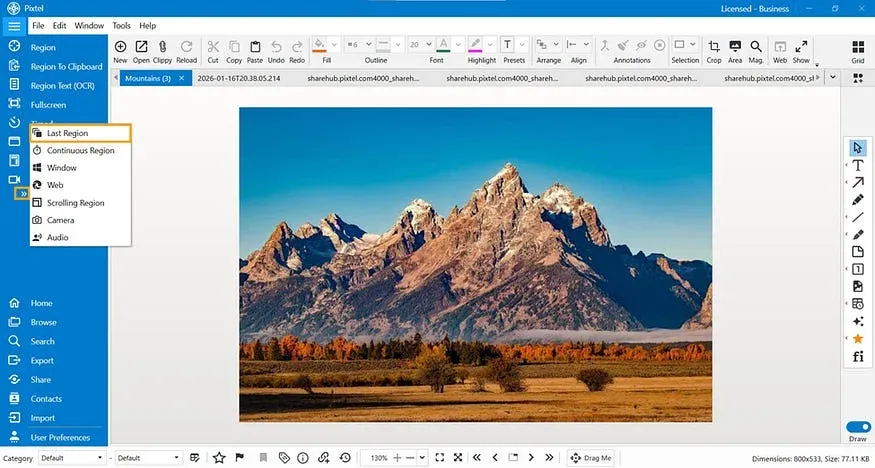
Step 2: Capture the Same Region Again
From the next time onward:
- Simply click on Last Region capture
- Pixtel will automatically capture the previously selected region
No need to reselect or resize the area — Pixtel does it for you.
Use Last Region Without Opening the App
You don’t even need to open Pixtel every time.
- Use the default shortcut**: Ctrl + Shift + L**
- Pixtel instantly captures the last selected region
This makes repetitive screenshots fast and seamless, especially during continuous work.
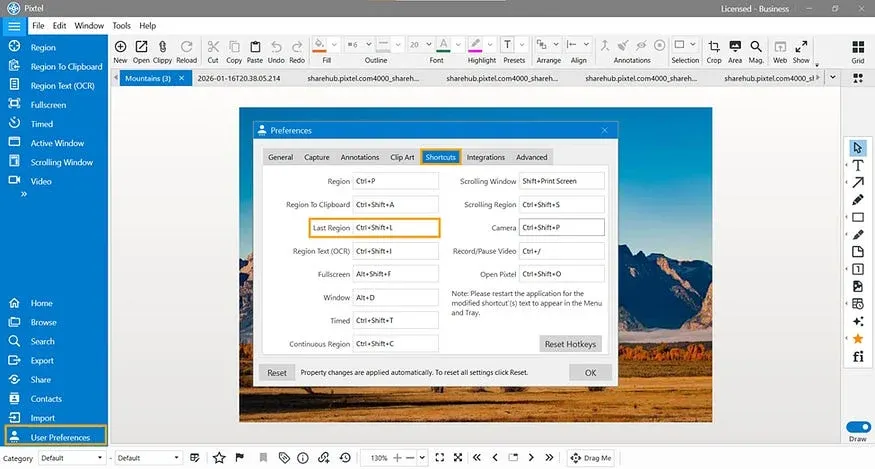
Customize the Last Region Shortcut
If you want a shortcut that better fits your workflow, Pixtel lets you customize it easily.
Steps to Customize the Shortcut
- Select User Preferences from the menu bar
- Navigate to the Shortcuts tab
- Find the Last Region field
- Enter the shortcut you prefer
- Click OK to save
Your custom shortcut is now set and ready to use.
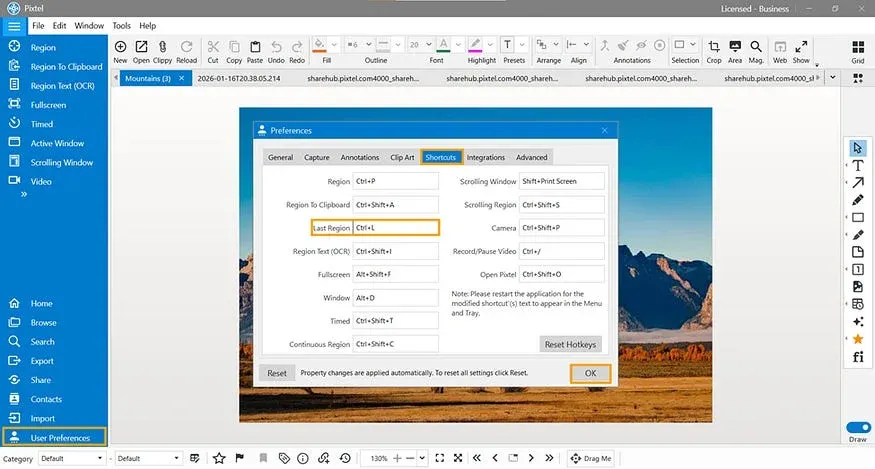
The Last Region feature in Pixtel removes the repetitive effort of selecting the same screen area again and again.By capturing the region once and reusing it instantly — either from the menu bar or via a shortcut — you can save time, stay focused, and work more efficiently.
With flexible shortcut customization and effortless reuse, Last Region turns repetitive screenshots into a one-click task.
Related reading:
- 4 Easy Ways to Capture Screenshots in Pixtel →
- How to Capture Continuous Region Using Pixtel →
- How to Snip Only What You Need — Pixtel Screen Capture Tutorial →
Capture once and use it forever. It isn’t just a tool — it’s Pixtel.
👉 Download Pixtel · 🎥 Follow us on YouTube · 📘 Read Detailed Documentation
'%3e%3cpath%20d='M6.49988%200.862305L0.380969%206.98121C-0.127315%207.4895%20-0.127315%208.31107%200.380969%208.81936C0.889253%209.32764%201.71083%209.32764%202.21911%208.81936L5.19992%205.83855V15.7C5.19992%2016.4176%205.781%2017%206.49988%2017C7.21875%2017%207.79984%2016.4176%207.79984%2015.7V5.83855L10.7806%208.81936C11.0341%209.07285%2011.3669%209.20024%2011.6997%209.20024C12.0325%209.20024%2012.3653%209.07285%2012.6188%208.81936C13.1271%208.31107%2013.1271%207.4895%2012.6188%206.98121L6.49988%200.862305Z'%20fill='white'/%3e%3c/g%3e%3cdefs%3e%3cclipPath%20id='clip0_1_2'%3e%3crect%20width='13.0002'%20height='16.8995'%20fill='white'%20transform='translate(-0.000244141%200.100533)'/%3e%3c/clipPath%3e%3c/defs%3e%3c/svg%3e)