

How to Get Back to the Original Source Page of Captured Images
In today’s fast-paced digital workflow, we often capture screenshots from various websites and applications for reference, documentation, or content creation. Over time, one common challenge arises: How do you navigate back to the original source page from where the screenshot was captured?
Manually tracking down the original webpage can be time-consuming and frustrating — especially when you work with multiple tabs, tools, and platforms.This is where Pixtel simplifies the process by preserving the source information of every capture.
Why Finding the Original Source Is Challenging?
When screenshots are captured using traditional tools:
- The original URL is lost
- There’s no reference to the source webpage
- Tracking the application or browser used becomes impossible
- Revalidating information takes extra effort
How Pixtel Preserves Original Source Links?
- Web Source Preservation
When you capture a screenshot from any browser, Pixtel automatically:
- Detects the original webpage
- Stores the URL of the source website
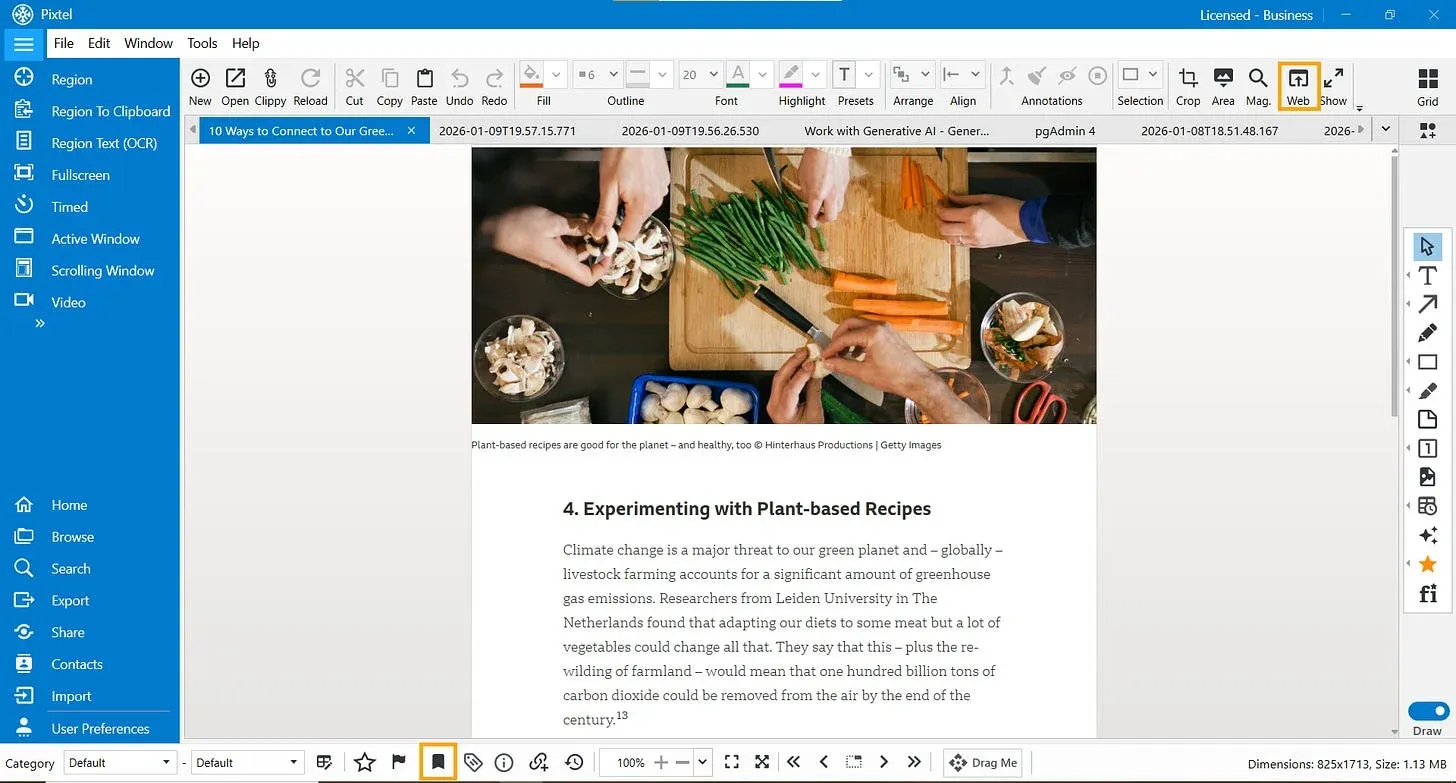
- Enables a Web icon(Open In Browser) in the Tool Bar
Simply clicking this icon will instantly redirect you back to the original source page.
2. Web Icon — One-Click Navigation
- The Web icon is enabled only when the capture is from a browser
- Clicking it opens the exact webpage where the screenshot was taken
- We can add a bookmark for the images that we captured from the web, which will be helpful while searching
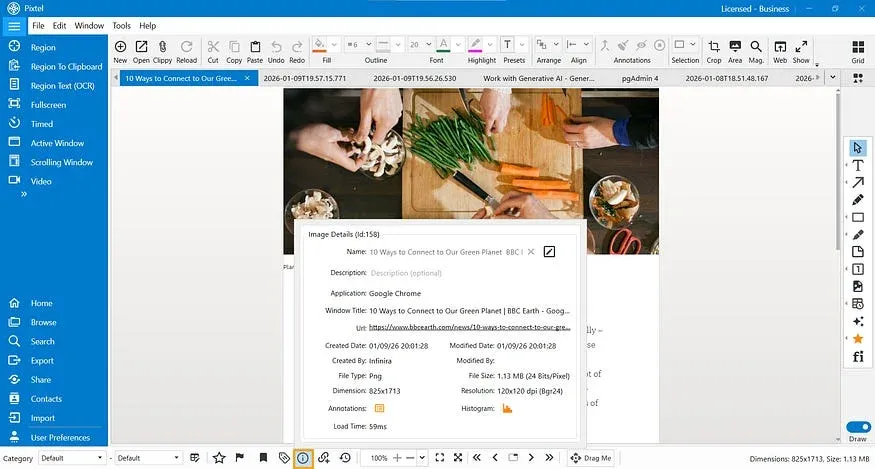
Detailed information about the image
The Info icon in the status bar provides detailed information about the image.
If the screenshot was captured from a any application:
- Pixtel records the application name
- You can easily identify where the content originated
- Useful for audits, reviews, and collaboration
Benefits of Using Pixtel for Source Tracking
- Instant access to original webpages
- Complete capture history and metadata
- Easy navigation back to sources
- Saves time during research and reviews
· Finding the original source of captured images no longer needs to be a challenge. With Pixtel’s Web icon and Info panel, every screenshot remains connected to its origin, whether it was captured from a browser or an application.
Related reading:
- Browse Option in Pixtel: Easily Find Your Captures Anytime →
- How to Manage Multiple Screenshots Effortlessly in One Place →
- Work Faster with Pixtel's Tabbed Approach →
Capture once and use it forever. It isn’t just a tool — it’s Pixtel.
👉 Download Pixtel · 🎥 Follow us on YouTube · 📘 Read Detailed Documentation
'%3e%3cpath%20d='M6.49988%200.862305L0.380969%206.98121C-0.127315%207.4895%20-0.127315%208.31107%200.380969%208.81936C0.889253%209.32764%201.71083%209.32764%202.21911%208.81936L5.19992%205.83855V15.7C5.19992%2016.4176%205.781%2017%206.49988%2017C7.21875%2017%207.79984%2016.4176%207.79984%2015.7V5.83855L10.7806%208.81936C11.0341%209.07285%2011.3669%209.20024%2011.6997%209.20024C12.0325%209.20024%2012.3653%209.07285%2012.6188%208.81936C13.1271%208.31107%2013.1271%207.4895%2012.6188%206.98121L6.49988%200.862305Z'%20fill='white'/%3e%3c/g%3e%3cdefs%3e%3cclipPath%20id='clip0_1_2'%3e%3crect%20width='13.0002'%20height='16.8995'%20fill='white'%20transform='translate(-0.000244141%200.100533)'/%3e%3c/clipPath%3e%3c/defs%3e%3c/svg%3e)