

How to Extract Text from an Image Using Pixtel
Whether it’s a screenshot, a scanned document, or a visual report, extracting text from images is a common need in today’s digital workflow.
With Pixtel’s Region Text (OCR) Capture, you can simply select any area containing text, and Pixtel’s built-in OCR engine instantly extracts the content. The recognized text appears in a clean pop-up window with a Copy Text button, allowing you to review, copy, or edit instantly.
Watch the tutorial: https://youtu.be/VR0xDAGCmQE
How to Capture Text from a Region Using Pixtel
- Initiate Capture: Open Pixtel and choose Region Text (OCR) Capture from the home bar.
- Select the Area: Drag your cursor over the section of the screen containing the text you want to extract.
- Extract and Use: Pixtel processes the selection with OCR and displays the recognized text in a window with a Copy Text button for quick access.
How to Extract Text from a Captured Image
You can also extract text from already captured images using Pixtel’s Area tool.
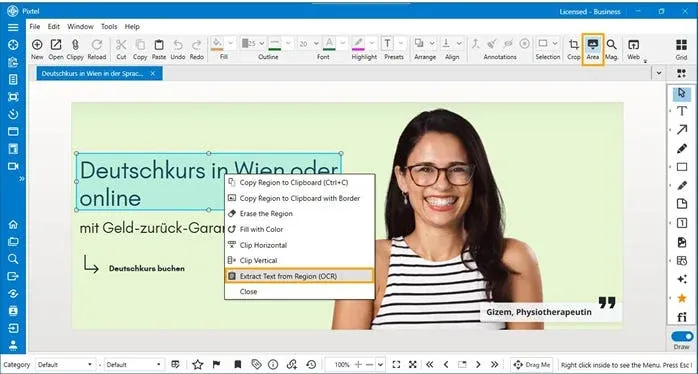
- Click the Area icon in Pixtel’s toolbar.
- Select the region of the image that contains text.
- Right-click and choose Extract Text From Region (OCR).
- Pixtel’s OCR engine processes the selection and displays the recognized text in a clean pop-up window with a Copy Text button, allowing instant review or editing.
How to Extract Text from a Region Using Shortcut Keys
Forget switching between tools — Pixtel lets you extract text instantly using a keyboard shortcut.
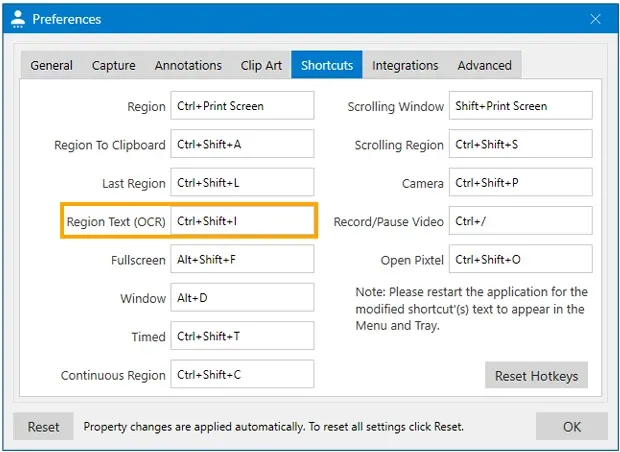
- Ensure Pixtel is running in the background.
- Navigate to the window or area you want to capture.
- Press Ctrl + Shift + I to start the Region Text (OCR) Capture.
- To customize the shortcut, open User Preferences → Shortcuts, set your preferred key combination, and click OK to save.
Pixtel simplifies text extraction with OCR — whether you’re capturing a region, using the Area tool, or a shortcut key. Get clean, editable text from any image in seconds.
Related reading:
- How to Snip Only What You Need — Pixtel Screen Capture Tutorial →
- How to Highlight Screenshots Clearly Using Smart Pencil →
- How to Annotate Images in Pixtel →
Capture once and use it forever. It isn’t just a tool — it’s Pixtel.
👉 Download Pixtel · 🎥 Watch the Full Tutorial on YouTube · 📘 Read Detailed Documentation
'%3e%3cpath%20d='M6.49988%200.862305L0.380969%206.98121C-0.127315%207.4895%20-0.127315%208.31107%200.380969%208.81936C0.889253%209.32764%201.71083%209.32764%202.21911%208.81936L5.19992%205.83855V15.7C5.19992%2016.4176%205.781%2017%206.49988%2017C7.21875%2017%207.79984%2016.4176%207.79984%2015.7V5.83855L10.7806%208.81936C11.0341%209.07285%2011.3669%209.20024%2011.6997%209.20024C12.0325%209.20024%2012.3653%209.07285%2012.6188%208.81936C13.1271%208.31107%2013.1271%207.4895%2012.6188%206.98121L6.49988%200.862305Z'%20fill='white'/%3e%3c/g%3e%3cdefs%3e%3cclipPath%20id='clip0_1_2'%3e%3crect%20width='13.0002'%20height='16.8995'%20fill='white'%20transform='translate(-0.000244141%200.100533)'/%3e%3c/clipPath%3e%3c/defs%3e%3c/svg%3e)