

How to Convert and Export Images in Multiple Formats with Pixtel
Need to change image formats in seconds? Whether it’s PNG to JPG, JPG to PNG, WebP, or TIFF, Pixtel makes it easy to convert and export images into multiple formats. From a single screenshot to bulk conversions, Pixtel gives you full control—right from capture to export, without any external tools.
Single Image Conversion Using Pixtel
Step 1: Capture or Import an Image
Capture a screenshot using Pixtel, or bring in an existing image using the Import option.
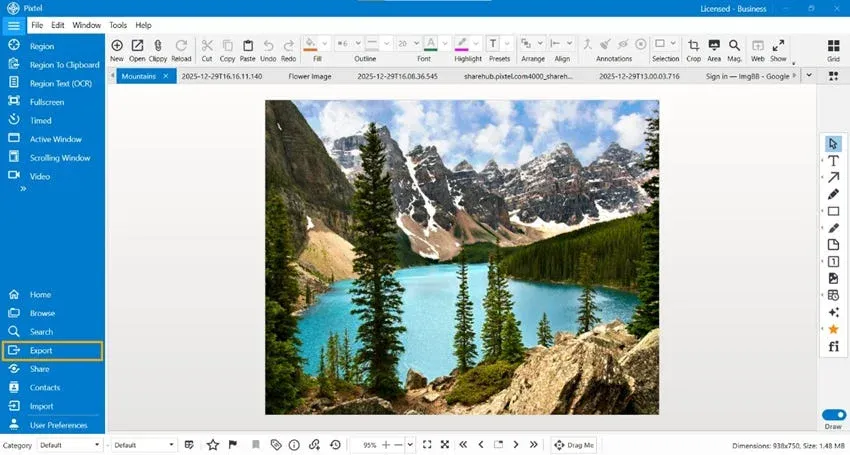
Step 2: View in Tabbed Interface
The captured or imported image opens in Pixtel’s tabbed view, where it’s ready for review, quick edits, or export.
Step 3: Export the Image
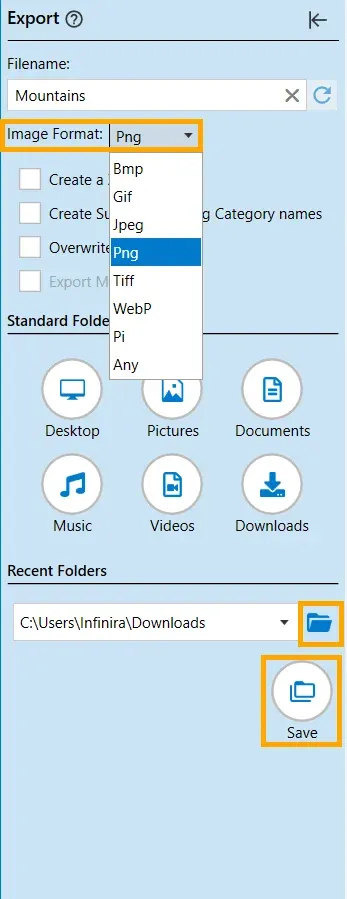
Click the Export option from the top menu bar.From the Image Format dropdown, choose the format you want to convert the image into.
Supported Formats
- PNG
- JPEG
- BMP
- GIF
- TIFF
- WebP
- PI (Pixtel’s internal editable format)
- Any
Choose the format based on your needs — web sharing, print quality, compression, or collaboration.
Step 4: Set the Destination Folder
Select the folder where you want the converted image to be saved.You can quickly choose a location or change it as needed.
Step 5: Convert and Export
Click Save, and Pixtel instantly converts and exports the image in your selected format.
Batch Conversion (Convert Multiple Images at Once)
Step 1: Switch to Grid View
Open Grid View to see all your captured and imported images in one place.
Step 2: Select Multiple Images
Click on the images you want to convert.Selected images are highlighted and ready for export.
Step 3: Export in Bulk
Click Export and choose the required output format.The selected format will be applied to all chosen images.
Step 4: Set the Destination Folder
Choose the folder where the converted images should be saved.
Step 5: Convert and Export
Click Save, and Pixtel converts and exports all selected images in one go.
Tips for Smooth Image Conversion
Choose the right format to get the best results:
- PNG — Perfect for transparency and high-quality graphics
- JPEG — Ideal for compressed photos and web uploads
- WebP — Great for modern web use with smaller file sizes
- TIFF — Best suited for print-quality images
- PI — Pixtel’s internal editable format for collaboration and future edits
With Pixtel, image conversion is fast, flexible, and effortless. Convert a single image or batch-process multiple files in just a few clicks — no extra software required. Choose the right format, save time, and keep your workflow smooth from start to finish.
It isn’t just a tool — it’s Pixtel.
Related reading:
- Export Images and Videos to Standard Folders with One Click →
- How to Export Images to Microsoft Word, PowerPoint, and Excel →
- How to Import and Export Captures in One Place with Pixtel →
Capture once and use it forever. It isn’t just a tool — it’s Pixtel.
👉 Download Pixtel · 🎥 Follow us on YouTube · 📘 Read Detailed Documentation
'%3e%3cpath%20d='M6.49988%200.862305L0.380969%206.98121C-0.127315%207.4895%20-0.127315%208.31107%200.380969%208.81936C0.889253%209.32764%201.71083%209.32764%202.21911%208.81936L5.19992%205.83855V15.7C5.19992%2016.4176%205.781%2017%206.49988%2017C7.21875%2017%207.79984%2016.4176%207.79984%2015.7V5.83855L10.7806%208.81936C11.0341%209.07285%2011.3669%209.20024%2011.6997%209.20024C12.0325%209.20024%2012.3653%209.07285%2012.6188%208.81936C13.1271%208.31107%2013.1271%207.4895%2012.6188%206.98121L6.49988%200.862305Z'%20fill='white'/%3e%3c/g%3e%3cdefs%3e%3cclipPath%20id='clip0_1_2'%3e%3crect%20width='13.0002'%20height='16.8995'%20fill='white'%20transform='translate(-0.000244141%200.100533)'/%3e%3c/clipPath%3e%3c/defs%3e%3c/svg%3e)