

Export Images and Videos to Standard Folders with One Click Using Pixtel
Managing and exporting media files shouldn’t be complicated or time-consuming. With Pixtel, you can seamlessly export your entire workflow — from captured media to organized local folders — in just a few clicks. Whether you’re working with images or videos, single files or bulk selections, Pixtel simplifies the entire export process.
Step-by-Step Guide to Export Media Files
Step 1: Import or Capture Media
Import your files into Pixtel using the Import option, or directly capture images and record videos within the platform.
Step 2: Export Single or Multiple Files Easily
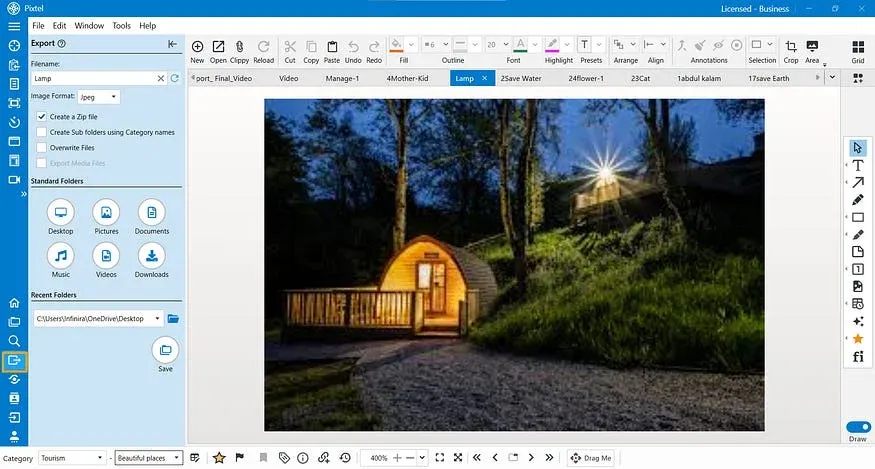
- Open the menu bar and choose the Export option.
- Choose a standard folder where you want to export your files.
- Alternatively, you can export to the recent folders.
Before exporting, Pixtel provides several flexible options:
- Create ZIP files for easy sharing
- Export based on category and sub-category
- Overwrite existing files if needed
- Rename files before saving
- You can also change the image format while exporting, with options such as PNG, JPEG, BMP, GIF, TIFF, WebP, PI, or keep the original format.
Once you click Save, your files will be exported instantly to the selected folder.
Step 3: Export Multiple Media Files Using Grid View
If you want to export multiple media files at once:
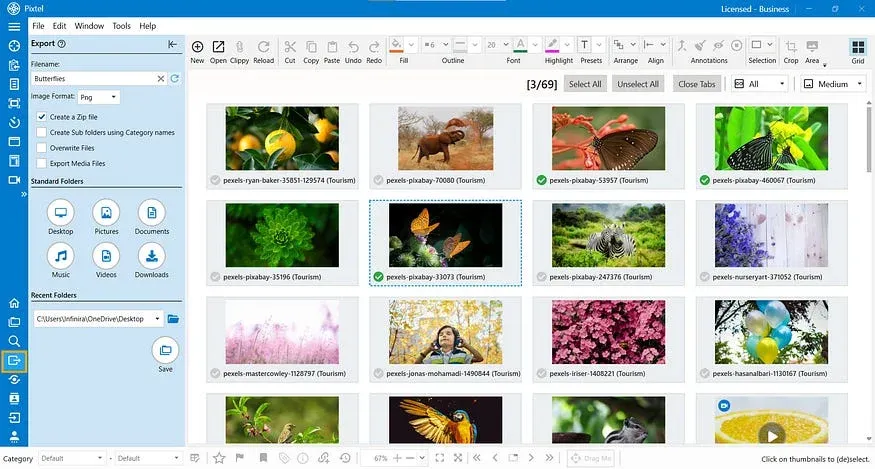
- Switch to Grid View.
- Select the media files you want to export.
- From the menu bar, click Export.
- Choose your destination folder or a recent folder.
- Apply options like Create ZIP, Category/Sub-category structure, Overwrite files
- You can also change the image format while exporting, with options such asPNG, JPEG, BMP, GIF, TIFF, WebP, PI, or keep the original format.
- Click Save, and all selected media files will be exported successfully.
Pixtel helps you streamline your entire workflow — from capturing media to exporting final files — using a single, unified tool. There’s no need to switch between multiple applications. With powerful export options, bulk handling, and folder flexibility, Pixtel ensures your work gets done faster, cleaner, and more efficiently — all in just a few clicks.
Related reading:
- How to Convert and Export Images in Multiple Formats with Pixtel →
- How to Import and Export Captures in One Place with Pixtel →
- Export Images to Word Documents Easily with Pixtel →
Capture once and use it forever. It isn’t just a tool — it’s Pixtel.
👉 Download Pixtel · 🎥 Follow us on YouTube · 📘 Read Detailed Documentation
'%3e%3cpath%20d='M6.49988%200.862305L0.380969%206.98121C-0.127315%207.4895%20-0.127315%208.31107%200.380969%208.81936C0.889253%209.32764%201.71083%209.32764%202.21911%208.81936L5.19992%205.83855V15.7C5.19992%2016.4176%205.781%2017%206.49988%2017C7.21875%2017%207.79984%2016.4176%207.79984%2015.7V5.83855L10.7806%208.81936C11.0341%209.07285%2011.3669%209.20024%2011.6997%209.20024C12.0325%209.20024%2012.3653%209.07285%2012.6188%208.81936C13.1271%208.31107%2013.1271%207.4895%2012.6188%206.98121L6.49988%200.862305Z'%20fill='white'/%3e%3c/g%3e%3cdefs%3e%3cclipPath%20id='clip0_1_2'%3e%3crect%20width='13.0002'%20height='16.8995'%20fill='white'%20transform='translate(-0.000244141%200.100533)'/%3e%3c/clipPath%3e%3c/defs%3e%3c/svg%3e)