

How to Capture a Web Page Using Pixtel
Capturing entire webpages is often essential for research, design inspiration, or archiving online content before it disappears.
With Pixtel’s Web Capture, you can easily save full webpages in a single shot — no manual scrolling or stitching required. Whether you’re documenting product pages, long articles, or chat threads, Pixtel ensures a clean, complete capture every time.
Watch the tutorial: https://youtu.be/0tAbBiHkWRI
Steps to Capture a Web Page Using Pixtel
Launch Web Capture: Open Pixtel and choose File → New Capture → Web Capture from the menu.
Enter the Web Address: In the Web Capture window, type or paste the URL of the webpage you want to capture. Press Enter or click the Open Page icon to load the page.
Start the Capture: Once the webpage finishes loading, the Capture button becomes active. Click it, and Pixtel will automatically scroll and capture the full webpage — no extra effort needed.
Edit and Export: After capturing, use Pixtel’s built-in tools to annotate, crop, highlight, or add notes. Export your screenshot in the format you prefer (PNG, JPEG, or PDF).
How to Manage Web Capture Height Limit
Need only part of a long webpage? Pixtel lets you limit the capture height for more precise results.
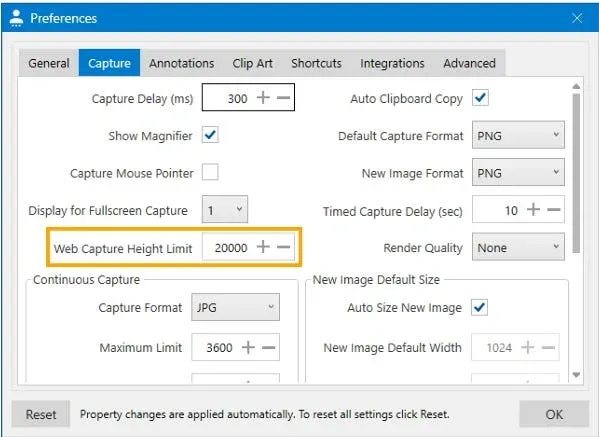
- Open User Preferences in Pixtel.
- Go to the Capture section.
- Locate Web Capture Height Limit and set your desired value.
- Pixtel will automatically stop capturing once it reaches your specified height.
How to Revisit the Original Webpage
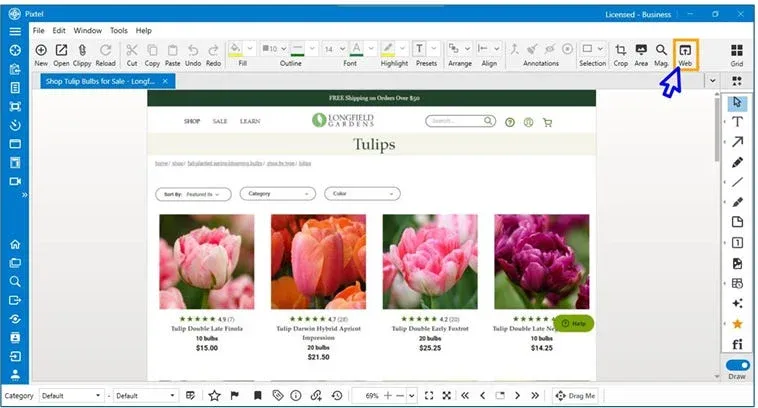
Every Pixtel web capture automatically saves the original webpage URL.
To revisit it later:
- Open your captured image in Pixtel.
- Click the Web option in the toolbar.
- Pixtel will instantly launch your browser and take you to the original webpage.
Pixtel simplifies webpage capture with its built-in browser, customizable height limits, and smart URL tracking. You can now document webpages exactly as they appear — in one scroll, one shot.
Related reading:
- How to Capture Scrolling Region Using Pixtel →
- How to Capture Scrolling Window with Pixtel →
- How to Snip Only What You Need — Pixtel Screen Capture Tutorial →
Capture once and use it forever. It isn’t just a tool — it’s Pixtel.
👉 Download Pixtel · 🎥 Watch the Full Tutorial on YouTube · 📘 Read Detailed Documentation
'%3e%3cpath%20d='M6.49988%200.862305L0.380969%206.98121C-0.127315%207.4895%20-0.127315%208.31107%200.380969%208.81936C0.889253%209.32764%201.71083%209.32764%202.21911%208.81936L5.19992%205.83855V15.7C5.19992%2016.4176%205.781%2017%206.49988%2017C7.21875%2017%207.79984%2016.4176%207.79984%2015.7V5.83855L10.7806%208.81936C11.0341%209.07285%2011.3669%209.20024%2011.6997%209.20024C12.0325%209.20024%2012.3653%209.07285%2012.6188%208.81936C13.1271%208.31107%2013.1271%207.4895%2012.6188%206.98121L6.49988%200.862305Z'%20fill='white'/%3e%3c/g%3e%3cdefs%3e%3cclipPath%20id='clip0_1_2'%3e%3crect%20width='13.0002'%20height='16.8995'%20fill='white'%20transform='translate(-0.000244141%200.100533)'/%3e%3c/clipPath%3e%3c/defs%3e%3c/svg%3e)