

Enhance Your Images Effortlessly with Pixtel Image Effects
In a world where visuals carry the message, a well-edited image can make all the difference. Whether you’re sharing a quick screenshot, preparing a presentation, or polishing content for your blog, having simple yet effective image editing tools matters.
With Pixtel, enhancing your images doesn’t require advanced skills or heavy software. From improving image quality to adding clean borders, everything is designed to be quick, intuitive, and practical.
Getting Started with Image Editing in Pixtel
Editing an image in Pixtel begins with just a few simple steps:
- Capture your image using the available capture options, or import an existing image into Pixtel.
- Once the image is ready, switch to Image Mode.
- Here, you’ll find a set of built-in image enhancement tools designed to improve visuals instantly.
The interface keeps things straightforward, so you can focus on the result rather than the process.
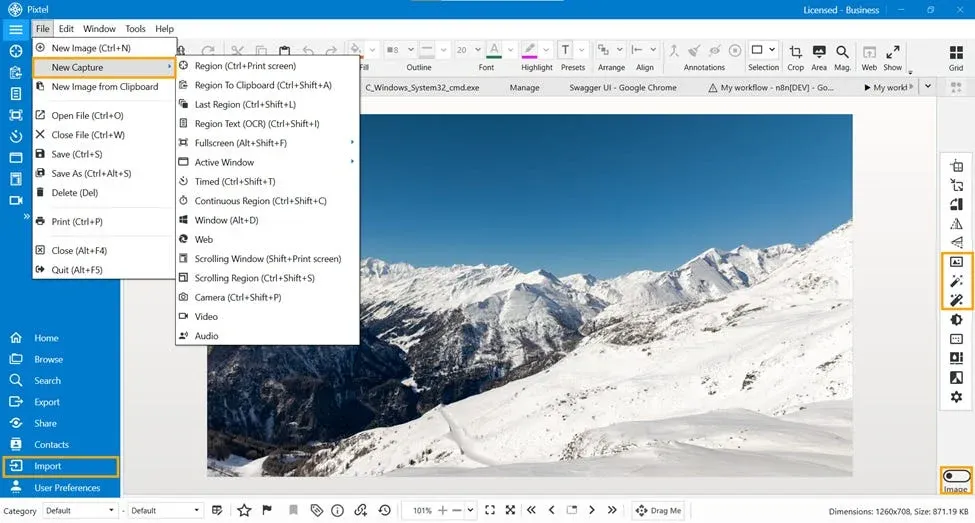
Image Editing in Pixtel
Image Border
Adding a border can completely change how an image feels — making it cleaner, more structured, and presentation-ready.
The Image Border feature allows you to:
- Choose from different border styles
- Adjust border width to match your design
- Select colors that complement your image
- Save your preferred settings as default for future use
This is especially useful when you want consistency across multiple images.
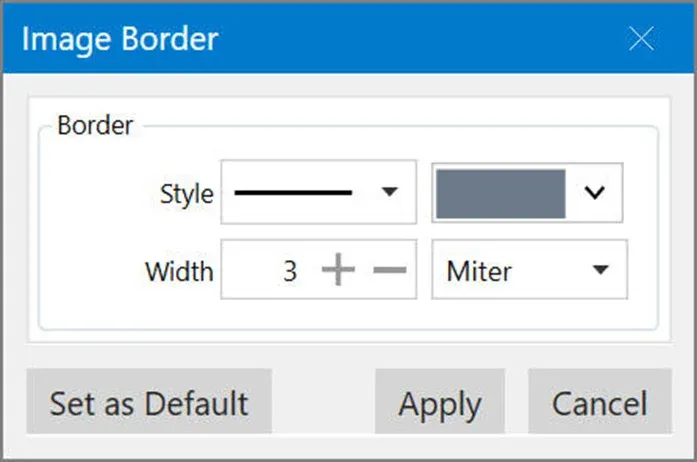
Image Auto Level
Sometimes images appear too dark or too bright due to lighting conditions. The Auto Level feature fixes this instantly.
With a single click, it:
- Balances brightness and contrast
- Enhances overall clarity
- Makes details more visible
It’s a quick way to bring out the true quality of your image without manual adjustments.
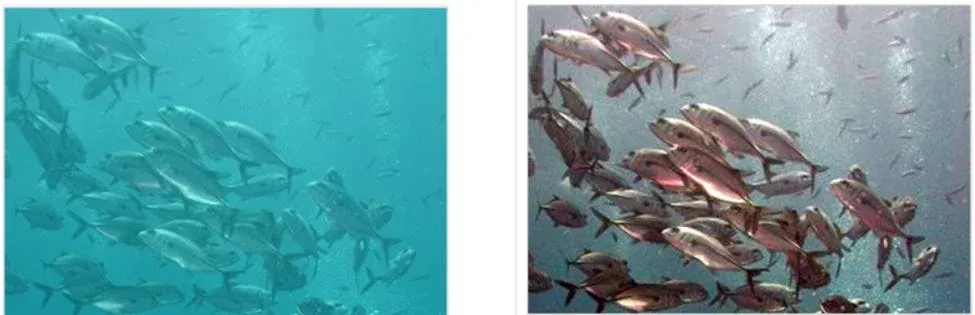
Image Auto Color Correction
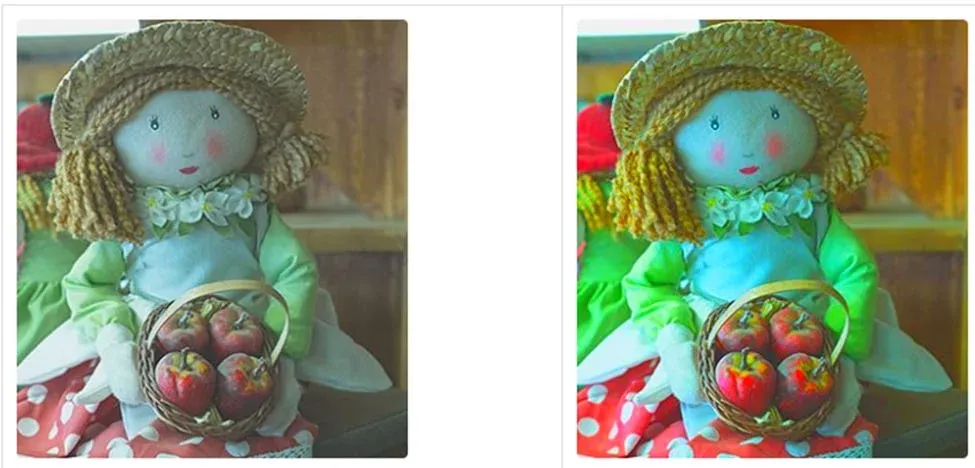
Color plays a crucial role in how an image is perceived. If colors look dull or slightly off, Auto Color Correction can refine them.
This feature:
- Adjusts color balance automatically
- Improves vibrancy while keeping it natural
- Enhances the visual appeal of the image
It’s particularly helpful for images taken in uneven lighting conditions.
Why Use Pixtel for Image Editing?
Pixtel focuses on simplicity without compromising on quality. Instead of complex editing workflows, it offers quick enhancements that work well for everyday use.
- No advanced editing skills required
- Fast and efficient image improvements
- Consistent output with minimal effort
- Ideal for screenshots, blogs, and presentations
Image editing doesn’t always need to be complicated. With Pixtel’s built-in image effects like Border, Auto Level, and Auto Color Correction, you can enhance your visuals in just a few clicks.
Whether you’re aiming to improve clarity, fix colors, or add a professional touch with borders, Pixtel provides a simple and reliable way to get it done. It’s a practical tool for anyone who wants better images without spending too much time editing.
Related reading:
- Image Effects in Pixtel: Edit Images Instantly Without Photoshop →
- Image Effects in Pixtel: Advanced Effects Made Simple →
- Image Filters in Pixtel: Enhance Images Effortlessly →
Capture once and use it forever. It isn’t just a tool — it’s Pixtel.
👉 Download Pixtel · 🎥 Follow us on YouTube · 📘 Read Detailed Documentation
'%3e%3cpath%20d='M6.49988%200.862305L0.380969%206.98121C-0.127315%207.4895%20-0.127315%208.31107%200.380969%208.81936C0.889253%209.32764%201.71083%209.32764%202.21911%208.81936L5.19992%205.83855V15.7C5.19992%2016.4176%205.781%2017%206.49988%2017C7.21875%2017%207.79984%2016.4176%207.79984%2015.7V5.83855L10.7806%208.81936C11.0341%209.07285%2011.3669%209.20024%2011.6997%209.20024C12.0325%209.20024%2012.3653%209.07285%2012.6188%208.81936C13.1271%208.31107%2013.1271%207.4895%2012.6188%206.98121L6.49988%200.862305Z'%20fill='white'/%3e%3c/g%3e%3cdefs%3e%3cclipPath%20id='clip0_1_2'%3e%3crect%20width='13.0002'%20height='16.8995'%20fill='white'%20transform='translate(-0.000244141%200.100533)'/%3e%3c/clipPath%3e%3c/defs%3e%3c/svg%3e)