

Image Effects in Pixtel: Advanced Effects Made Simple
Editing images in different styles usually requires advanced tools like Photoshop and a good amount of skill. From adding shadows to applying artistic filters, traditional editing can be time-consuming and complex.
Pixtel simplifies this entire process. With built-in image effects, you can transform your images in just a few clicks — no design expertise required. Whether you’re enhancing screenshots or styling imported images, Pixtel provides quick and effective editing options.
How to Upload Images in Pixtel?
Getting started with image editing in Pixtel is simple. You can:
- Import images directly from your system
- Capture screenshots using Pixtel’s built-in capture options
Once you capture or upload an image, it automatically opens in a new Pixtel tab, where you can start editing immediately.
Accessing Image Effects
To use image effects:
- Switch to Image Mode
- Navigate to the Image Effects option
- Click to open the effects panel
Pixtel offers multiple effects that can be applied instantly to your images.
Advanced Image Effects in Pixtel
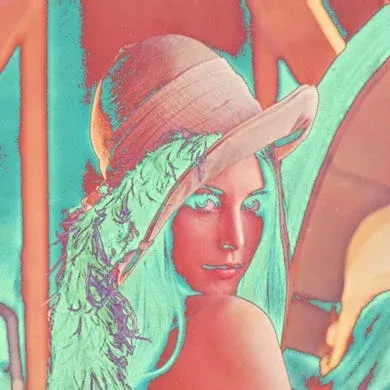
Solarize
Solarize creates a dramatic look by reversing the tones in the image. Dark areas turn light, and light areas turn dark.Best for: Artistic and high-contrast edits.
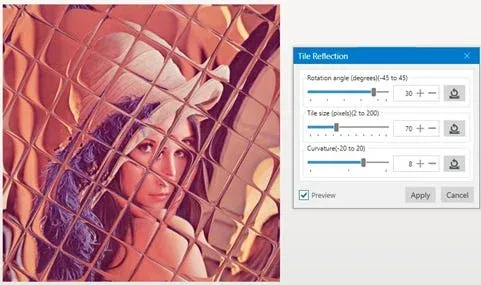
Tile
Tile applies a glass-tile overlay effect, dividing the image into reflective sections.Best for: Decorative and stylized visuals.
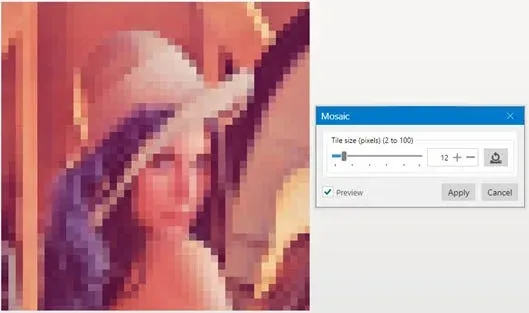
Mosaic
Mosaic transforms the image into block-like tiles, reducing detail and creating an abstract look.Best for: Creative designs or hiding details.
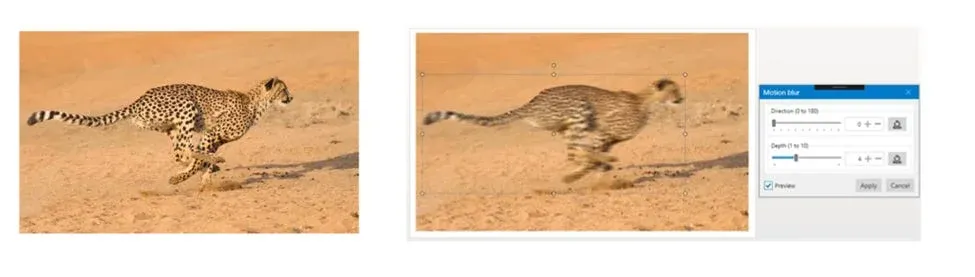
Motion Blur
Motion Blur adds a sense of movement by blurring parts of the image in a direction. You can also apply it selectively using tools like the Lasso tool.Best for: Action effects and dynamic visuals.
Why Use Pixtel for Image Effects?
Pixtel removes the complexity of traditional image editing tools. Instead of spending time learning advanced software, you can apply professional-looking effects instantly.
- No technical skills required
- Fast and easy to use
- Multiple effects in one place
- Ideal for screenshots and quick edits
Pixtel makes image editing simple and efficient. With advanced effects like Solarize, Tile, Mosaic, and Motion Blur, you can enhance your images creatively without using complex tools.
These features help you go beyond basic editing and create visually appealing content in just a few clicks.
Related reading:
- Image Effects in Pixtel: Edit Images Instantly Without Photoshop →
- Enhance Your Images Effortlessly with Pixtel Image Effects →
- Image Filters in Pixtel: Enhance Images Effortlessly →
Capture once and use it forever. It isn’t just a tool — it’s Pixtel.
👉 Download Pixtel · 🎥 Follow us on YouTube · 📘 Read Detailed Documentation
'%3e%3cpath%20d='M6.49988%200.862305L0.380969%206.98121C-0.127315%207.4895%20-0.127315%208.31107%200.380969%208.81936C0.889253%209.32764%201.71083%209.32764%202.21911%208.81936L5.19992%205.83855V15.7C5.19992%2016.4176%205.781%2017%206.49988%2017C7.21875%2017%207.79984%2016.4176%207.79984%2015.7V5.83855L10.7806%208.81936C11.0341%209.07285%2011.3669%209.20024%2011.6997%209.20024C12.0325%209.20024%2012.3653%209.07285%2012.6188%208.81936C13.1271%208.31107%2013.1271%207.4895%2012.6188%206.98121L6.49988%200.862305Z'%20fill='white'/%3e%3c/g%3e%3cdefs%3e%3cclipPath%20id='clip0_1_2'%3e%3crect%20width='13.0002'%20height='16.8995'%20fill='white'%20transform='translate(-0.000244141%200.100533)'/%3e%3c/clipPath%3e%3c/defs%3e%3c/svg%3e)