

Pixtel vs Greenshot: Which Free Windows Screenshot Tool Wins in 2026?
Greenshot has been a beloved fixture on Windows desktops for nearly two decades. Millions of users installed it when the built-in Snipping Tool felt too basic — and for years, it was the go-to free screenshot utility for developers, testers, and technical writers who needed more than Print Screen.
But it's 2026. And the honest question is: does Greenshot still hold up?
This comparison looks at both tools side by side — features, capture modes, integrations, editing capabilities, and long-term viability — to help you decide whether Greenshot still fits your workflow, or whether it's time to move to something built for how people actually work today.
Quick Verdict
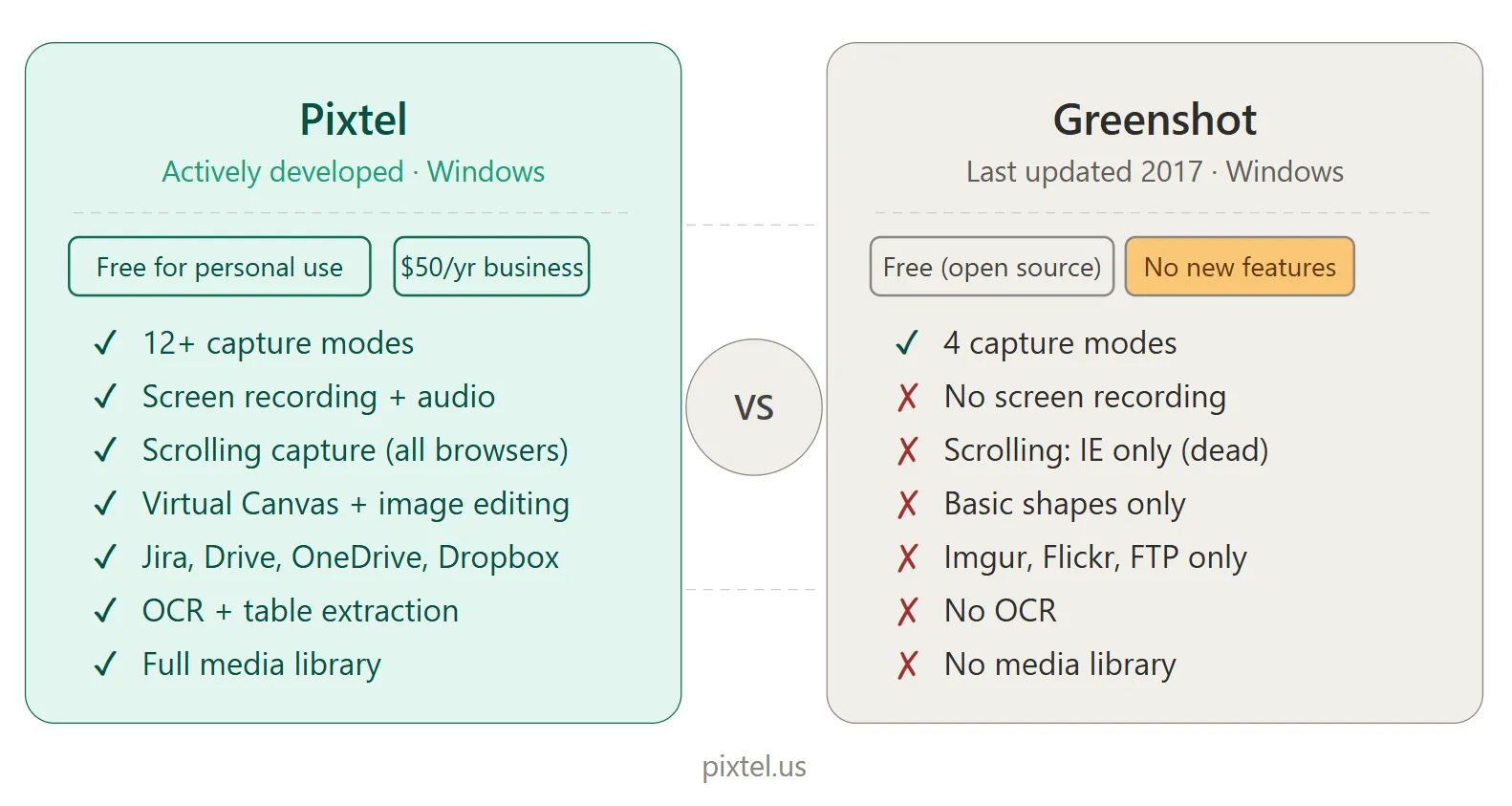
| Pixtel | Greenshot | |
|---|---|---|
| Best for | Windows power users, developers, QA, designers | Light users needing quick basic captures |
| Platform | Windows | Windows (Mac version unmaintained) |
| Pricing | Free with watermarks / $25/yr (no watermarks) / $50/yr (business) | Free (open-source) |
| Last major update | Actively developed | 2017 — nearly a decade ago |
| Capture modes | 12+ | 4 |
| Scrolling capture | ✅ Full support | ⚠️ Internet Explorer only (effectively dead) |
| Screen recording | ✅ Yes | ❌ No |
| Video/GIF capture | ✅ Yes | ❌ No |
| OCR / text extraction | ✅ Advanced (table extraction) | ❌ No |
| Virtual Canvas | ✅ Yes | ❌ No |
| Image editing suite | ✅ Yes | ❌ Basic shapes and text only |
| Cloud integrations | Google Drive, OneDrive, Dropbox, Box, FTP + more | Imgur, Flickr, FTP only |
| Multiple cloud accounts | ✅ Yes | ❌ No |
| Jira integration | ✅ Native | ❌ No |
| Media management | ✅ Full library system | ❌ No library |
| Active development | ✅ Yes | ❌ No updates since 2017 |
Overview: What Are These Tools?
Pixtel
Pixtel is a Windows-native screen capture and media management suite available on the Microsoft Store. It was built for professionals who handle screenshots as a core part of their daily workflow — developers, QA engineers, product managers, designers, and technical writers.
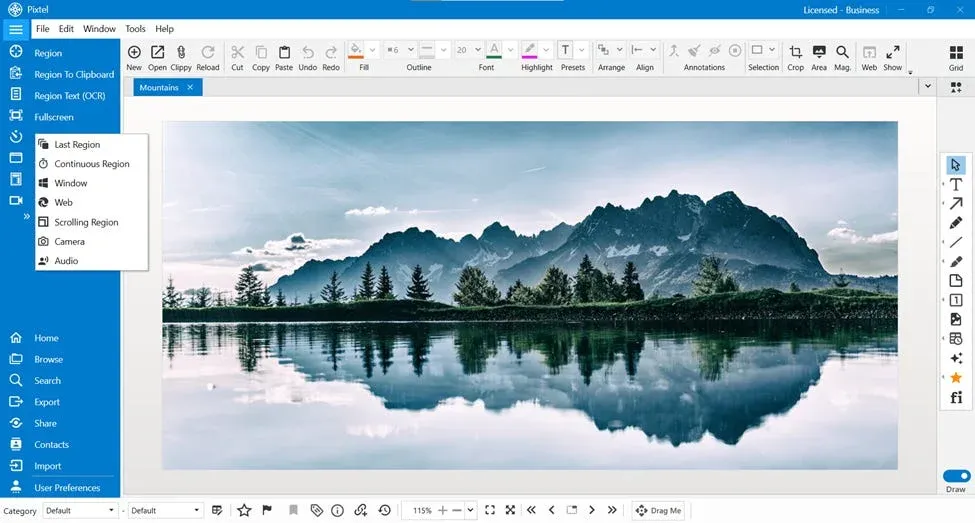
Rather than treating each capture as a one-off action, Pixtel organizes everything into a tabbed workspace with a full media library, so captures from different sessions stay contextually grouped and instantly accessible. It pairs 12+ capture modes with a complete annotation and image editing suite, a Virtual Canvas, and deep integrations with tools like Jira, Google Drive, OneDrive, Dropbox, Box, and Microsoft Office.
For personal use, Pixtel is free — all features included, with watermarks on captured images and videos. Upgrade to Personal ($25/yr) to remove watermarks.
Greenshot
Greenshot is a free, open-source screenshot tool for Windows, originally released in 2007. It earned its reputation by being fast, lightweight, and significantly more useful than the default Windows Print Screen workflow. At its peak, it was a genuinely excellent tool for its time — easy to install, easy to use, and free.
The problem is that development has effectively stalled. The last major release shipped in September 2017. While small maintenance patches have appeared since, there has been no meaningful new feature development in nearly a decade. Greenshot has no screen recording, no video or GIF capture, no cloud sharing beyond Imgur and Flickr, no OCR, no media library, and its scrolling capture feature only works with Internet Explorer — a browser that no longer exists in any practical sense.
Greenshot still works for basic captures. But for anyone who needs more than that, it's increasingly difficult to recommend starting fresh on it in 2026.
The Development Gap: Why It Matters
This is the most important context for the entire comparison, and it's worth being direct about.
Greenshot has not received a major update since 2017. That's nearly nine years without new features — during which time Windows 10 and Windows 11 shipped, Internet Explorer was retired, cloud collaboration became standard practice, and screen recording became a baseline expectation for any productivity tool.
Greenshot still functions. The capture engine works. The basic annotation tools work. But it is a frozen snapshot of what screenshot software looked like in 2017, running on an operating system that looks very different today.
For individual users who only need occasional, basic captures, this may not matter. For anyone relying on a screenshot tool as a daily productivity instrument — capturing, annotating, sharing, managing, and integrating screenshots into a broader workflow — Greenshot's stalled development is a meaningful limitation.
Pixtel, by contrast, is actively developed with regular updates, new integrations, and feature additions — all while offering a free tier with no time limit (watermarks on captures; removed from $25/yr).
Capture Modes
Pixtel (12+ modes)
- Region Capture — click and drag to select any area
- Fullscreen Capture — all monitors, with or without taskbar
- Active Window Capture — isolate the current app window
- Scrolling Window Capture — capture entire scrollable windows automatically
- Scrolling Region Capture — capture a specific scrollable section within a page
- Web Capture — capture full webpages with source URL preserved
- Region to Clipboard — capture directly to clipboard without opening editor
- Last Region — instantly re-capture the exact same screen area
- Continuous Region Capture — capture a fixed area at set intervals
- Timed Capture — countdown before capture for menus and tooltips
- Camera Capture — capture from a connected webcam
- Screen Recording — record screen, camera, or both with audio
- Audio Capture — record microphone or system audio independently
Greenshot (4 modes)
- Region Capture — click and drag area selection
- Window Capture — active window
- Fullscreen Capture — entire display
- Scrolling Capture — scrolling web pages in Internet Explorer only
Greenshot's scrolling capture is worth calling out specifically: it only works with Internet Explorer, which Microsoft retired in June 2022. In practice, this means Greenshot has no working scrolling capture for any modern browser. Users who need to capture a full webpage or a long document must either take multiple screenshots and stitch them manually, or use a different tool.
Edge: Pixtel — not close. Pixtel offers 12+ modes to Greenshot's effectively 3 working modes. The absence of scrolling capture for modern browsers alone is a significant functional gap.
Screen Recording and Video
Pixtel includes full screen recording — capture your screen, connected webcam, or both simultaneously, with system audio and microphone support. Screen recordings open in the same library as your screenshots, keeping your entire visual workflow in one place. Pixtel also supports audio-only capture independently of video.
Greenshot has no screen recording capability. None. If you need to record a workflow, demonstrate a bug, or create a tutorial video, you need a completely separate application. This is a fundamental feature gap that has existed since Greenshot was first released and shows no sign of being addressed.
Edge: Pixtel — categorically. Greenshot cannot record anything.
Annotation and Editing
Pixtel
Pixtel's annotation suite covers the full range of professional needs:
- Arrows, lines, shapes (rectangles, ellipses, polygons, freehand)
- Text boxes, callouts (14 callout types), sticky notes
- Blur for redacting sensitive data, highlights, borders
- Stamps, rubber stamps, timestamps, clickable links
- Smart Pencil — converts rough freehand drawings into clean geometry
- Selection tools — rectangular, ellipse, lasso, polygon, curved
- Counter/step numbering for sequential screenshots
- Crop, Magnifier, Embedded Image
- Virtual Canvas — extend your annotation space infinitely beyond the image boundaries
Beyond annotation, Pixtel includes a full image editing suite that eliminates the need to open Photoshop or Paint:
- Brightness and Contrast adjustment
- Hue, Saturation, and Color Balance
- Convert to Grayscale / Black & White
- Sharpen and Blur
- Image Effects (solarize, mosaic, tile, motion blur)
- Canvas Resize and Image Resize
- Flip, Rotate, Color Picker, Invert Colors
- Watermark — embed a custom watermark image into any capture for branding or attribution
Editor UX: All tools are always visible around the window — no hidden menus to dig through. Clicking a tool like an arrow opens a popup panel showing all style variants to choose from. The top bar surfaces the relevant controls (line width, color, opacity) as quick dropdowns, and those selections are saved for the next annotation. Double-clicking any annotation opens a properties panel for precise control. The full canvas stays available — no persistent side panel eating into your workspace.
Greenshot
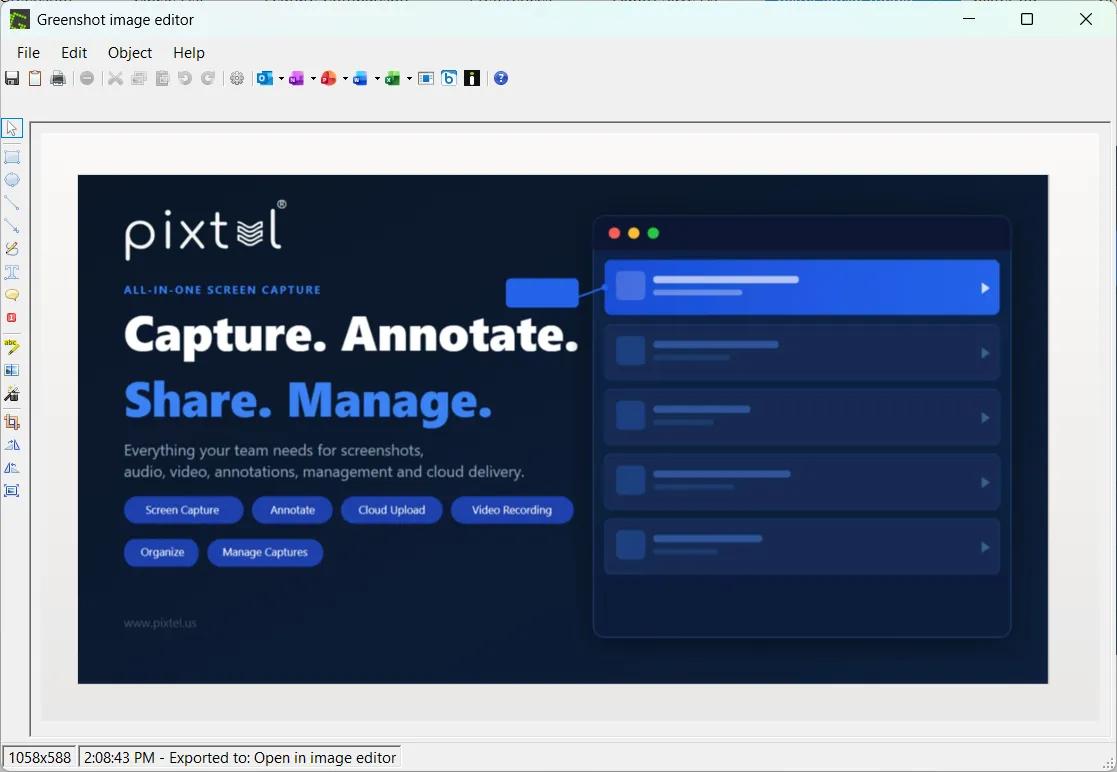
Greenshot's image editor is functional but basic:
- Arrows, lines, rectangles, ellipses
- Text boxes
- Highlight
- Obfuscate (blur/pixelate for redacting)
- Crop
That is essentially the complete list. No sticky notes, no callout variants, no step numbering, no Virtual Canvas, no Smart Pencil, no image effects, no canvas resize, no brightness or contrast controls. Users who need to resize an image, convert it to grayscale, or apply any kind of image-level adjustment have to export to Paint or another external tool.
Users on review platforms consistently flag this: "Would like a little more markup capability" and "Limited editing features" are among the most repeated complaints.
Edge: Pixtel — significantly. Pixtel's annotation toolkit is broader, its image editing suite adds a full layer of capability Greenshot has never had, and the editor UX keeps the canvas clean and tools accessible without hunting through menus.
OCR and Text Extraction
Pixtel includes advanced OCR that extracts plain text from any image or screenshot, and can extract structured table data directly into spreadsheet format. The Region Text Capture mode lets you pull text from any area of your screen on the fly — extremely useful for copying content from PDFs, legacy systems, or locked-down web pages.
Greenshot has no OCR capability. If you need to extract text from a screenshot, you need a separate tool.
Edge: Pixtel — Greenshot has no equivalent feature.
Cloud Sharing and Integrations
Pixtel
- Jira — native integration to attach annotated screenshots directly to issues
- Google Drive — single or bulk upload; supports multiple accounts
- OneDrive — direct Microsoft account upload; supports multiple accounts
- Dropbox — folder selection and bulk upload; supports multiple accounts
- Box — secure enterprise cloud upload; supports multiple accounts
- FTP — direct server upload; multiple server configurations
- Email — send via configured email with OAuth2
- OneNote — clip directly into notebooks
- Evernote — capture to notes
- YouTube — publish screen recordings directly
- Vimeo — upload videos without switching apps
- Microsoft Office — export to Word, PowerPoint, and Excel
- Share Link — generate a shareable URL with custom auto-delete settings
- Drag Me — drag images directly into any app without saving first
A standout capability: Pixtel supports multiple accounts per cloud service. You can connect several Google Drive, OneDrive, Dropbox, or Box accounts and switch between them with a single click when uploading — essential for consultants, agencies, and anyone managing files across multiple client environments.
Greenshot
- Imgur — upload to the public image hosting site
- Flickr — upload to photo sharing
- Picasa — Google's retired photo service (no longer functional)
- FTP — direct server upload
- Email — basic email attachment
- Microsoft Office — send to Word, PowerPoint, Excel, or OneNote via plugin
- Clipboard — copy to clipboard
Greenshot's cloud sharing has not kept pace with how teams work today. There is no Google Drive, no OneDrive, no Dropbox, no Jira, no Slack, no Teams. Picasa, one of Greenshot's listed destinations, was shut down by Google in 2016 and is no longer functional. The Office integration remains useful for users embedded in Office workflows.
Edge: Pixtel — not comparable. Pixtel covers every major cloud platform, enterprise tool, and communication channel. Greenshot covers basic file output and a handful of legacy upload destinations.
Media Management
Pixtel functions as a complete media management system. Every screenshot, recording, and imported file is stored in a browsable library with:
- Grid view with thumbnails
- Filter by type (image, video, audio)
- Date-based browsing and search
- Tags and bulk operations (export, collage, delete)
- Recycle bin for accidental deletions
- Backup, restore, and data relocation tools
- Duplicate detection and cleanup
- Automatic organization by source application or website
Greenshot has no media library. Screenshots are saved to a specified folder on your file system. There is no browsable history, no thumbnail view, no tagging, no search, and no bulk management. If you take 50 screenshots in a session, they live in a folder like any other files — organized only by filename and date.
For light users who take occasional screenshots and immediately use them, this is fine. For anyone capturing screenshots at any meaningful volume, the absence of a library creates real friction.
Edge: Pixtel — Greenshot has no equivalent.
Performance and Resource Usage
Greenshot's greatest strength has always been its footprint. It is genuinely lightweight — a small system tray app that consumes minimal RAM and CPU, launches instantly, and stays out of your way until needed. For users on older hardware or those who value a minimal background presence, Greenshot earns its reputation here.
Pixtel is also designed to be lean for a full-featured application. Its Windows-native architecture keeps it fast — the system tray integration allows any capture mode to be triggered without interrupting your workflow, and captures open immediately in a new tab. As a richer application with media management, cloud integrations, and a full editor, its footprint is naturally larger than Greenshot's minimal install — but it is not the heavy, slow editor that some commercial tools bring.
Edge: Greenshot for raw minimalism. For users who want zero background presence, Greenshot is hard to beat. For everyone else, Pixtel's performance-to-capability ratio is strong.
Who Should Use Pixtel?
Pixtel is the right choice if you:
- Work on Windows and want a professional-grade tool at no personal cost
- Need screen recording alongside screenshots in the same workflow
- Take scrolling captures of modern web pages and documents
- Work in development or QA and need native Jira integration
- Need to extract text or table data from screenshots via OCR
- Handle high volumes of screenshots and need a real media library
- Want to edit images (adjust brightness, convert to grayscale, resize canvas) without opening another app
- Use multiple cloud accounts across Google Drive, OneDrive, Dropbox, or Box
- Want a tool that is actively maintained and will keep pace with Windows updates
- Want a clutter-free editor with always-visible tools and persistent annotation settings
Who Should Keep Using Greenshot?
Greenshot still makes sense if you:
- Take occasional, simple screenshots and need nothing more than basic annotation
- Are on older hardware and want the absolute minimum footprint
- Have an established Office workflow and use the direct Office plugin daily
- Simply need a fast, no-friction capture tool and don't require recording, cloud sync, or media management
- Are deeply familiar with Greenshot's shortcuts and see no reason to change
That said, if any of Greenshot's limitations — no recording, no modern scrolling capture, no cloud sharing, no OCR, no media library — have caused friction in your workflow, those limitations are not going to be fixed. Greenshot's development has been stalled since 2017 and shows no signs of resuming.
Feature Comparison: Full Table
| Feature | Pixtel | Greenshot |
|---|---|---|
| Platform | Windows | Windows (Mac unmaintained) |
| Pricing | Free with watermarks / $25/yr (no watermarks) / $50/yr (business) | Free |
| Active development | ✅ | ❌ Last update 2017 |
| Region capture | ✅ | ✅ |
| Fullscreen capture | ✅ | ✅ |
| Window capture | ✅ | ✅ |
| Scrolling capture | ✅ All browsers | ⚠️ IE only (non-functional) |
| Last Region (repeat capture) | ✅ | ❌ |
| Continuous/interval capture | ✅ | ❌ |
| Timed/delayed capture | ✅ | ❌ |
| Camera capture | ✅ | ❌ |
| Screen recording | ✅ | ❌ |
| Audio capture | ✅ | ❌ |
| Video/GIF capture | ✅ | ❌ |
| Arrows and shapes | ✅ | ✅ |
| Text boxes | ✅ | ✅ |
| Callout types | 14 | 1 (basic) |
| Sticky notes | ✅ | ❌ |
| Blur / obfuscate | ✅ | ✅ |
| Step / counter numbering | ✅ | ❌ |
| Smart Pencil | ✅ | ❌ |
| Virtual Canvas | ✅ | ❌ |
| Image editing suite | ✅ Full | ❌ None |
| Brightness / contrast | ✅ | ❌ |
| Grayscale / B&W conversion | ✅ | ❌ |
| Canvas resize | ✅ | ❌ |
| Image effects | ✅ | ❌ |
| Color picker | ✅ | ❌ |
| Watermark (custom image) | ✅ | ❌ |
| Editor UX | Popup panels, always-visible tools | Menu-based, basic toolbar |
| Tool settings persistence | ✅ | ❌ |
| OCR text extraction | ✅ Advanced | ❌ |
| Table data extraction | ✅ | ❌ |
| Media library | ✅ Full system | ❌ |
| Backup and restore | ✅ | ❌ |
| Jira integration | ✅ Native | ❌ |
| Google Drive | ✅ | ❌ |
| OneDrive | ✅ | ❌ |
| Dropbox | ✅ | ❌ |
| Box | ✅ | ❌ |
| Multiple cloud accounts | ✅ | ❌ |
| FTP | ✅ | ✅ |
| ✅ | ✅ | |
| OneNote | ✅ | ✅ (via plugin) |
| Evernote | ✅ | ❌ |
| YouTube upload | ✅ | ❌ |
| Vimeo upload | ✅ | ❌ |
| Microsoft Office export | ✅ | ✅ (via plugin) |
| Imgur / Flickr | ❌ | ✅ |
| Share Link (URL sharing) | ✅ | ❌ |
| Drag Me (drag-drop sharing) | ✅ | ❌ |
| Collage / image layouts | ✅ | ❌ |
| Slideshow / presentation mode | ✅ | ❌ |
| Free personal use | ✅ (watermarks on free tier) | ✅ |
The Bottom Line
Greenshot earned its reputation honestly. For a free, open-source tool first released in 2007, it delivered genuine value for years — and for users who only need the most basic screenshot capability, it still technically works.
But for Windows professionals in 2026, Greenshot is a tool built for a different era. No screen recording, no working scrolling capture, no cloud integrations beyond Imgur, no OCR, no media library, no image editing — and no sign of these limitations being addressed, given that development stalled in 2017.
Pixtel offers all of that — with a free tier that has no time limit and no features locked behind a paywall. Watermarks are added to captures on the free tier and removed from $25/yr. For anyone evaluating screenshot tools on Windows today, Pixtel is the more complete, more capable, and equally accessible choice.
If Greenshot's limitations have never bothered you, you may not need to switch. But if you've ever needed to record a screen, capture a long webpage, share directly to Google Drive, extract text from a screenshot, or find a capture you took three weeks ago — Pixtel was built for exactly that.
Try Pixtel Free Today
👉 Download Pixtel
🎥 Follow us on YouTube
📘 Read Detailed Documentation
'%3e%3cpath%20d='M6.49988%200.862305L0.380969%206.98121C-0.127315%207.4895%20-0.127315%208.31107%200.380969%208.81936C0.889253%209.32764%201.71083%209.32764%202.21911%208.81936L5.19992%205.83855V15.7C5.19992%2016.4176%205.781%2017%206.49988%2017C7.21875%2017%207.79984%2016.4176%207.79984%2015.7V5.83855L10.7806%208.81936C11.0341%209.07285%2011.3669%209.20024%2011.6997%209.20024C12.0325%209.20024%2012.3653%209.07285%2012.6188%208.81936C13.1271%208.31107%2013.1271%207.4895%2012.6188%206.98121L6.49988%200.862305Z'%20fill='white'/%3e%3c/g%3e%3cdefs%3e%3cclipPath%20id='clip0_1_2'%3e%3crect%20width='13.0002'%20height='16.8995'%20fill='white'%20transform='translate(-0.000244141%200.100533)'/%3e%3c/clipPath%3e%3c/defs%3e%3c/svg%3e)