Top 10 Screen Capture Tools for Better Productivity in 2026
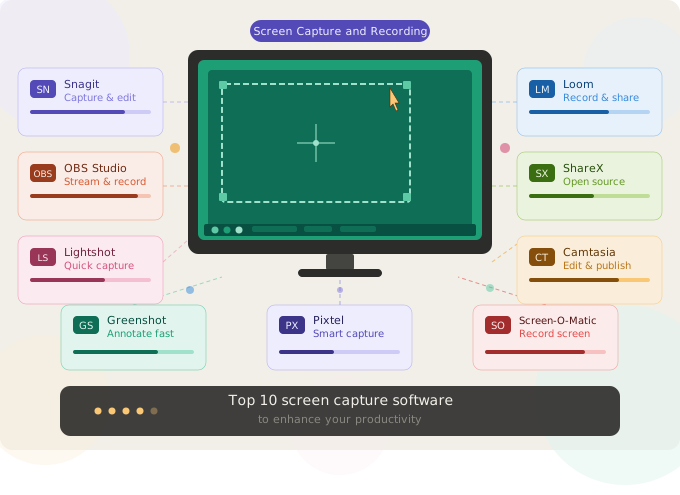
The screen capture category has grown considerably more interesting in 2026. What was once a choice between "free and basic" or "Snagit" now spans a genuine range of tools, from video-first async communication platforms to perpetual-license alternatives to Windows-native professional suites. Pricing structures have shifted too — Snagit moved to subscription-only in 2025, and Loom has seen price increases following its Atlassian acquisition.
This guide cuts through the noise. We've assessed ten tools across capture depth, annotation capability, workflow integrations, platform fit, and pricing — and ranked them by overall value for professionals who use screen capture as a regular part of their work, not just occasionally.
The list is Windows-focused where platform matters, but notes Mac availability where relevant.
How we evaluated these tools
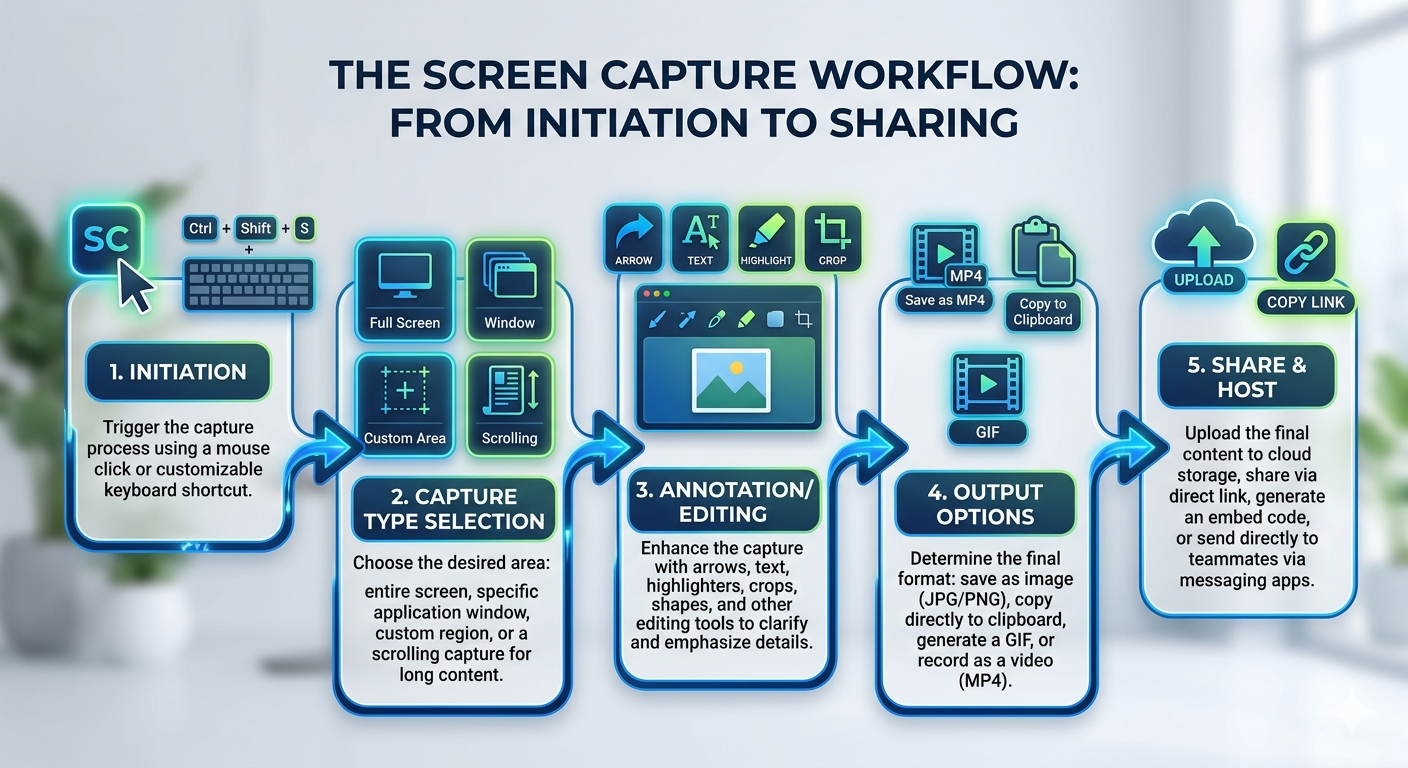
Every tool in this list was assessed on five criteria:
Capture depth — how many capture modes are available (region, scrolling, window, timed, continuous, video) and how reliably they work in real workflows.
Annotation quality — whether the annotation toolkit is robust enough to produce clear, professional-grade callouts, highlights, blur redaction, and text overlays without leaving the tool.
Workflow integrations — whether captures can be routed directly to the destinations professionals actually use: Jira, Google Drive, OneDrive, Dropbox, email, PowerPoint, Confluence.
Organization and management — whether the tool provides a meaningful capture library, search, tagging, and the ability to find and reuse earlier captures.
Pricing clarity and value — total cost of ownership, what's included at each tier, and whether the pricing model matches the way the tool is actually used.
The top 10 screen capture tools in 2026
1. Pixtel — Best all-in-one for Windows professionals
Platform: Windows (Microsoft Store) Pricing: Free (watermarked) · Personal/Non-profit $25/yr · Business $50/yr
Pixtel is a Windows-native screen capture, annotation, and media management platform built specifically for professionals who use screenshots and recordings as a core part of their daily workflow — developers, QA engineers, product managers, support teams, technical writers, and trainers.
Where most tools treat each capture as a standalone event, Pixtel's persistent tabbed workspace keeps every capture open simultaneously. A developer can have fifteen bug-report captures open, jump between them, annotate them consistently, and attach them all to a Jira ticket in one operation without touching the file system.
Capture modes: Pixtel offers over 12 capture modes including region, active window, full screen, scrolling web capture (auto-scrolls and stitches entire pages into a single image), timed capture (countdown before firing, for transient UI states), continuous region capture (auto-captures at set intervals), and video and audio recording.
Annotation toolkit: Numbered callout sequences, arrows, highlight rectangles and ellipses, blur redaction, sticky notes with contextual tips, text boxes, speech bubbles, and freehand drawing — all stored as a vector layer on top of the original image until explicitly flattened. Annotations can be updated without a recapture.
Integrations: Direct connections to Jira (with pre-configured field defaults per project), Google Drive, OneDrive, Dropbox, Box, FTP/SFTP, email (Gmail, Outlook, SMTP), Evernote, OneNote, YouTube, and Vimeo — with multi-account support across all of them simultaneously. PowerPoint and Word export are built in, allowing Grid View selections to export as complete slide decks in one operation.
Media library: All captures are stored with source URL, capture date, capture mode, and user-applied tags. Search, filter by date, filter by tag, browse by Grid View. A searchable library of past captures turns Pixtel into a reusable knowledge asset rather than a folder of PNG files.
What makes it stand out: Multi-account cloud support (connecting multiple Google Drive accounts, multiple Dropbox accounts, and so on simultaneously), OCR for extracting text from any screen region, and Virtual Canvas for annotating beyond the boundaries of the original capture. Free personal plan with full features (watermarked output only) is a genuine on-ramp.
Best for: Developers, QA engineers, product managers, support teams, technical writers, and trainers on Windows who capture regularly and need a complete capture-to-share workflow in one place.
2. Snagit — Best established professional tool (Windows & Mac)
Platform: Windows, macOS Pricing: Individual $39/yr · Business $48/user/yr · No free tier
Snagit is TechSmith's flagship capture and image editing tool and the longest-established professional-grade option in the category. It handles screenshots, scrolling capture, and short screen recordings well, and its annotation editor is deep — including a Smart Move feature that lets you reposition UI elements in a captured image after the fact.
Its strength is annotation depth and a large library of templates for creating SOPs and training guides. It integrates with TechSmith Assets and connects to popular platforms including Google Drive, Dropbox, and Microsoft Office.
The notable changes in 2026: Snagit moved to subscription-only pricing with the 2025 release, ending the perpetual license option. At $39/year for an individual license it remains reasonably priced, but the loss of the one-time purchase model has frustrated long-term users. It is also the only major tool in this list available on both Windows and Mac with full parity.
Best for: Documentation professionals, technical writers, and educators who need deep annotation capability on both Windows and Mac.
3. Loom — Best for async video messaging
Platform: Windows, macOS, browser extension Pricing: Starter free (25 videos, 5-min limit) · Business $15/user/month billed annually · Business + AI $20/user/month
Loom occupies a genuinely different category from the rest of this list. It is primarily a video messaging tool rather than a screenshot platform — you record your screen and face, share a link, and the viewer watches. The positioning is async communication rather than documentation or bug reporting.
Following Atlassian's acquisition in 2024, Loom has been integrated into Atlassian's billing and infrastructure, which has introduced some turbulence: price increases, a migration that still isn't fully complete, and user complaints about login difficulties and audio sync issues. The natural integration with Jira and Confluence is a genuine advantage for teams already in the Atlassian ecosystem.
For static screenshot workflows, Loom is the wrong tool. For teams whose primary need is quick async video explanations rather than annotated visual documentation, it fills a distinct purpose.
Best for: Remote teams doing async video communication, particularly those already using Jira and Confluence.
4. Camtasia — Best for professional video production
Platform: Windows, macOS Pricing: Starter $39/yr (video exports watermarked) · Essentials $179.88/yr · Create $249/yr
Camtasia is TechSmith's video editing and production suite. It is a fundamentally different category from most tools on this list: it is a multi-track video editor for producing polished training videos, tutorials, and course content — not a quick-capture annotation tool.
The 2026 pricing restructure introduced a Starter tier at $39/year that overlaps with Snagit's pricing, but the catch is significant: video exports from the Starter tier carry a watermark, which limits it to internal use only. Any external-facing video production requires the Essentials tier at $179.88/year.
For teams already paying for Camtasia Essentials or higher, Snagit is included at no extra cost — which removes the case for purchasing Snagit separately.
Best for: Instructional designers, L&D teams, and marketers producing polished tutorial or course video content.
5. Greenshot — Best free screenshot tool for Windows
Platform: Windows (open-source) Pricing: Free
Greenshot is the most capable free screenshot tool available for Windows. It handles region, window, and full-screen captures reliably, includes a decent annotation editor with arrows, highlights, and text, and integrates with Dropbox, Google Drive, Microsoft Office, and several other platforms.
Its limitations are clear: no scrolling capture, no video recording, no media library, no Jira integration. But for users whose needs are genuinely basic — capture a region, add an arrow, share — Greenshot does it cleanly and for free.
Best for: Individual Windows users who need a reliable, free screenshot tool without advanced workflow requirements.
6. ShareX — Best free tool for power users
Platform: Windows (open-source) Pricing: Free
ShareX is the most feature-dense free screen capture tool available, period. It supports a wider range of capture modes than most paid tools — region, window, full-screen, scrolling, GIF, video — and integrates with over 80 file hosting and sharing services. It also includes OCR, a built-in color picker, and a screen ruler.
The significant caveat is usability. ShareX's interface is designed for configurability over approachability, and the initial setup to get it working the way you want takes meaningful time and patience. It is excellent for technically capable users who want maximum capture flexibility at zero cost.
Best for: Technically-minded Windows professionals who want advanced capture capabilities and don't mind configuration overhead.
7. Lightshot — Best for quick single captures
Platform: Windows, macOS, browser extension Pricing: Free
Lightshot is the leanest tool on this list. It replaces the Print Screen button, lets you drag a selection box, add basic annotations, and share or save the result in a few seconds. That is essentially its entire feature set.
For users who take a screenshot once a week and need to do nothing more than highlight something and paste it into an email, Lightshot is faster to reach than any more capable tool. Its reverse image search feature — finding visually similar images on the web from a screenshot — is a genuinely useful bonus for research purposes.
Best for: Casual users who need fast, minimal screenshot capture with no workflow integration requirements.
8. OBS Studio — Best free screen recorder
Platform: Windows, macOS, Linux (open-source) Pricing: Free
OBS Studio is the dominant free option for screen recording and live streaming, with a large active community and extensive plugin ecosystem. It handles multi-source recording, scene transitions, and real-time audio and video mixing at a level that paid tools struggle to match at any price.
For static screenshot workflows, OBS is entirely the wrong tool — it has no screenshot annotation capability whatsoever. But for users who need serious, free video recording (game capture, streaming, long-form screen recording), OBS is the clear choice.
Best for: Content creators, streamers, and professionals who need powerful free video capture, not screenshots.
9. ScreenPal — Best for lightweight video sharing
Platform: Windows, macOS, Chromebook, browser extension Pricing: Free (watermarked, 15-min limit) · Deluxe $1.65/month · Premier $4/month
ScreenPal (formerly Screencast-O-Matic) is a lightweight screen recording and video editing tool aimed at educators and individual content creators who need more than raw recording but not the full power of Camtasia. Its green screen effect, basic video editing, and cloud hosting make it a practical option for teachers and solo creators who want to produce short video content without a large investment.
At $1.65–$4/month for paid tiers, it is the most affordable paid video tool in this list. It does not offer screenshot annotation, media library management, or workflow integrations beyond basic cloud sharing.
Best for: Educators and individual content creators who need affordable, accessible video recording with basic editing.
10. Screenpresso — Best perpetual-license alternative
Platform: Windows Pricing: Free (watermarked video, 3-min limit) · Pro $29.99 one-time · Enterprise $2,190 one-time
Screenpresso earns the final spot as the only professional-grade screen capture tool remaining in the market that offers a true perpetual license — pay once, keep it indefinitely. In a market where Snagit moved to subscription-only in 2025 and most other professional tools follow the same model, Screenpresso's $29.99 one-time Pro license is a compelling proposition for cost-conscious users.
It handles region, window, scrolling, and video captures reasonably well, includes a competent annotation editor, and integrates with Dropbox, Google Drive, and Evernote. The caveat: the perpetual license is version-specific, so you keep whatever version you bought permanently, but upgrades to new major versions require a maintenance renewal fee (~$14.99/year after the first year of included updates). Users who prioritize the latest features should account for this.
Best for: Windows professionals who want a capable screenshot tool with a one-time purchase rather than annual subscription.
Feature and pricing comparison
| Tool | Platform | Scrolling capture | Annotation | Integrations | Free tier | Paid pricing |
|---|---|---|---|---|---|---|
| Pixtel | Windows | ✓ | Full toolkit | Jira, Drive, OneDrive, Dropbox, Box, email, Office | ✓ (watermarked) | $25–$50/yr |
| Snagit | Win + Mac | ✓ | Deep | Drive, Dropbox, Office | ✗ | $39–$48/yr |
| Loom | Win + Mac | ✗ | Video only | Jira, Slack, Salesforce | ✓ (limited) | $15–$20/user/month |
| Camtasia | Win + Mac | ✗ | Video only | Office, LMS | ✗ | $39–$249/yr |
| Greenshot | Windows | ✗ | Basic | Drive, Dropbox, Office | ✓ (full) | Free |
| ShareX | Windows | ✓ | Moderate | 80+ services | ✓ (full) | Free |
| Lightshot | Win + Mac | ✗ | Minimal | Clipboard, web | ✓ (full) | Free |
| OBS Studio | Win/Mac/Linux | ✗ | None | Streaming platforms | ✓ (full) | Free |
| ScreenPal | Win + Mac | ✗ | Basic | Cloud hosting | ✓ (watermarked) | $1.65–$4/month |
| Screenpresso | Windows | ✓ | Moderate | Drive, Dropbox, Evernote | ✓ (limited) | $29.99 one-time |
Which tool is right for you?
If you capture screenshots regularly as part of your professional workflow and need a complete solution — precise capture modes, professional annotation, direct Jira and cloud integrations, a searchable media library, and Office export — Pixtel is the clear choice for Windows users. It is the only tool in this list that addresses the full capture-to-share workflow in a single persistent workspace, and its free personal plan means you can try every feature before committing.
If you work across Windows and Mac and your primary need is documentation and annotation rather than video, Snagit remains the strongest cross-platform option despite the subscription-only pricing change.
If your team's primary communication need is async video rather than annotated screenshots, Loom is purpose-built for that use case — particularly if you're already in the Atlassian ecosystem.
If you're producing polished training videos or course content, Camtasia handles professional multi-track video editing at a level no other tool on this list approaches.
If you need something free and functional for occasional captures, Greenshot is the most accessible choice; ShareX if you're technically confident and want more capability.
If subscription pricing is a deal-breaker and you want a capable one-time purchase, Screenpresso at $29.99 perpetual is the best current option in that category.
Get started with Pixtel
Pixtel is available on the Microsoft Store with a free personal plan that includes all features. No time limit, no feature gates — just watermarks on output until you upgrade.
👉 Download Pixtel
📘 Read the Documentation
🎥 Watch Tutorials
Related Articles
- Pixtel vs Snagit: The Complete Comparison for 2026 →
- Pixtel vs Loom: Which Screen Recording Tool Is Right for You? →
- Pixtel vs ShareX: Which Windows Screenshot Tool Is Right for You? →
- What Is a Screen Capture Tool? (And Why Basic Snipping Isn't Enough) →
- Screenshots: Why Most Teams Are Still Getting It Wrong →
'%3e%3cpath%20d='M6.49988%200.862305L0.380969%206.98121C-0.127315%207.4895%20-0.127315%208.31107%200.380969%208.81936C0.889253%209.32764%201.71083%209.32764%202.21911%208.81936L5.19992%205.83855V15.7C5.19992%2016.4176%205.781%2017%206.49988%2017C7.21875%2017%207.79984%2016.4176%207.79984%2015.7V5.83855L10.7806%208.81936C11.0341%209.07285%2011.3669%209.20024%2011.6997%209.20024C12.0325%209.20024%2012.3653%209.07285%2012.6188%208.81936C13.1271%208.31107%2013.1271%207.4895%2012.6188%206.98121L6.49988%200.862305Z'%20fill='white'/%3e%3c/g%3e%3cdefs%3e%3cclipPath%20id='clip0_1_2'%3e%3crect%20width='13.0002'%20height='16.8995'%20fill='white'%20transform='translate(-0.000244141%200.100533)'/%3e%3c/clipPath%3e%3c/defs%3e%3c/svg%3e)