

Pixtel vs Zight: Which Visual Communication Tool Is Right for You in 2026?
Pixtel and Zight are both used for screenshots, screen recording, and sharing visual content — but they are built around fundamentally different philosophies.
Zight (formerly CloudApp) is a cloud-first async communication platform. Every capture is automatically uploaded to Zight's cloud, a shareable link is copied to your clipboard, and your team can view, comment, and engage with content through a browser — no download required. It has added AI-powered transcription, Smart Actions for automated documentation, and viewer analytics to become a broader team communication tool.
Pixtel is a Windows-native capture and media management suite. Everything lives on your machine, organized in a full media library, with deep integrations into the tools your team already uses — Jira, Google Drive, OneDrive, Dropbox, Microsoft Office, and more. Captures are annotated, edited, and shared from a clean tabbed workspace without a mandatory cloud dependency.
The right choice depends on whether your primary need is frictionless cloud sharing for teams or professional-grade local capture with deep workflow integrations.
Quick Verdict
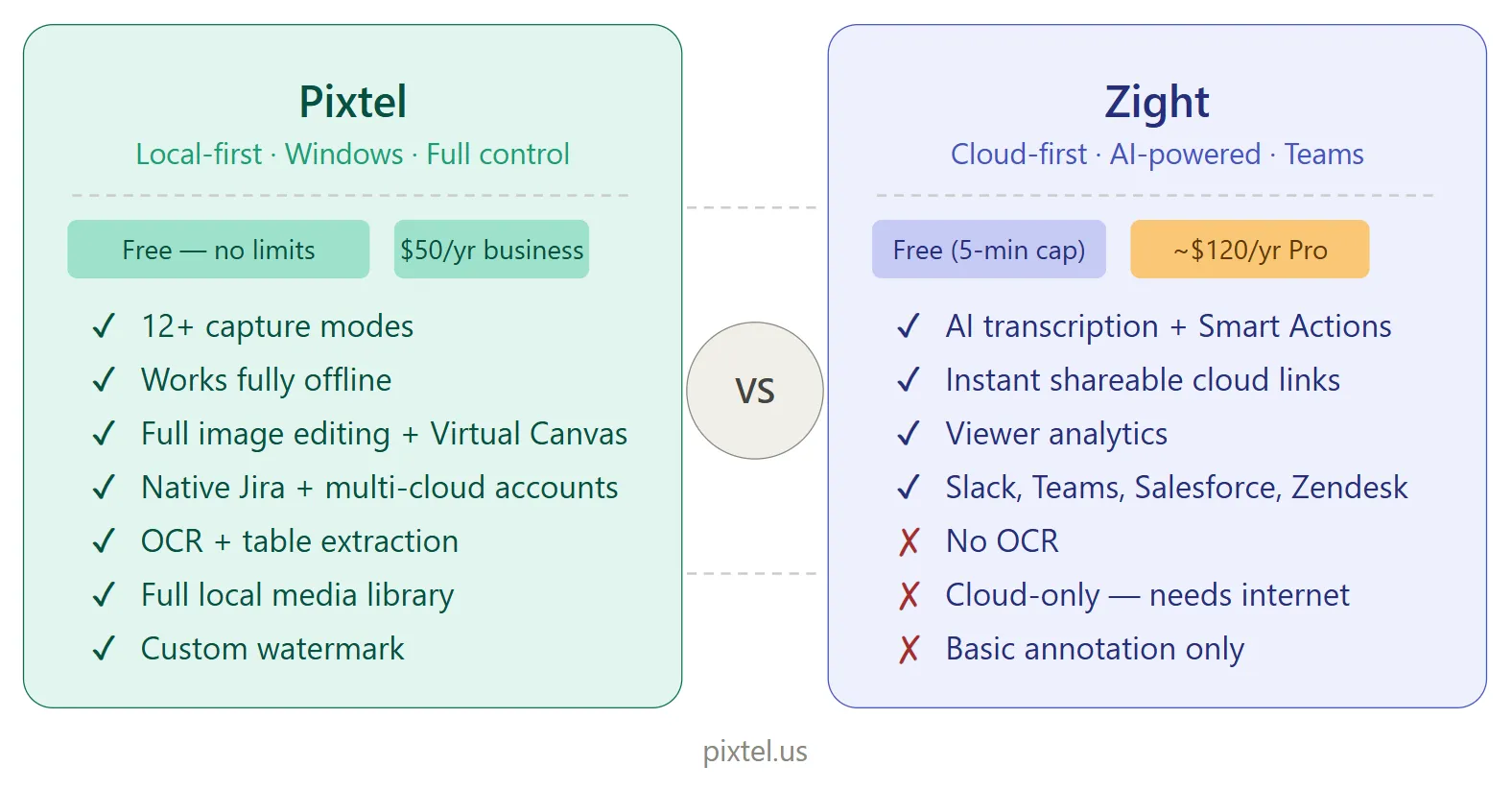
| Pixtel | Zight | |
|---|---|---|
| Best for | Windows power users needing local capture + deep integrations | Teams needing instant cloud sharing + async video communication |
| Platform | Windows | Windows, Mac, iOS, Chrome extension |
| Pricing (free) | Free — all features, watermarks on captures | Free — 5-minute recording limit, limited storage |
| Pricing (paid) | $50/year (business) | From ~$9.99/user/month (Pro) |
| Capture modes | 12+ | Region, fullscreen, window, scrolling |
| Screen recording | ✅ Yes | ✅ Yes (core feature) |
| GIF recording | ✅ Yes | ✅ Yes |
| Scrolling capture | ✅ Yes | ✅ Yes |
| OCR / text extraction | ✅ Advanced (table extraction) | ❌ No |
| AI transcription | ❌ | ✅ Yes |
| AI Smart Actions | ❌ | ✅ Yes |
| Viewer analytics | ❌ | ✅ Yes |
| Virtual Canvas | ✅ Yes | ❌ No |
| Image editing suite | ✅ Full | ⚠️ Basic (trim, arrows, blur) |
| Watermark (custom) | ✅ Yes | ❌ No |
| Jira integration | ✅ Native | ✅ Via integration |
| Cloud storage | Local + optional cloud | Cloud-mandatory |
| Multiple cloud accounts | ✅ Yes | ❌ Single account |
| Media management library | ✅ Full local system | ✅ Cloud-based library |
| Free personal use | ✅ All features (watermarks on captures) | ⚠️ Limited (5-min recording cap) |
| Works offline | ✅ Fully | ⚠️ Limited — cloud-dependent |
Overview: What Are These Tools?
Pixtel
Pixtel is a Windows-native screen capture and media management suite available on the Microsoft Store. It is built for professionals — developers, QA engineers, product managers, designers, and technical writers — who handle screenshots as a core part of their daily workflow.
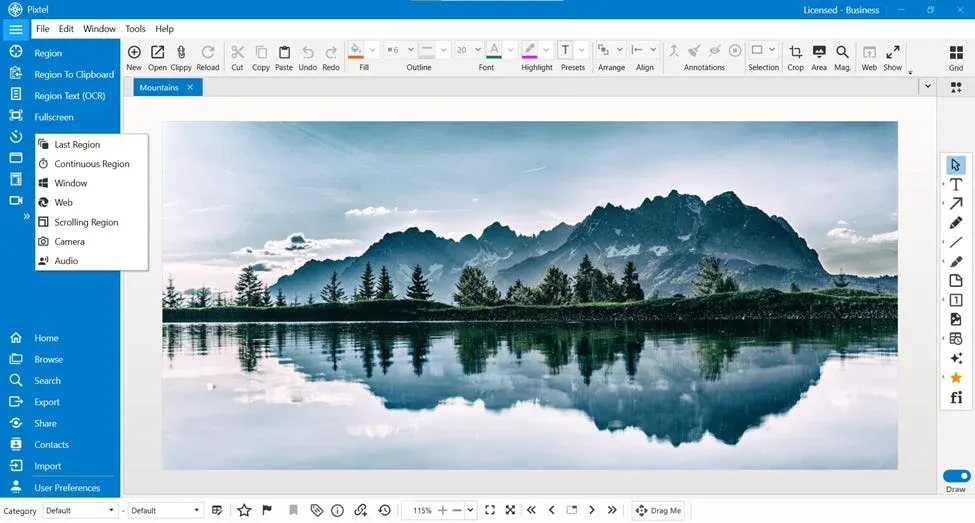
Every capture opens as a new tab in a persistent workspace. The media library keeps every screenshot, recording, and audio file organized, searchable, and manageable without ever touching Windows Explorer. Integrations with Jira, Google Drive, OneDrive, Dropbox, Box, Microsoft Office, YouTube, Vimeo, and more let you share directly from the app to wherever your workflow lives.
For personal use, Pixtel is free — all features included, no ads, no recording time limit. Watermarks are added to captured images and videos on the free tier; upgrade to Personal ($25/yr) to remove them.
Zight
Zight (formerly CloudApp) is a visual communication and async collaboration platform available on Windows, Mac, iOS, and as a Chrome extension. It was built around a single core idea: every capture should instantly become a shareable link. Record a screen, take a screenshot, create a GIF — and before you've switched apps, the link is already in your clipboard.
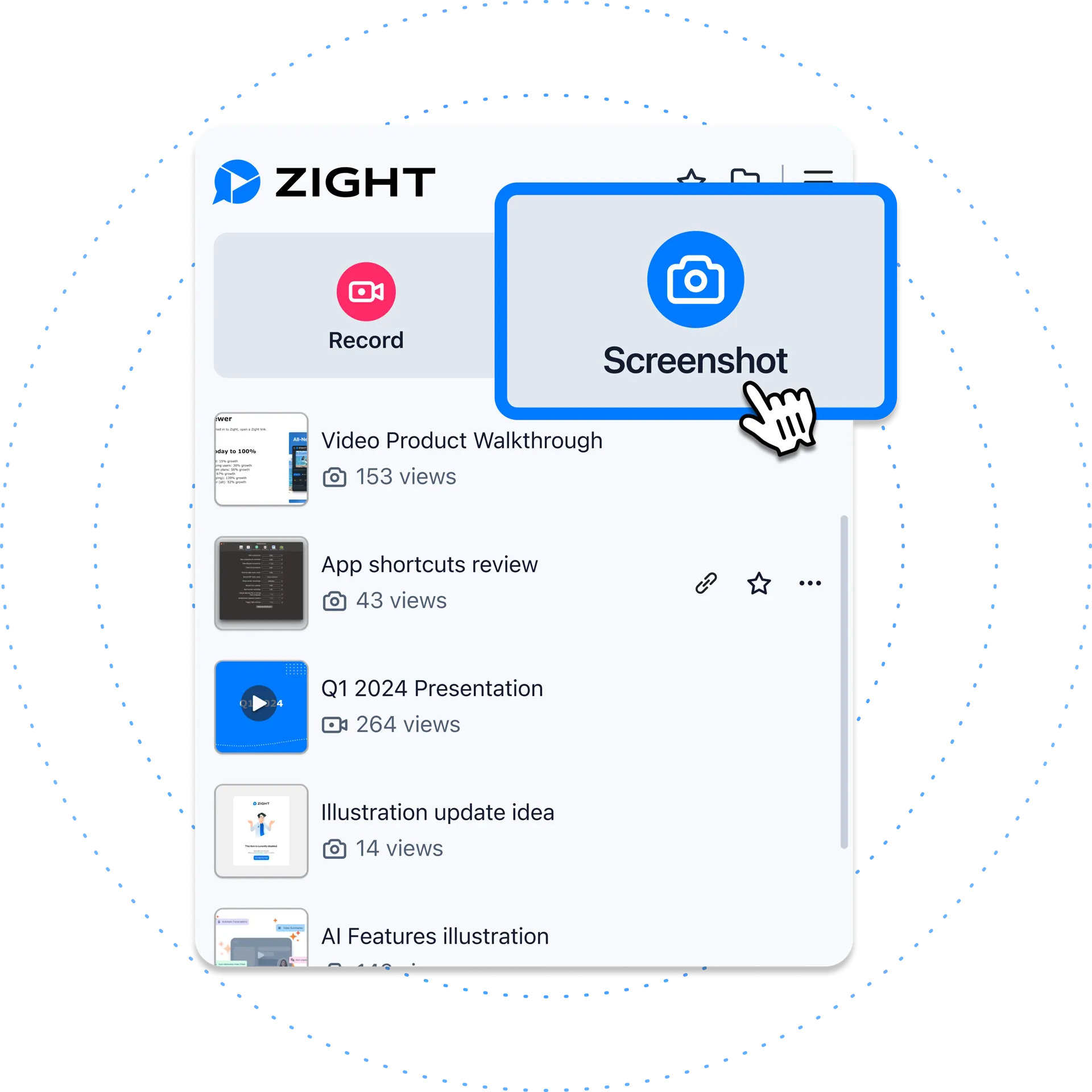
Over time, Zight has expanded into AI territory: automatic video transcription, Smart Actions that generate SOPs and FAQs from recordings, step-by-step guide creation, and viewer analytics that show who watched your content and for how long. It has grown from a screenshot tool into a team communication and documentation platform.
Its free plan covers basic use but caps screen recordings at 5 minutes and limits cloud storage. Paid plans start at approximately $9.99/user/month, making it significantly more expensive than Pixtel for teams.
The Core Philosophy Difference
This is the most important framing for the entire comparison.
Zight is cloud-first by design. Every capture is uploaded automatically. There is no "save locally and decide later" — the workflow assumes you want a link, and the link is the product. This is genuinely powerful for teams where the primary goal is fast async communication: record a bug, paste the link in Slack, teammate watches it in their browser, leaves a comment. No files, no attachments, no download prompts.
The trade-off is dependency. Zight requires an internet connection to function fully. Without it, sharing is unavailable. Some users also report reliability issues on Windows — crashes, high memory usage, and occasional upload failures — which becomes friction precisely when you need speed. Your entire capture library lives in Zight's cloud, not on your machine.
Pixtel is local-first by design. Every capture is yours, on your machine, organized in your library, available offline. Sharing is an action you take — upload to Drive, attach to a Jira issue, send to OneDrive, generate a private link — not something that happens automatically whether you want it or not. You control what gets shared, where it goes, and for how long.
Neither approach is universally better. They reflect different working styles and different team needs.
Pricing: A Significant Gap
This is where the comparison becomes most important for teams evaluating total cost.
Pixtel
- Personal: Free — all features, no ads, no recording limits; watermarks on captures. $25/yr (Personal) removes watermarks
- Business: $50/year per user
Zight
- Free: Basic captures, GIFs, screenshots — screen recording capped at 5 minutes, limited cloud storage
- Pro:
$9.99/user/month ($119.88/year) — unlimited recording length, 4K recording, custom branding - Team: Custom pricing — admin controls, analytics, SSO
- Enterprise: Custom pricing — enterprise-grade security, custom domain
For a team of 10, Zight's Pro plan runs approximately $1,200/year. Pixtel's business plan for the same team is $500/year — less than half the cost. For individuals, Pixtel's free tier has no meaningful limitations; Zight's 5-minute recording cap makes it a trial experience in practice.
Edge: Pixtel — significantly cheaper at every tier, with a free plan that includes all features — noting that watermarks are added to captures on the free tier, removed at $25/yr.
Capture Modes
Pixtel (12+ modes)
- Region Capture — click and drag any area
- Fullscreen Capture — all monitors, with or without taskbar
- Active Window Capture — isolate the current app window
- Scrolling Window Capture — capture entire scrollable pages automatically
- Scrolling Region Capture — capture a specific scrollable section
- Web Capture — full webpage with source URL preserved
- Region to Clipboard — capture directly to clipboard
- Clipboard as New Tab — open clipboard images as a new editor tab
- Last Region — instantly re-capture the same area
- Continuous Region Capture — capture a fixed area at set intervals
- Timed Capture — countdown for menus and tooltips
- Camera Capture — capture from a connected webcam
- Screen Recording — screen, camera, or both with audio
- Audio Capture — record microphone or system audio independently
Zight
- Region Capture — drag to select a screen area
- Fullscreen Capture — entire display
- Window Capture — active application window
- Scrolling Screenshot — capture long web pages
- Screen Recording — screen, webcam, or both with audio
- GIF Recording — create animated GIFs from screen activity
- Delayed Screenshot — timed capture for menus and tooltips
- File Upload & Sharing — upload any file for a shareable link (not just captures)
Zight's File Upload feature is unique in this comparison — you can drop any file (PDF, image, video, document) into Zight and instantly get a shareable link, with viewer tracking. This extends its usefulness beyond screen capture into general file sharing.
Pixtel's Continuous Region Capture, Audio Capture, Last Region, and Camera Capture are not available in Zight.
Edge: Pixtel — more specialized capture modes. Zight's file upload capability is a genuine differentiator for teams that share a mix of captures and documents.
Annotation and Image Editing
Pixtel
Full professional annotation toolkit:
- Arrows, lines, shapes (rectangles, ellipses, polygons, freehand)
- Text boxes, callouts (14 callout types), sticky notes
- Blur for redacting sensitive data, highlights, borders
- Stamps, rubber stamps, timestamps, clickable links
- Smart Pencil — converts freehand drawings to clean geometry
- Counter/step numbering for sequential screenshots
- Crop, Magnifier, Embedded Image
- Virtual Canvas — extend annotation space infinitely beyond image boundaries
Full image editing suite (no Photoshop needed):
- Brightness and Contrast, Hue, Saturation, Color Balance
- Grayscale / Black & White, Sharpen, Blur
- Image Effects (solarize, mosaic, tile, motion blur)
- Canvas Resize and Image Resize
- Flip, Rotate, Color Picker, Invert Colors
- Watermark — embed custom watermark images for branding
Editor UX: All tools always visible, popup panel for style variants, persistent tool settings, double-click for properties panel, full uncluttered canvas.
Zight
Zight's annotation tools are functional but focused on quick markup rather than comprehensive editing:
- Arrows and lines
- Text boxes
- Rectangle and shape highlight
- Blur / redact
- Emoji and stickers
- Basic crop
For videos, Zight supports basic trimming. It does not have a full image editing suite, Virtual Canvas, 14 callout types, sticky notes, Smart Pencil, watermarking, or canvas resize. Users wanting to adjust brightness, convert to grayscale, or resize a canvas need an external tool.
Reviewers on Capterra and G2 consistently note that Zight's annotation tools are useful for quick highlights but limited for detailed documentation work.
Edge: Pixtel — not close for image editing depth. Zight is optimized for fast, minimal markup before sharing. Pixtel is optimized for thorough, professional annotation and editing.
AI Features
This is Zight's most distinctive category and its clearest competitive advantage over any traditional screenshot tool.
Zight AI Features
- Auto Transcription — videos are automatically transcribed after recording, searchable and shareable as text
- AI Summaries — AI generates a summary of any video so viewers can get the key points without watching
- Smart Actions — one-click generation of SOPs, FAQs, step-by-step guides, and bug reports from recordings
- Auto Titles and Descriptions — AI automatically names and describes your recordings for searchability
- Step-by-Step Guide Maker — converts recordings into written step-by-step documentation automatically
For teams that create a lot of training content, SOPs, or customer support walkthroughs, these features represent a significant productivity gain. Turning a 5-minute screen recording into a written step-by-step guide automatically is genuinely valuable.
Pixtel
Pixtel does not currently offer AI transcription, AI-generated summaries, or Smart Actions. Its OCR feature extracts text from images and tables from screenshots — a different but complementary capability.
Edge: Zight — AI-powered documentation automation is Zight's clearest differentiator and has no equivalent in Pixtel or any other tool in this comparison series. For teams creating training materials and SOPs at scale, this is a significant advantage.
Viewer Analytics
Zight offers viewer analytics — see who viewed your shared content, when they viewed it, how long they watched, and whether they re-watched. This is useful for sales teams tracking prospect engagement, training teams monitoring completion rates, and customer success teams confirming clients have seen walkthroughs.
Pixtel does not offer viewer analytics. Its Share Link feature generates private URLs with configurable auto-delete settings, but does not track viewer engagement.
Edge: Zight — viewer analytics is a genuine differentiator for sales, customer success, and training workflows.
Integrations
Pixtel
- Jira — native integration for attaching annotated screenshots directly to issues
- Google Drive — single or bulk upload; multiple accounts supported
- OneDrive — direct upload; multiple accounts supported
- Dropbox — folder selection, bulk upload; multiple accounts supported
- Box — enterprise cloud upload; multiple accounts supported
- FTP — multiple server configurations
- Email — via configured email with OAuth2
- OneNote — clip directly into notebooks
- Evernote — capture to notes
- YouTube — publish screen recordings directly
- Vimeo — upload videos without switching apps
- Microsoft Office — export to Word, PowerPoint, and Excel
- Share Link — private shareable URL with configurable auto-delete
- Drag Me — drag images directly into any app without saving
Pixtel supports multiple accounts per cloud service — connect several Google Drive, OneDrive, Dropbox, or Box accounts and switch between them instantly.
Zight
- Slack — share captures directly to channels and DMs
- Microsoft Teams — share captures in Teams conversations
- Jira — attach screenshots and recordings to issues
- Confluence — embed captures in documentation
- Zendesk — attach to support tickets
- Intercom — share in customer conversations
- GitHub — attach to issues and PRs
- Salesforce — attach to CRM records
- Zapier — connect to hundreds of additional tools via automation
- Custom domain — serve shared content from your own brand domain (paid plans)
Zight's integration story is strongest for customer-facing and team communication tools — Slack, Teams, Zendesk, Intercom, Salesforce. This reflects its identity as a communication platform. Its Jira integration is present but less native than Pixtel's — it works via the integration layer rather than being built directly into the capture workflow.
Edge: Draw — different strengths for different workflows. Pixtel leads on cloud storage integrations (multiple accounts, Drive, OneDrive, Dropbox, Box, FTP), Office export, and YouTube/Vimeo. Zight leads on customer-facing and CRM integrations (Salesforce, Zendesk, Intercom, Slack, Teams) and Zapier automation.
Media Management
Pixtel
Full local media management system:
- Browsable thumbnail grid organized by source app or website
- Filter by type (image, video, audio)
- Tags, search, and bulk operations
- Recycle bin, backup, restore, duplicate detection
- Tabbed workspace — every capture opens as a new tab, sessionly organized
- All data on your machine — accessible offline, always
Zight
Cloud-based content library:
- All captures stored in Zight's cloud automatically
- Searchable by name, date, and content (AI-powered search on paid plans)
- Team members can access the same library
- Version history on paid plans
- Dependent on internet connectivity and Zight's service uptime
Both approaches have genuine merits. Zight's cloud library means captures are accessible from any device and shareable with team members without any setup. Pixtel's local library means your data stays on your machine, is available offline, and isn't dependent on a third-party service's uptime or pricing changes.
Edge: Draw — local vs cloud is a preference and risk tolerance decision as much as a feature comparison.
Reliability and Performance
Zight users on Capterra report crashes, high memory usage, and unreliable desktop or browser performance — a meaningful concern for a tool whose core workflow depends on real-time cloud upload. When Zight's upload fails or the app crashes mid-recording, the fast-sharing promise breaks down entirely. Some users also note that the Windows desktop app feels less polished than the Mac version, reflecting Zight's Mac-first heritage.
Pixtel is Windows-native and runs lean. The system tray integration keeps it out of the way until needed, captures open immediately without perceptible delay, and the local-first architecture means there is no upload dependency in the critical path of your capture workflow.
Edge: Pixtel on Windows specifically — native architecture means more consistent performance on the platform that matters for this comparison.
Who Should Use Pixtel?
Pixtel is the right choice if you:
- Work primarily on Windows and want a native, fast, reliable experience
- Need deep local control over your captures without mandatory cloud upload
- Work in development or QA and need native Jira integration baked into the capture workflow
- Handle high volumes of screenshots and need a real local media library
- Need OCR or table data extraction from screenshots
- Want a full image editing suite — brightness, contrast, grayscale, watermark, canvas resize
- Need multiple cloud accounts (multiple Google Drive, OneDrive, or Dropbox accounts)
- Want the tool to work fully offline
- Need audio capture independent of video recording
- Want a free personal tier with no recording limits (watermarks on captures; removed from $25/yr)
Who Should Use Zight?
Zight is the right choice if you:
- Work on Mac, iOS, or across multiple platforms (Zight is stronger on Mac)
- Want every capture to instantly become a shareable link with zero extra steps
- Create training materials, SOPs, or customer walkthroughs and want AI to generate written documentation from recordings automatically
- Need viewer analytics — knowing who watched your content and for how long
- Work in customer success, sales, or support and share recordings with clients via Salesforce, Zendesk, or Intercom
- Want custom branded sharing on your own domain
- Are comfortable with cloud-mandatory storage and subscription pricing
- Need Slack and Teams as first-class sharing destinations
Feature Comparison: Full Table
| Feature | Pixtel | Zight |
|---|---|---|
| Platform | Windows | Windows, Mac, iOS, Chrome |
| Free tier | ✅ All features (watermarks on captures) | ⚠️ 5-min recording cap |
| Business pricing | $50/yr per user | ~$120/yr per user (Pro) |
| Works offline | ✅ | ⚠️ Limited |
| Region capture | ✅ | ✅ |
| Fullscreen capture | ✅ | ✅ |
| Window capture | ✅ | ✅ |
| Scrolling capture | ✅ | ✅ |
| Timed/delayed capture | ✅ | ✅ |
| Last Region | ✅ | ❌ |
| Continuous/interval capture | ✅ | ❌ |
| Camera capture | ✅ | ❌ |
| Audio capture (independent) | ✅ | ❌ |
| Screen recording | ✅ | ✅ |
| GIF recording | ✅ | ✅ |
| File upload & sharing | ❌ | ✅ |
| Virtual Canvas | ✅ | ❌ |
| 14 callout types | ✅ | ❌ |
| Sticky notes | ✅ | ❌ |
| Smart Pencil | ✅ | ❌ |
| Blur / redact | ✅ | ✅ |
| Step numbering | ✅ | ❌ |
| Stickers / emoji | ❌ | ✅ |
| Image editing suite | ✅ Full | ❌ Basic only |
| Watermark (custom) | ✅ | ❌ |
| Canvas resize | ✅ | ❌ |
| AI transcription | ❌ | ✅ |
| AI summaries | ❌ | ✅ |
| AI Smart Actions / SOP maker | ❌ | ✅ |
| Viewer analytics | ❌ | ✅ |
| OCR text extraction | ✅ Advanced | ❌ |
| Table data extraction | ✅ | ❌ |
| Local media library | ✅ Full | ❌ |
| Cloud media library | ❌ | ✅ |
| Tabbed workspace | ✅ | ❌ |
| Backup and restore | ✅ | ❌ |
| Jira integration | ✅ Native | ✅ Via integration |
| Slack | ❌ | ✅ |
| Microsoft Teams | ❌ | ✅ |
| Zendesk | ❌ | ✅ |
| Salesforce | ❌ | ✅ |
| Intercom | ❌ | ✅ |
| Confluence | ❌ | ✅ |
| Google Drive | ✅ Multiple accounts | ✅ Single account |
| OneDrive | ✅ Multiple accounts | ❌ |
| Dropbox | ✅ Multiple accounts | ❌ |
| Box | ✅ | ❌ |
| FTP | ✅ | ❌ |
| Microsoft Office export | ✅ | ❌ |
| YouTube upload | ✅ | ❌ |
| Vimeo upload | ✅ | ❌ |
| Share Link (private) | ✅ With expiry | ✅ With analytics |
| Custom brand domain | ❌ | ✅ (paid) |
| Zapier integration | ❌ | ✅ |
| Password-protected sharing | ❌ | ✅ |
| Collage / image layouts | ✅ | ❌ |
| Slideshow / presentation mode | ✅ | ❌ |
| Free personal use (full) | ✅ | ❌ |
The Bottom Line
Pixtel and Zight are solving different problems, and the right choice depends on what your workflow actually looks like.
If your primary need is instant, frictionless sharing — capture something, paste a link in Slack, done — and you want AI to help turn your recordings into written documentation automatically, Zight is built for exactly that. Its viewer analytics, customer-facing integrations (Salesforce, Zendesk, Intercom), and AI Smart Actions are genuine differentiators that Pixtel does not match. For Mac-first teams or organizations where async video communication is central, Zight earns its subscription cost.
If your primary need is professional-grade Windows capture — 12+ capture modes, a full image editing suite, native Jira integration, OCR with table extraction, a local media library, multi-account cloud support, and a free tier without recording limits (watermarks on captures; removed from $25/yr) — Pixtel is the stronger choice. It costs less at every tier, works fully offline, runs natively on Windows without the reliability concerns that Zight users report on that platform, and gives you complete control over where your data lives.
For individual professionals and Windows-focused development and QA teams specifically, Pixtel delivers more capability at significantly lower cost. For cloud-first teams prioritizing async communication, AI documentation, and customer-facing workflows, Zight offers tools Pixtel simply doesn't have.
Try Pixtel Free Today
👉 Download Pixtel
🎥 Follow us on YouTube
📘 Read Detailed Documentation
Related Articles
- Pixtel vs Snagit: The Complete Comparison for 2026 →
- Pixtel vs Greenshot: Which Free Windows Screenshot Tool Wins in 2026? →
- Pixtel vs ShareX: Which Windows Screenshot Tool Is Right for You? →
- Pixtel vs Lightshot: Which Screenshot Tool Should You Use in 2026? →
- Pixtel vs PicPick: Which All-in-One Screenshot Tool Wins in 2026? →
'%3e%3cpath%20d='M6.49988%200.862305L0.380969%206.98121C-0.127315%207.4895%20-0.127315%208.31107%200.380969%208.81936C0.889253%209.32764%201.71083%209.32764%202.21911%208.81936L5.19992%205.83855V15.7C5.19992%2016.4176%205.781%2017%206.49988%2017C7.21875%2017%207.79984%2016.4176%207.79984%2015.7V5.83855L10.7806%208.81936C11.0341%209.07285%2011.3669%209.20024%2011.6997%209.20024C12.0325%209.20024%2012.3653%209.07285%2012.6188%208.81936C13.1271%208.31107%2013.1271%207.4895%2012.6188%206.98121L6.49988%200.862305Z'%20fill='white'/%3e%3c/g%3e%3cdefs%3e%3cclipPath%20id='clip0_1_2'%3e%3crect%20width='13.0002'%20height='16.8995'%20fill='white'%20transform='translate(-0.000244141%200.100533)'/%3e%3c/clipPath%3e%3c/defs%3e%3c/svg%3e)