

The Architecture of Speed: Reengineering Modern Workflows via Pixtel’s Visual Ecosystem

In knowledge-work environments, operational inefficiencies rarely announce themselves with massive, catastrophic failures. Instead, organizational performance experiences a silent, compounding drain known as micro-friction — the accumulation of small, repetitive administrative tasks that puncture employee focus throughout the workday.
Consider the anatomy of a standard, multi-tool visual documentation task:
- An engineer identifies a critical interface anomaly.
- They launch a native operating system utility to capture a screen clip.
- The raw file is saved to a cluttered desktop folder.
- An external image editor is launched to crop out sensitive data.
- A third utility is opened to manually type out associated text logs.
- A presentation or spreadsheet app is initiated to arrange the assets.
- Finally, the fragmented payload is manually uploaded into an enterprise ticketing queue.
Individually, this sequence consumes three to five minutes. Scaled across a 100-person cross-functional engineering, product, or QA group, it translates into hundreds of lost hours annually — sacrificed to digital housekeeping.
Pixtel addresses this dynamic by consolidating desktop workflows. By unifying high-fidelity capturing, mathematical vector annotation, native optical character recognition, and rapid presentation mechanics into a single desktop application, Pixtel eliminates tool fragmentation at its source.
Part I: The Operational Cost of Digital Tool Splintering
To understand the necessity of an integrated visual ecosystem, organizations must first quantify the cognitive and structural bottlenecks imposed by disconnected software architectures.
1. The Context-Switching Tax
Every time an individual toggles between a browser tab, a local image editor, and a project board, the brain must cycle through a complex cognitive reset. Research shows it takes an average of 23 minutes to return to a state of deep focus following a single workflow disruption. Tool-switching doesn't just cost literal seconds — it breaks cognitive momentum.
2. File-System Entropy ("The Desktop Clog")
Relying on intermediary local file storage (saving Untitled_Capture_v2.png repeatedly) results in localized data silos. Valuable operational context is frequently lost as teams waste billable time searching directories, renaming assets, or worse — re-capturing data that was misrouted.
3. Asymmetric Information Transfer
When technical teams cannot quickly document structural bugs or capture complex backend console logs alongside clear visuals, documentation clarity suffers. This gap leads to extended development cycles, ambiguous Jira tickets, and avoidable product rework.
Part II: Core Architectural Solutions Within Pixtel
Pixtel transforms screen management from a passive, single-frame utility into a proactive, high-velocity documentation engine.
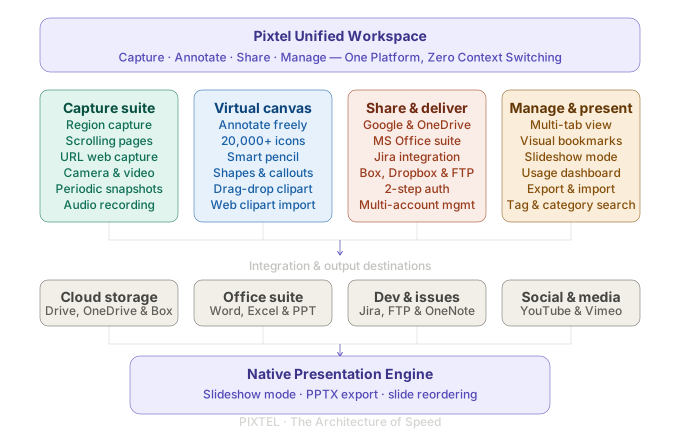
1. The Infinite Virtual Canvas: Removing Dimensional Bounds
Standard screenshot applications restrict markup boundaries to the physical frame of the initial image.
The Capability: Pixtel's native Virtual Canvas removes these limitations. Users can layer text fields, structural flowchart shapes, and dynamic directional pointers entirely outside the borders of their original screen captures.
The Value: This allows teams to preserve a clean, untouched view of an interface while building comprehensive, context-heavy annotations around the perimeter. Users can also drag, stack, change depth ordering (Z-index layers), or tile multiple distinct captures onto a single workspace tab for side-by-side comparative audits.
2. Intelligent Data Extraction via Advanced Text & Table OCR
Information is often trapped inside non-interactive pixel layers — video streams, legacy PDF catalogs, or protected database applications.
The Capability: Pixtel integrates an Advanced OCR and Table Data Extraction engine directly into the capture view. When a matrix or data chart is captured, the processing engine maps row boundaries, grid intersections, and text characters natively.
The Value: Text strings are copied immediately to the system clipboard for code execution or ticketing documentation. Structured tabular data can be pasted directly into Microsoft Excel or Google Sheets without manual retyping.
3. Vector Graphic Infrastructure: Flawless Analytical Scaling
Most traditional screen capture markups are flattened into raster files (PNG/JPG) upon saving, permanently locking annotations into the pixel grid.
The Capability: Every annotation, border shape, callout bubble, and icon placed within Pixtel operates on absolute vector math layers. Pixtel ships with a native library of over 20,000 font icons and pre-configured vector clip-art graphics.
The Value: These visual assets remain infinitely scalable and perfectly crisp at 4K or thumbnail resolution. Because layers are never prematurely flattened, users can open legacy canvas tabs months later to adjust text, recolor pointers, or rearrange elements — without re-capturing the asset.
4. Direct Presentation Automation: Slideshow and PPTX Templates
Transitioning design iterations or data audits into presentation decks typically requires tedious formatting and manual layout adjustments.
The Capability: Pixtel bridges this gap through a built-in Presentation Builder and Slideshow Mode. Teams can loop through active tab documents in full-screen format during sync meetings.
The Value: For formal reviews, teams export visual clusters directly into standard PowerPoint templates (.pptx), eliminating manual image copy-pasting and optimizing slide generation for agile environments.
Part III: Quantifying the ROI
The strategic impact of deploying a unified visual ecosystem can be calculated across an organization's bottom line:
| Operational metric | Fragmented tool flow | Pixtel integrated flow | Efficiency gain |
|---|---|---|---|
| Asset capture & cropping | 90 sec · 3 tools | 5 sec · 1 workspace | 18× faster |
| Data extraction / transcription | 180 sec · manual entry | 4 sec · Table OCR | 45× faster |
| Slide alignment & preparation | 20 min · copy / paste / scale | 30 sec · direct export | 40× faster |
| Layer revision & re-editing | Scrap & restart (flattened) | Real-time (active vector) | ∞ continuity |
| Documentation assembly | 100 min · manual entry | 10 sec · direct export | 10× faster |
If an individual team member saves an average of just 20 minutes per day through faster data extraction, image markup, and documentation assembly:
- Daily savings per employee: 20 minutes
- Weekly savings per employee: ~1.7 hours
- Annual recaptured capacity (100-person team): ~8,000 operational hours
That's 8,000 hours reallocated from digital housekeeping to production.
Architectural Velocity for Modern Enterprises
Operational speed is realized by refining the micro-actions your team executes dozens of times every day. Pixtel changes screen capturing from an administrative afterthought into a unified, strategic workspace asset — freeing builders, analysts, and operators to focus on growth.
Related reading:
- Mastering Scrolling Captures in Pixtel →
- Master Bug Reporting: Best Practices with Pixtel & Jira →
- The Strategic Advantage of Vector Graphics in Visual Workspaces →
Capture once and use it forever. It isn't just a tool — it's Pixtel.
'%3e%3cpath%20d='M6.49988%200.862305L0.380969%206.98121C-0.127315%207.4895%20-0.127315%208.31107%200.380969%208.81936C0.889253%209.32764%201.71083%209.32764%202.21911%208.81936L5.19992%205.83855V15.7C5.19992%2016.4176%205.781%2017%206.49988%2017C7.21875%2017%207.79984%2016.4176%207.79984%2015.7V5.83855L10.7806%208.81936C11.0341%209.07285%2011.3669%209.20024%2011.6997%209.20024C12.0325%209.20024%2012.3653%209.07285%2012.6188%208.81936C13.1271%208.31107%2013.1271%207.4895%2012.6188%206.98121L6.49988%200.862305Z'%20fill='white'/%3e%3c/g%3e%3cdefs%3e%3cclipPath%20id='clip0_1_2'%3e%3crect%20width='13.0002'%20height='16.8995'%20fill='white'%20transform='translate(-0.000244141%200.100533)'/%3e%3c/clipPath%3e%3c/defs%3e%3c/svg%3e)