

Pixtel vs Loom: Which Screen Recording Tool Is Right for You in 2026?
Loom has earned a loyal following as a fast, frictionless way to record your screen and share a link. For async team communication — quick walkthroughs, feedback videos, onboarding clips — it remains one of the most recognized names in the space. Its Chrome extension, instant shareable links, and clean viewer experience made it a staple for remote teams.
But the landscape has shifted. Loom was acquired by Atlassian in 2023, and user reports throughout 2025 and into 2026 have flagged a consistent pattern of lag, audio sync issues, and upload failures since the infrastructure migration began. Meanwhile, Loom's pricing has climbed: the free tier caps recordings at 5 minutes and 25 videos; meaningful features like AI editing, transcript-based editing, and silence removal are locked behind the Business + AI plan at $20–$24 per user per month. For a tool many originally chose for simplicity, that's a steep subscription for a team of any size.
Pixtel takes a fundamentally different approach. It is a Windows-native application built around a high-performance recording engine capable of smooth, hardware-accelerated video and audio capture — with low resource consumption even during long sessions. Every recording stays on your own machine. There are no upload queues, no cloud storage caps, and no subscription per seat for the core recording workflow. And unlike Loom, Pixtel combines screen recording with a full screenshot capture suite, annotation editor, OCR, media library, and direct integrations with Jira, Google Drive, OneDrive, and Microsoft Office.
This comparison looks at both tools honestly: where Loom genuinely excels, where Pixtel leads, and how to decide which one fits your actual workflow.
Quick Verdict
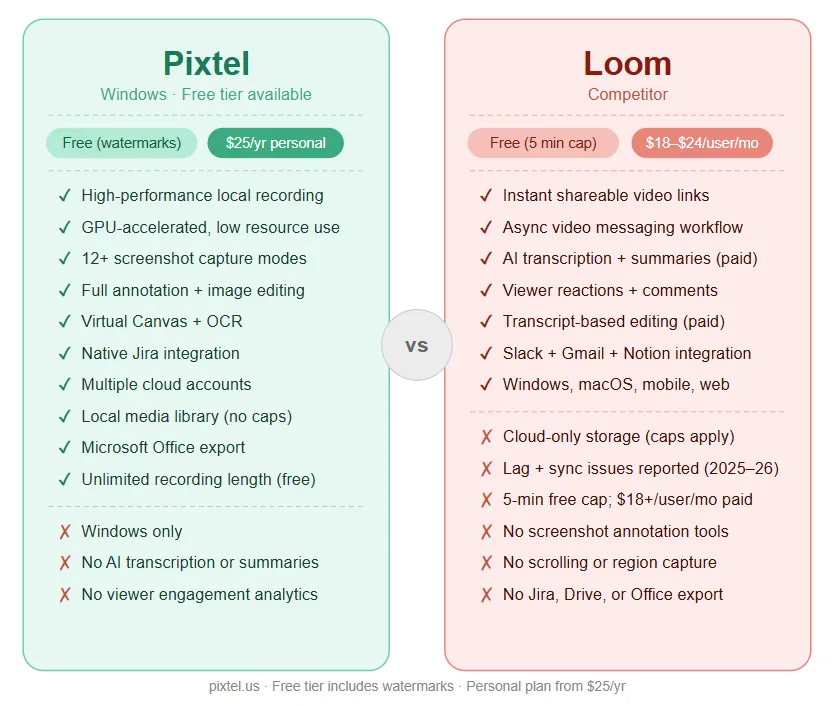
| Pixtel | Loom | |
|---|---|---|
| Best for | Windows professionals needing high-performance local recording + screenshot + annotation | Teams prioritizing instant async video sharing and video messaging |
| Platform | Windows | Windows, macOS, web, Chrome extension, mobile |
| Pricing | Free with watermarks / $25/yr personal / $50/yr business | Free (5 min cap, 25 videos) / $18/user/mo Business / $24/user/mo Business + AI |
| Recording storage | Local (your machine) | Cloud (Loom servers) |
| Recording performance | ✅ High-performance, hardware-accelerated, low resource use | ⚠️ Cloud-dependent; lag and sync issues reported post-Atlassian migration |
| Screenshot capture | ✅ 12+ modes | ⚠️ Basic screenshots only (no capture modes) |
| Annotation tools | ✅ Full suite | ⚠️ Basic overlays (text, arrows, box — paid only) |
| Image editing suite | ✅ Full | ❌ No |
| Virtual Canvas | ✅ Yes | ❌ No |
| OCR / text extraction | ✅ Advanced (table extraction) | ❌ No |
| Media library | ✅ Full local system | ⚠️ Cloud library (storage limits apply) |
| Jira integration | ✅ Native | ⚠️ Via AI-generated tickets (Business + AI only) |
| Google Drive / OneDrive | ✅ Yes (multiple accounts) | ❌ No direct upload |
| Microsoft Office export | ✅ Yes | ❌ No |
| AI transcription | ❌ No | ✅ Yes (Business + AI) |
| Instant share link | ✅ Yes | ✅ Yes (core strength) |
| Learning curve | Low | Low |
| Free personal use | ✅ (watermarks on free tier) | ✅ (5-min cap, 25 videos) |
Overview: What Are These Tools?
Pixtel
Pixtel is a Windows-native screen capture and media management suite available on the Microsoft Store. It is built for professionals — developers, QA engineers, product managers, designers, and technical writers — who use screenshots and recordings as a core part of their daily workflow.
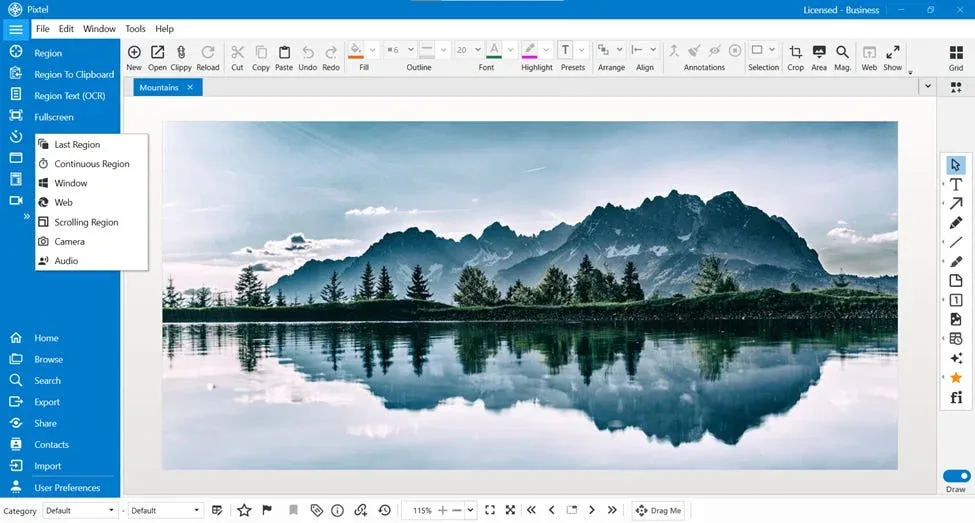
Pixtel's recording engine is built on a mature, high-performance video and audio capture platform that delivers smooth, hardware-accelerated output with low CPU and memory overhead — even during long sessions. It captures full screen, selected regions, active windows, and webcam, with system audio, microphone, or both. Recordings are saved locally to the media library, immediately available for sharing without waiting for an upload.
Beyond recording, Pixtel is a complete screenshot and annotation suite: 12+ capture modes, a full image editor, Virtual Canvas, OCR with table extraction, and direct integrations with Jira, Google Drive, OneDrive, Dropbox, Box, and Microsoft Office. It is the tool professionals reach for when both screenshots and recordings are part of the daily workflow.
For personal use, Pixtel is free — all features included, with watermarks on captured images and videos. Upgrade to Personal ($25/yr) to remove watermarks.
Loom
Loom is a cloud-based video messaging platform designed for async team communication. Record your screen, webcam, or both, and get an instant shareable link to send via email, Slack, or any messaging tool. Viewers can watch, comment with emojis, and leave timestamped replies — creating a lightweight async conversation around each video.
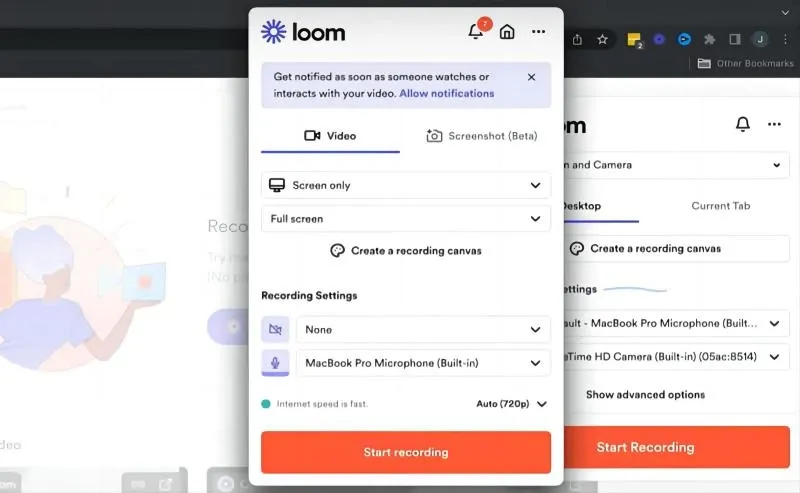
Loom's core strength is the instant sharing loop: record → link → share. It removes the friction of scheduling meetings or writing long emails and replaces it with a short video that the other person can watch on their own time. For sales outreach, customer support walkthroughs, and async team feedback, this is a genuinely strong workflow.
Loom was acquired by Atlassian in 2023 and is in the process of deeper Jira and Confluence integration. However, the migration has brought reported stability issues — lag during recording, audio sync failures, and upload delays — flagged consistently across user reviews on G2, Trustpilot, and Capterra throughout 2025 and into 2026. Pricing has also increased: meaningful editing features and AI capabilities require the Business + AI plan at $20–$24 per user per month, which adds up quickly for teams.
Recording Performance and Reliability
This is where the tools diverge most meaningfully for Windows professionals.
Pixtel
Pixtel's recording engine delivers high-performance video and audio capture with minimal system impact. It supports GPU-accelerated encoding for smooth frame delivery, handles long-session recording without instability, and keeps CPU and memory usage lean enough to run comfortably in the background while other applications remain fully usable. Recording starts instantly from the system tray — no browser extension, no upload queue, no cloud dependency.
Capture modes include full screen, custom region, active window, and webcam — with system audio, microphone, or independent audio-only capture. Output is written directly to local storage in standard formats. The result is available immediately upon stopping the recording: no wait, no upload, no sync failure.
For professionals who need to capture a bug reproduction, a long QA session, a product walkthrough, or a technical tutorial, local high-performance recording is not a luxury — it is a requirement. Pixtel's recording engine is built precisely for this.
Loom
Loom records via a desktop app or Chrome extension and uploads recordings to Loom's cloud servers in real time or upon completion. The instant share link is Loom's headline feature, and it works well when the upload succeeds smoothly.
The concern in 2026 is reliability. Since Loom's infrastructure migration to Atlassian's systems, user reports have consistently cited lag during recording, audio sync issues, failed uploads, and login difficulties. These are not isolated incidents — they appear across Trustpilot, G2, Reddit, and Capterra review threads throughout 2025 and into early 2026. For time-sensitive workflows where a recording failure means repeating the work, cloud-dependent recording introduces risk that local recording does not.
Additionally, Loom's free tier caps recordings at 5 minutes — a genuine constraint for anything beyond a brief update. The Business plan ($18/user/month) lifts the cap but adds per-seat cost that scales quickly across a team.
Edge: Pixtel — for Windows professionals who need high-performance, long-session, reliable recording with immediate local access. Loom's instant sharing remains compelling, but cloud-dependency and reported stability issues in 2026 are real trade-offs.
Screenshot Capture
Pixtel (12+ modes)
- Region Capture — click and drag to select any area
- Fullscreen Capture — all monitors, with or without taskbar
- Active Window Capture — isolate the current app window
- Scrolling Window Capture — capture entire scrollable windows automatically
- Scrolling Region Capture — capture a specific scrollable section within a page
- Web Capture — full webpage capture with source URL preserved
- Region to Clipboard — capture directly to clipboard without opening the editor
- Last Region — instantly re-capture the exact same screen area
- Continuous Region Capture — capture a fixed area at set intervals
- Timed Capture — countdown before capture for menus and tooltips
- Camera Capture — capture from a connected webcam
- Clipboard as New Tab — open any clipboard image directly as a new tab for instant annotation or sharing
Every capture opens immediately in the Pixtel editor. No cloud upload, no waiting.
Loom
Loom supports basic screenshots alongside its recording workflow. Screenshots generate an instant shareable link and live in the workspace alongside videos. There are no dedicated capture modes, no scrolling capture, no timed or region-specific options beyond the standard screen area selection. For users who primarily need to share a quick screenshot link, Loom's approach is adequate.
For professionals who take screenshots at volume — capturing menus, tooltips, scrolling pages, specific UI regions — Loom's screenshot feature is a minimal afterthought compared to Pixtel's 12+ mode capture suite.
Edge: Pixtel — not comparable for screenshot-heavy workflows.
Annotation and Image Editing
Pixtel
Pixtel's annotation toolkit covers the full professional range:
- Arrows, lines, shapes (rectangles, ellipses, polygons, freehand)
- Text boxes, callouts (14 callout types), sticky notes
- Blur for redacting sensitive data, highlights, borders
- Stamps, rubber stamps, timestamps, clickable links
- Smart Pencil — converts rough freehand to clean geometry
- Counter/step numbering for sequential screenshots
- Crop, Magnifier, Embedded Image
- Virtual Canvas — extend annotation space infinitely beyond image boundaries
Beyond annotation, Pixtel includes a complete image editing suite — no Photoshop or Paint needed:
- Brightness and Contrast adjustment
- Hue, Saturation, and Color Balance
- Convert to Grayscale / Black & White
- Sharpen and Blur
- Image Effects (solarize, mosaic, tile, motion blur)
- Canvas Resize and Image Resize
- Flip, Rotate, Color Picker, Invert Colors
- Watermark — embed a custom watermark image into any capture
Loom
Loom includes basic video overlays: text, arrows, and box highlights can be added to recordings. These are available on Business and higher plans — not on the free tier. Annotation while recording is not available; overlays are added after the fact in the web editor.
There is no image editing suite, no Virtual Canvas, no callout library, and no dedicated screenshot annotation workflow. For users who need to mark up an image precisely — for a bug report, a design review, or technical documentation — Loom's annotation tools are too limited.
Edge: Pixtel — the full annotation and image editing suite gives Pixtel a meaningful advantage for any documentation or visual communication workflow beyond casual video messages.
OCR and Text Extraction
Pixtel includes advanced OCR that extracts plain text from any image, and can extract structured table data directly into spreadsheet format. The Region Text Capture mode pulls text from any area of the screen on the fly — useful for copying content from PDFs, video frames, locked interfaces, and any area where copy-paste is unavailable.
Loom includes AI-powered transcription of video recordings (Business + AI plan), which is useful for searching and skimming video content. It does not offer OCR for screenshots or screen content.
Edge: Pixtel for text extraction from screen content. Loom's video transcription is a different capability for a different workflow.
Integrations and Sharing
Pixtel
- Jira — native integration to attach annotated screenshots and recordings directly to issues
- Google Drive — single or bulk upload; multiple accounts supported
- OneDrive — direct upload; multiple accounts supported
- Dropbox — folder selection, bulk upload; multiple accounts supported
- Box — enterprise cloud upload; multiple accounts supported
- FTP — multiple server configurations supported
- Email — via configured email with OAuth2
- OneNote — clip directly into notebooks
- Evernote — capture to notes
- YouTube — publish screen recordings directly
- Vimeo — upload videos without switching apps
- Microsoft Office — export to Word, PowerPoint, and Excel with layout controls
- Share Link — generate a shareable URL
- Drag Me — drag images directly into any app without saving
Pixtel supports multiple accounts per cloud service — connect several Google Drive, OneDrive, Dropbox, or Box accounts and switch between them when uploading.
Loom
Loom's sharing model centers on its own cloud platform — you get an instant Loom link after every recording, and viewers can watch, comment, and react in Loom's viewer. It integrates well with Slack, Gmail, Google Meet, Notion, Microsoft Teams, and Asana for embedding and sharing those links.
Loom does not upload recordings to Google Drive, OneDrive, or Dropbox directly — files live on Loom's servers. Jira ticket creation from recordings is available via Loom AI (Business + AI plan only). There is no Microsoft Office export, no FTP, and no multi-account cloud management.
Edge: Draw — Loom wins on instant async sharing via its own platform, which is its primary design purpose. Pixtel wins on destination breadth, local-first flexibility, native Jira integration, multi-account cloud support, and direct Office export.
Media Management
Pixtel includes a full local media management system:
- Browsable library with thumbnail grid view
- Filter by type (image, video, audio)
- Date-based browsing and search
- Tags and bulk operations (export, collage, delete)
- Recycle bin for accidental deletions
- Backup, restore, and data relocation tools
- Duplicate detection and cleanup
- Automatic organization by source application or website
Everything is on your own machine — no storage caps, no monthly seat cost, no data leaving your environment unless you explicitly share it.
Loom stores recordings in a cloud-based workspace. The free tier holds up to 25 videos; paid plans increase storage but tie your media library to Loom's servers. Searching, organizing, and managing recordings happens in Loom's web interface. For compliance-sensitive environments where recordings should not leave the local network, cloud-first storage is a meaningful constraint.
Edge: Pixtel — for volume, privacy, and flexibility. Loom's cloud library is convenient for async sharing but becomes limiting as recording volume grows and storage restrictions apply.
Pricing Comparison
| Pixtel | Loom | |
|---|---|---|
| Free tier | All features, watermarks | 5-min cap, 25 videos |
| Entry paid | $25/yr personal (no watermarks) | $18/user/month (Business) |
| Full features | $50/yr business | $24/user/month (Business + AI) |
| 5-person team / year | $250/yr | $1,080–$1,440/yr |
| 10-person team / year | $500/yr | $2,160–$2,880/yr |
| Storage | Local (unlimited) | Cloud (plan-dependent) |
| AI features | ❌ | $24/user/month tier |
For a team of even five people, Loom's Business + AI plan costs over four times what Pixtel's business plan costs for the entire team for a year. For teams where async video is the primary use case and AI summaries are valued, Loom's pricing may be justified. For teams that need capable screen recording alongside screenshot, annotation, and document workflows, Pixtel delivers considerably more capability per dollar.
Who Should Use Pixtel?
Pixtel is the right choice if you:
- Need high-performance local screen recording without cloud dependency or upload delays
- Work in development or QA and need native Jira integration for bug reports and issue tracking
- Use screenshots daily and need 12+ capture modes, including scrolling, timed, and region capture
- Need to annotate and edit images without opening a second application
- Manage recordings and screenshots at high volume and want a real local media library
- Work in an environment where recordings should stay on-device for privacy or compliance
- Use multiple cloud accounts across Google Drive, OneDrive, or Dropbox
- Need OCR and table data extraction from screenshots
- Want professional-grade capability at significantly lower cost per team
Who Should Use Loom?
Loom is the right choice if you:
- Want instant shareable video links for async team communication as the primary workflow
- Work on macOS or mobile as well as Windows
- Use Loom's AI transcription, auto-summaries, and transcript-based editing (Business + AI) regularly
- Are already embedded in Atlassian's ecosystem (Jira, Confluence) and value the integration roadmap
- Need viewer engagement analytics — who watched, how far, emoji reactions
- Run sales outreach or customer support workflows where personalized async video messages are the primary deliverable
Feature Comparison: Full Table
| Feature | Pixtel | Loom |
|---|---|---|
| Platform | Windows | Windows, macOS, web, mobile |
| Pricing | Free with watermarks / $25/yr / $50/yr (business) | Free (5 min) / $18/user/mo / $24/user/mo |
| Active development | ✅ | ✅ |
| Screen recording | ✅ | ✅ |
| Recording engine | ✅ High-performance, hardware-accelerated, local | ⚠️ Cloud-dependent, reported stability issues |
| GPU-accelerated encoding | ✅ | ❌ |
| Local storage | ✅ | ❌ (cloud only) |
| Free recording length | ✅ Unlimited | ⚠️ 5 minutes |
| Webcam overlay | ✅ | ✅ |
| System audio | ✅ | ✅ |
| Microphone | ✅ | ✅ |
| Audio-only capture | ✅ | ❌ |
| Region capture | ✅ | ❌ |
| Scrolling capture | ✅ | ❌ |
| Timed/delayed capture | ✅ | ❌ |
| 12+ screenshot modes | ✅ | ❌ |
| Annotation tools | ✅ Full suite | ⚠️ Basic overlays (paid) |
| Virtual Canvas | ✅ | ❌ |
| 14 callout types | ✅ | ❌ |
| Sticky notes | ✅ | ❌ |
| Smart Pencil | ✅ | ❌ |
| Step numbering | ✅ | ❌ |
| Image editing suite | ✅ Full | ❌ |
| Brightness / contrast | ✅ | ❌ |
| Canvas resize | ✅ | ❌ |
| OCR text extraction | ✅ Advanced | ❌ |
| Table data extraction | ✅ | ❌ |
| Media library | ✅ Full local system | ⚠️ Cloud (storage limits) |
| Backup and restore | ✅ | ❌ |
| Instant share link | ✅ | ✅ |
| Viewer engagement analytics | ❌ | ✅ (paid) |
| AI video transcription | ❌ | ✅ (Business + AI) |
| AI summaries / chapters | ❌ | ✅ (Business + AI) |
| Transcript-based editing | ❌ | ✅ (Business + AI) |
| Jira integration | ✅ Native | ⚠️ AI-generated tickets (Business + AI) |
| Google Drive | ✅ (multiple accounts) | ❌ |
| OneDrive | ✅ (multiple accounts) | ❌ |
| Dropbox | ✅ | ❌ |
| Microsoft Office export | ✅ | ❌ |
| YouTube upload | ✅ | ❌ |
| ✅ | ✅ (via link) | |
| Slack integration | ❌ | ✅ |
| Emoji reactions / comments | ❌ | ✅ |
| Slideshow / presentation mode | ✅ | ❌ |
| Collage / image layouts | ✅ | ❌ |
| Free personal use | ✅ (watermarks) | ✅ (5-min cap, 25 videos) |
The Bottom Line
Loom solved a real problem — replacing back-and-forth emails and unnecessary meetings with quick async video — and it does that well. The instant share link, viewer reactions, and AI transcription on paid plans are genuinely useful for teams built around async video communication.
But Loom has also become more expensive, less stable, and more limited than many of its users originally signed up for. The 5-minute free cap, the $18–$24 per-user monthly pricing, the reported infrastructure issues following the Atlassian acquisition, and the absence of any real screenshot or annotation workflow all represent real costs that add up across a team.
For Windows professionals in 2026, Pixtel delivers more capability across more dimensions — high-performance local recording, 12+ screenshot capture modes, a full annotation and image editing suite, OCR, a local media library with no storage caps, native Jira integration, and direct Office and cloud export — at a fraction of the per-seat cost.
If your primary workflow is async video messaging and AI-powered video editing: Loom. If your daily work involves screenshots, annotations, recordings, and integrations with development and documentation tools — and you want all of that in a fast, local, low-overhead Windows app: Pixtel.
Try Pixtel Free Today
👉 Download Pixtel
🎥 Follow us on YouTube
📘 Read Detailed Documentation
Related Articles
- Pixtel vs Snagit: The Complete Comparison for 2026 →
- Pixtel vs ShareX: Which Windows Screenshot Tool Wins in 2026? →
- Pixtel vs OBS Studio: Which Screen Capture Tool Is Right for You? →
- Pixtel vs Greenshot: Which Free Windows Screenshot Tool Wins in 2026? →
- Top 10 Screen Capture Tools for Better Productivity in 2026 →
'%3e%3cpath%20d='M6.49988%200.862305L0.380969%206.98121C-0.127315%207.4895%20-0.127315%208.31107%200.380969%208.81936C0.889253%209.32764%201.71083%209.32764%202.21911%208.81936L5.19992%205.83855V15.7C5.19992%2016.4176%205.781%2017%206.49988%2017C7.21875%2017%207.79984%2016.4176%207.79984%2015.7V5.83855L10.7806%208.81936C11.0341%209.07285%2011.3669%209.20024%2011.6997%209.20024C12.0325%209.20024%2012.3653%209.07285%2012.6188%208.81936C13.1271%208.31107%2013.1271%207.4895%2012.6188%206.98121L6.49988%200.862305Z'%20fill='white'/%3e%3c/g%3e%3cdefs%3e%3cclipPath%20id='clip0_1_2'%3e%3crect%20width='13.0002'%20height='16.8995'%20fill='white'%20transform='translate(-0.000244141%200.100533)'/%3e%3c/clipPath%3e%3c/defs%3e%3c/svg%3e)