

Secure Your Data with Easy Backup in Pixtel
Backing up your important files is no longer a complicated task. With Pixtel, you can quickly and securely back up your data in just a few clicks, Pixtel gives you complete control.
Let’s walk through how simple it is.
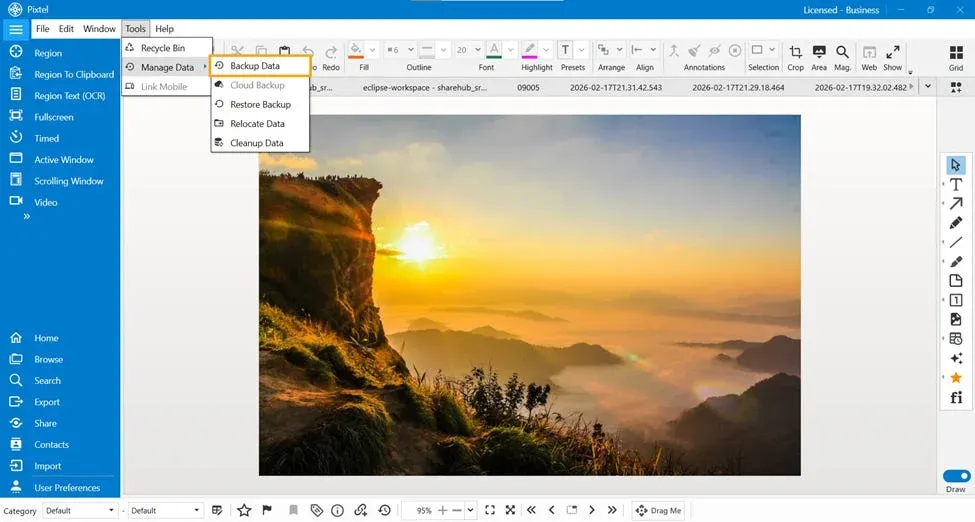
📂 Step 1: Open Manage Data in Pixtel
- Open Pixtel.
- In the Menu Bar, click on Tools.
- From the dropdown list, select Manage Data.
- Once you click on Manage Data, it will display multiple options.
- From those options, select Backup Data.
Once you select Backup, Pixtel automatically prepares everything for you.
📝 Step 2: Configure Your Backup Details
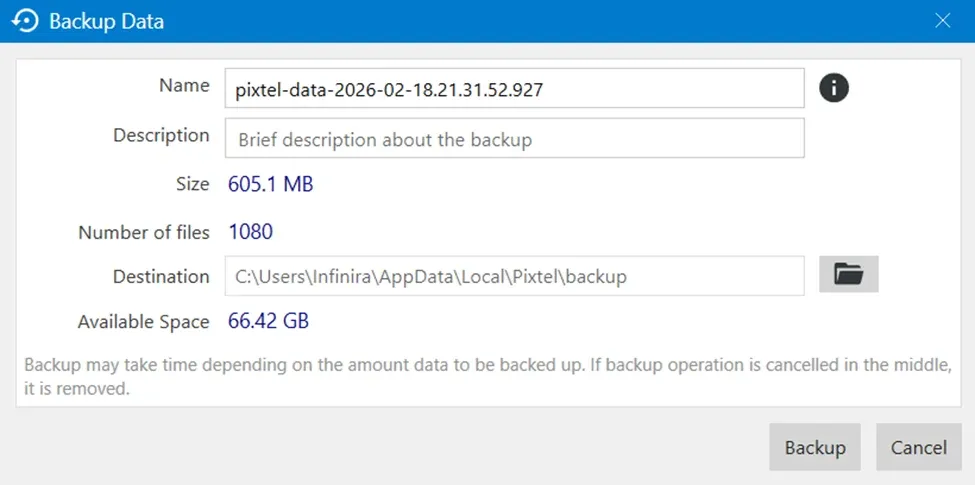
By default, Pixtel displays:
- ✅ Backup folder name (with current timestamp)
- ✅ Number of available files
- ✅ Default destination path
The default backup location is: AppData\Local\Pixtel\Backup
You can:
- ✏️ Edit the backup name
- 🗒️ Add a meaningful description
- 📍 Change the destination folder (if needed)
This flexibility allows you to organize backups based on project, date, or purpose.
💾 Step 3: Start the Backup Process
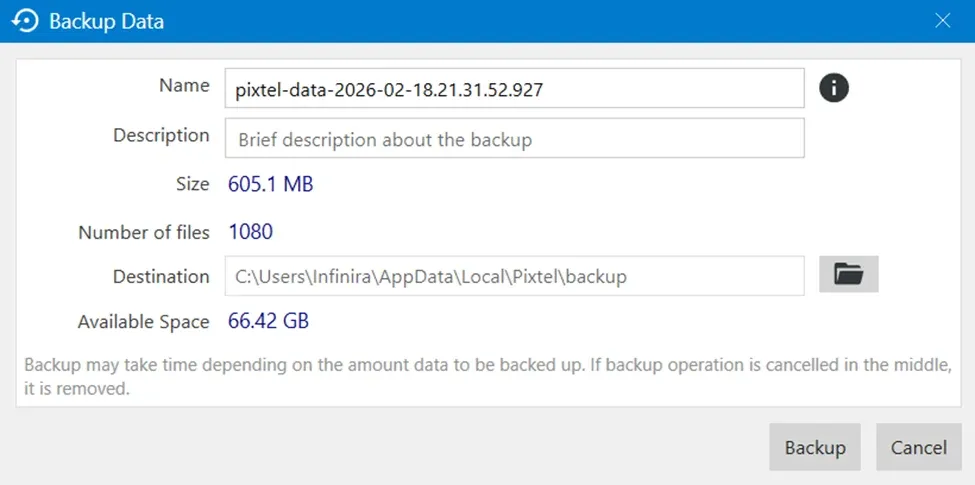
Once everything is set:
- Click on Backup
- Wait for the process to complete
That’s it! Your files are now safely stored in the selected destination.
📁 What’s Inside the Backup Folder?
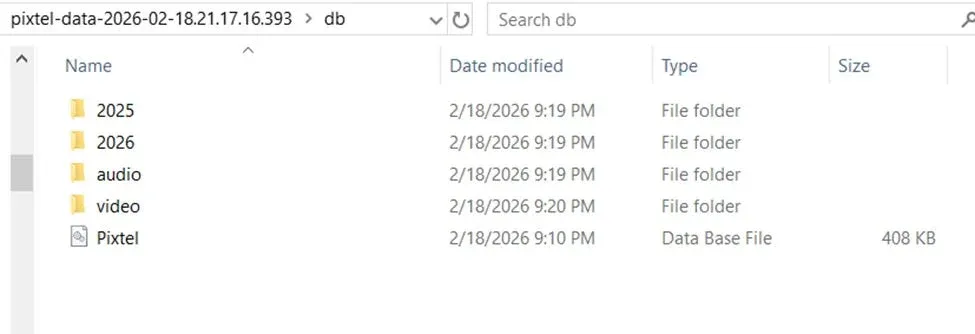
After the backup is completed:
- Open the selected destination folder
- You will find a DB folder
- Inside it, Pixtel neatly organizes:
- 📸 Photos
- 🎵 Audios
- 🎥 Videos
All your files are structured properly, making restoration or manual access simple and clear.
Why Backup with Pixtel?
✔ Simple and user-friendly✔ Option to back up all or selected files✔ Custom folder name and description✔ Change destination anytime✔ Organized file structure✔ Secure local storage
Data is valuable, and protecting it should never be complicated. With Pixtel’s Manage Data → Backup feature, you can safely store your files in minutes. Whether you want a full backup or selective backup, Pixtel makes the entire process smooth, flexible, and efficient.
Start backing up today and keep your data secure with Pixtel
Related reading:
- Restore Deleted Media Easily with the Pixtel Recycle Option →
- How to Relocate Data in Pixtel →
- How to Manage Data in Pixtel: Backup, Restore, Relocate & Clean Up →
Capture once and use it forever. It isn’t just a tool — it’s Pixtel.
👉 Download Pixtel · 🎥 Follow us on YouTube · 📘 Read Detailed Documentation
'%3e%3cpath%20d='M6.49988%200.862305L0.380969%206.98121C-0.127315%207.4895%20-0.127315%208.31107%200.380969%208.81936C0.889253%209.32764%201.71083%209.32764%202.21911%208.81936L5.19992%205.83855V15.7C5.19992%2016.4176%205.781%2017%206.49988%2017C7.21875%2017%207.79984%2016.4176%207.79984%2015.7V5.83855L10.7806%208.81936C11.0341%209.07285%2011.3669%209.20024%2011.6997%209.20024C12.0325%209.20024%2012.3653%209.07285%2012.6188%208.81936C13.1271%208.31107%2013.1271%207.4895%2012.6188%206.98121L6.49988%200.862305Z'%20fill='white'/%3e%3c/g%3e%3cdefs%3e%3cclipPath%20id='clip0_1_2'%3e%3crect%20width='13.0002'%20height='16.8995'%20fill='white'%20transform='translate(-0.000244141%200.100533)'/%3e%3c/clipPath%3e%3c/defs%3e%3c/svg%3e)