

Restore Deleted Media Easily with the Pixtel Recycle Option
Ever deleted a screenshot or recording by mistake after finishing your work? Don’t worry — Pixtel’s Recycle option has your back. It lets you quickly restore deleted media files or permanently remove them, all from one simple place.
What is the Pixtel Recycle Option?
The Recycle option in Pixtel works like a safety net for your media files. Once your screen-capturing or editing work is completed, if you accidentally delete any images or videos, you can easily recover them without any hassle.
How to Access the Recycle Option in Pixtel?
Follow these simple steps:
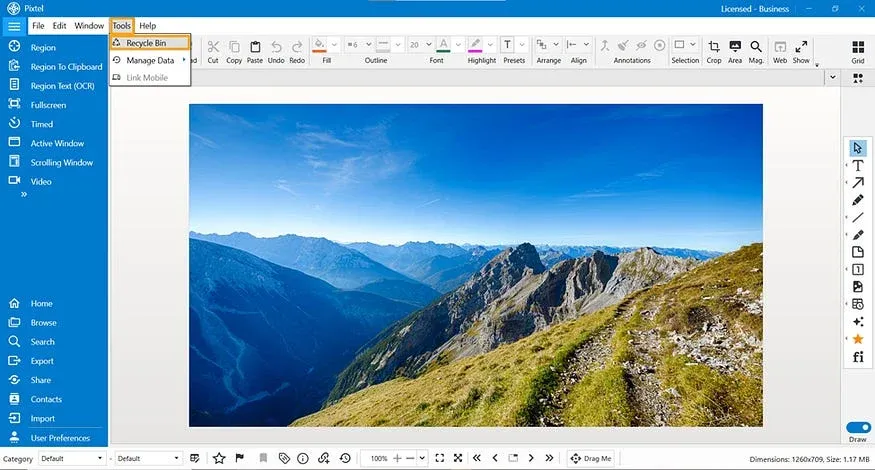
- From the top menu, click on Tools.
- Select the Recycle option from the list.
- You will now see all deleted media files in one place.
Manage Deleted Media Files
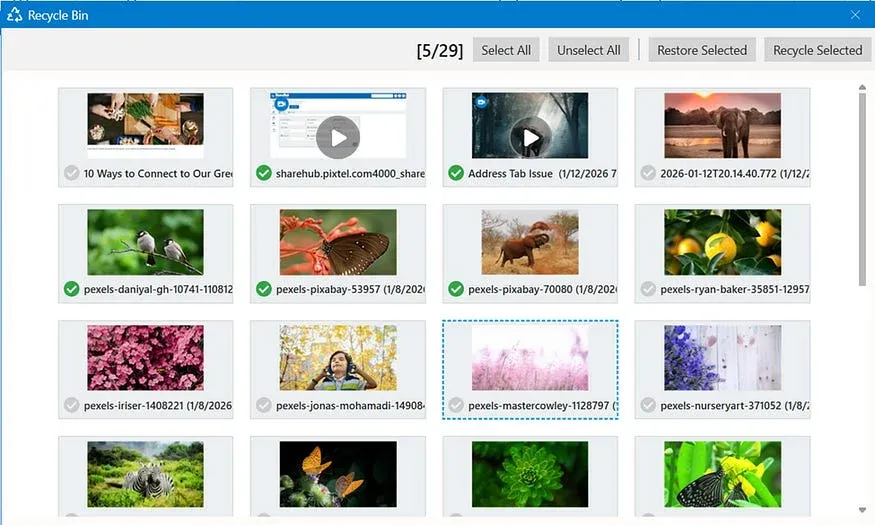
Inside the Recycle option, Pixtel gives you full control:
- View all deleted images and media files.
- Select all images at once or unselect all with a single click.
- Choose specific images if you want to manage them individually.
- Click Restore Selected to bring files back.
- Or choose Recycle Selected to permanently remove them.
Why Use the Pixtel Recycle Option?
- Avoid losing important screenshots or recordings.
- Restore files quickly without re-capturing.
- Manage everything from a single, simple platform.
- Save time and work with confidence.
The Pixtel Recycle option makes media management stress-free. Whether you want to restore deleted files or clean up unwanted ones, everything is just a few clicks away. It’s simple, reliable, and designed to keep your workflow smooth.
Related reading:
- Secure Your Data with Easy Backup in Pixtel →
- How to Relocate Data in Pixtel →
- How to Manage Data in Pixtel: Backup, Restore, Relocate & Clean Up →
Capture once and use it forever. It isn’t just a tool — it’s Pixtel.
👉 Download Pixtel · 🎥 Follow us on YouTube · 📘 Read Detailed Documentation
'%3e%3cpath%20d='M6.49988%200.862305L0.380969%206.98121C-0.127315%207.4895%20-0.127315%208.31107%200.380969%208.81936C0.889253%209.32764%201.71083%209.32764%202.21911%208.81936L5.19992%205.83855V15.7C5.19992%2016.4176%205.781%2017%206.49988%2017C7.21875%2017%207.79984%2016.4176%207.79984%2015.7V5.83855L10.7806%208.81936C11.0341%209.07285%2011.3669%209.20024%2011.6997%209.20024C12.0325%209.20024%2012.3653%209.07285%2012.6188%208.81936C13.1271%208.31107%2013.1271%207.4895%2012.6188%206.98121L6.49988%200.862305Z'%20fill='white'/%3e%3c/g%3e%3cdefs%3e%3cclipPath%20id='clip0_1_2'%3e%3crect%20width='13.0002'%20height='16.8995'%20fill='white'%20transform='translate(-0.000244141%200.100533)'/%3e%3c/clipPath%3e%3c/defs%3e%3c/svg%3e)