

Change Format and Resample Image Features in Pixtel
Managing image quality, resolution, and compatibility often requires multiple editing tools and technical knowledge. Converting image formats, reducing file sizes, or resizing images without affecting quality can sometimes become a complex and time-consuming process.
Pixtel simplifies these image editing operations with built-in features that allow users to quickly modify image formats and resolutions with just a few clicks. Whether you are working with screenshots, imported images, or captured visuals, Pixtel provides an easy and efficient way to optimize your images.
How to Upload Images in Pixtel
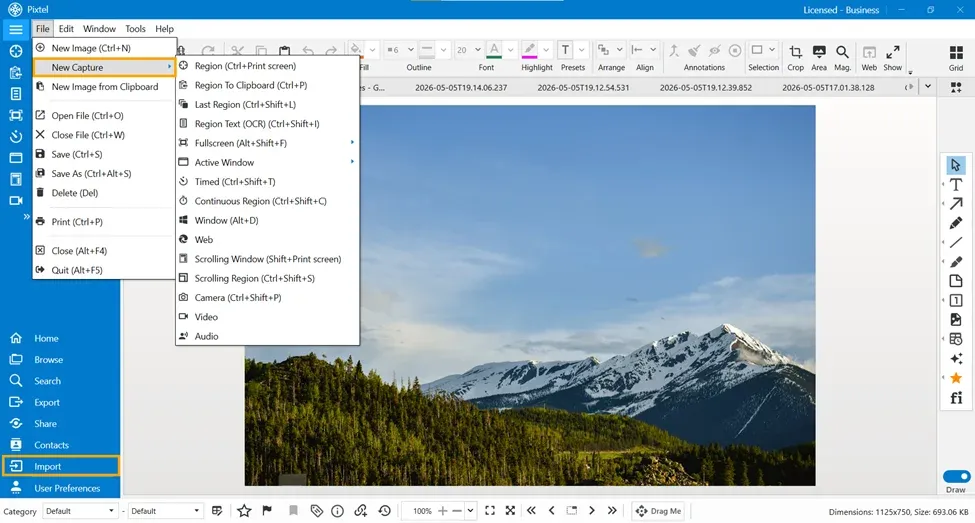
Getting started with image editing in Pixtel is simple. You can:
- Import images directly from your system
- Capture screenshots using Pixtel's built-in capture options
Once you capture or upload an image, it opens in a new Pixtel tab where you can start editing immediately.
Accessing Change Format and Resample Image Features
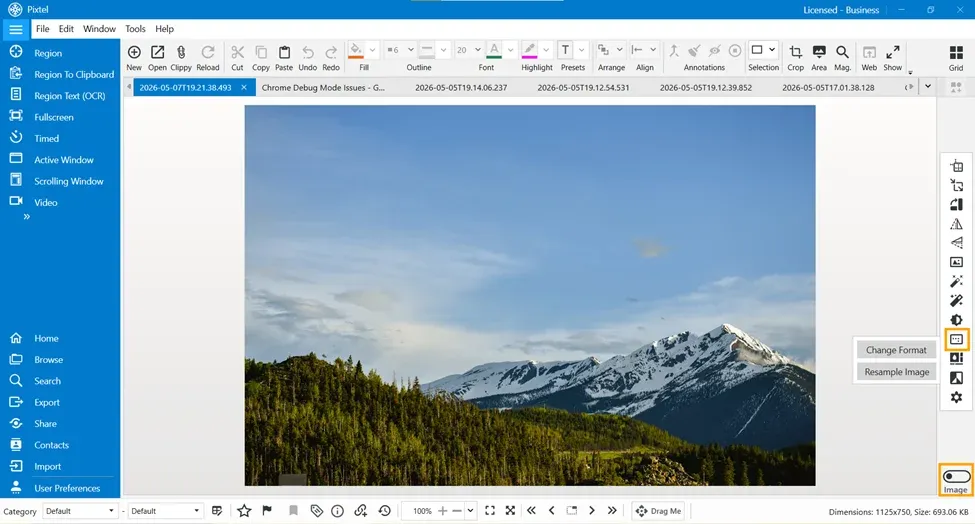
To use these image editing features in Pixtel:
- Switch to Image Mode
- Navigate to the Image Formats option
- Click to open the available image format and resampling tools
From here, users can access:
- Change Format for converting image pixel formats
- Resample Image for changing image resolution and scaling quality
These features can be applied to uploaded images, screenshots, and captured visuals directly within Pixtel.
Change Format Feature
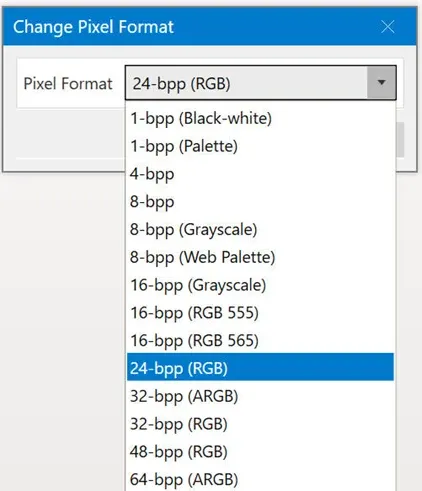
The Change Format feature helps users convert images into different pixel formats based on their requirements.
This feature is useful for:
- Optimizing image quality
- Reducing file size
- Improving compatibility
- Preparing images for different platforms and applications
Pixtel supports multiple pixel format conversion options including:
- 1-bpp (Black-white)
- 8-bpp (Grayscale)
- 16-bpp (RGB 555 / RGB 565)
- 24-bpp (RGB)
- 32-bpp (ARGB)
- 48-bpp (RGB)
- 64-bpp (ARGB)
What is bpp?
bpp stands for Bits Per Pixel. It defines how much color information is stored for each pixel in the image.
- Lower bpp values reduce file size
- Higher bpp values improve image quality and color depth
For example:
- 1-bpp converts the image into black and white format
- 24-bpp RGB provides standard high-quality color representation
- 32-bpp ARGB supports transparency using an alpha channel
This flexibility allows users to choose the appropriate format depending on their use case.
Benefits of Change Format
The Change Format feature helps users:
- Convert images into lightweight formats
- Improve image compatibility
- Optimize storage usage
- Support transparency and advanced color formats
- Prepare images for web, documentation, or professional editing
Resample Image Feature
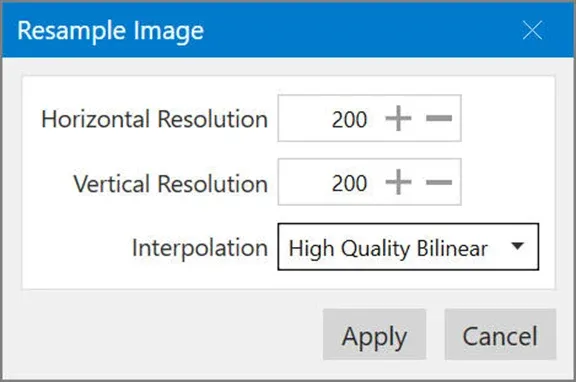
The Resample Image feature helps users change the image resolution while maintaining image quality.
Users can adjust:
- Horizontal Resolution
- Vertical Resolution
Pixtel also provides interpolation options to improve image scaling quality during resizing.
Interpolation Options
Interpolation determines how pixels are processed when resizing an image.
High Quality Bilinear — this interpolation method produces smoother and better-quality resized images.
Benefits:
- Smooth scaling
- Better visual clarity
- Reduced distortion during resizing
This is especially useful when enlarging or reducing screenshots and imported images.
Benefits of Resample Image
The Resample Image feature helps users:
- Resize images for different screen sizes
- Optimize images for web uploads
- Reduce image size without major quality loss
- Improve printing compatibility
- Maintain better image clarity during resizing
Conclusion
Pixtel provides simple yet powerful image editing capabilities through features like Change Format and Resample Image. These tools help users easily optimize image quality, resize images, and convert formats without needing advanced editing skills.
With easy image uploading options and built-in editing features, Pixtel streamlines the complete image management workflow and improves productivity for users handling screenshots, documents, and digital images.
Related reading:
- Resize Images Easily with Pixtel →
- Resize Canvas Easily with Pixtel →
- How to Perform Image Operations in Pixtel →
Capture once and use it forever. It isn't just a tool — it's Pixtel.
'%3e%3cpath%20d='M6.49988%200.862305L0.380969%206.98121C-0.127315%207.4895%20-0.127315%208.31107%200.380969%208.81936C0.889253%209.32764%201.71083%209.32764%202.21911%208.81936L5.19992%205.83855V15.7C5.19992%2016.4176%205.781%2017%206.49988%2017C7.21875%2017%207.79984%2016.4176%207.79984%2015.7V5.83855L10.7806%208.81936C11.0341%209.07285%2011.3669%209.20024%2011.6997%209.20024C12.0325%209.20024%2012.3653%209.07285%2012.6188%208.81936C13.1271%208.31107%2013.1271%207.4895%2012.6188%206.98121L6.49988%200.862305Z'%20fill='white'/%3e%3c/g%3e%3cdefs%3e%3cclipPath%20id='clip0_1_2'%3e%3crect%20width='13.0002'%20height='16.8995'%20fill='white'%20transform='translate(-0.000244141%200.100533)'/%3e%3c/clipPath%3e%3c/defs%3e%3c/svg%3e)