

Legal and Compliance Documentation: Capturing Evidence with Pixtel
A screenshot is easy to take. A screenshot that holds up in a regulatory review, a legal dispute, or a compliance audit is considerably harder to produce — not because the technical act of capturing is difficult, but because the surrounding context matters as much as the image itself.
What was the URL of the page at the time of capture? When exactly was the screenshot taken, and by whom? Has the image been altered since it was captured? Where is it stored, and who has access to it? These are the questions that transform a simple screen capture into a defensible piece of documentary evidence — and they are the questions that most screenshot tools are entirely unprepared to answer.
Pixtel was built with persistent metadata, source URL preservation, timestamp annotation, and secure cloud routing at the core of its capture architecture. For legal professionals, compliance officers, internal auditors, and anyone working in regulated industries, these aren't peripheral features — they're the foundation of a documentation workflow that actually holds up under scrutiny.
The compliance gap in standard screenshot tools
When most professionals think about screenshot tools, they think about image quality and annotation convenience. For general productivity, those are the right criteria. For legal and compliance work, they miss the point entirely.
The standard workflow — Snipping Tool, Print Screen, or a lightweight capture extension — produces an image file with no inherent provenance. The file's creation timestamp in Windows Explorer is mutable: copying, moving, or converting the file changes it. The source URL is not embedded in the image. There is no chain of custody. If the image is challenged — by opposing counsel, a regulator, an internal auditor, or a dispute resolution body — there is no mechanism in the image itself to demonstrate when it was captured, where it came from, or whether it has been modified.
This matters across a wider range of professional contexts than many people initially appreciate: marketing compliance teams documenting competitor advertising for FTC purposes, legal operations teams preserving web evidence before sites change, healthcare IT professionals documenting system states for HIPAA audit trails, financial services compliance officers capturing trading platform screenshots for regulatory filings, HR departments documenting policy violations, and IT security teams capturing evidence of unauthorized access or policy breaches.
In each of these scenarios, the image is only as valuable as the context surrounding it.
How Pixtel builds context into every capture
Source URL preservation
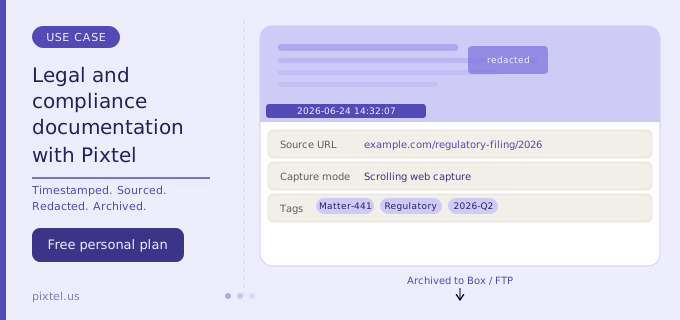
Every time Pixtel captures a web page — through region capture, scrolling capture, or full web capture — it records and preserves the source URL of the page at the moment of capture. This URL is stored with the capture in Pixtel's media library and is accessible at any time through the Info panel.
The practical implication is significant: you can capture a web page displaying a specific piece of content — a regulatory filing, a competitor's advertisement, a public-facing policy statement, a social media post — and the capture carries with it an auditable record of exactly where it came from. Clicking the Web icon in Pixtel reopens the original source URL, providing a direct link back to the original location even days or weeks after the capture was taken.
For legal teams documenting web-based evidence, this eliminates one of the most common objections to screenshot evidence: the inability to verify where the content appeared. The source URL is part of the capture record, not a post-hoc annotation that could be questioned as having been added later.
Timestamp annotation
Pixtel's Draw Mode includes a dedicated timestamp tool that embeds the date and time of capture directly into the image as a visible, styled annotation. This timestamp is applied at the moment of use and reflects the system time of the capture session.
Visible timestamps serve a different purpose from metadata: they make the date and time legible in the final document itself, without requiring anyone to inspect file properties or database records. For court exhibits, regulatory submissions, or compliance reports where the image will be reproduced in a PDF or printed document, an embedded visible timestamp provides a simple, human-readable chain of custody marker.
For internal audit purposes where metadata access is possible, the capture date is also preserved in Pixtel's media library independently of any annotation, providing a second layer of temporal documentation.
Capture metadata and the Info panel
Each capture in Pixtel's media library carries a metadata record that includes the capture date and time, the source application or URL, the capture mode used, and tags applied by the user. This information is accessible through the Info panel for any capture in the library.
For compliance workflows that require documentation of how evidence was collected — not just what was captured — this metadata provides the procedural record. A compliance officer reviewing a library of captures can see not just the images but the full context of how each one was obtained: when, from where, and through which capture mode.
Continuous and timed capture for process documentation
Some compliance scenarios require documenting a process or state over time rather than a single moment. Pixtel's Continuous Region Capture automatically captures the same screen area at configurable intervals — every few seconds, every minute, or any custom interval — producing a timestamped sequence of images that together document how a system state evolved.
This is particularly useful for IT compliance documentation (capturing a system's state at regular intervals to demonstrate configuration compliance over a maintenance window), for trading surveillance documentation (capturing a platform view at intervals during a trading session), and for any scenario where point-in-time evidence is insufficient and a temporal record is needed.
Timed capture — a countdown before capture fires — complements this for cases where a specific transient state needs to be documented: a dialog that appears briefly, a notification that auto-dismisses, or a tooltip that only displays on hover.
Annotation that supports, not undermines, evidentiary value
In legal and compliance work, annotation is a double-edged capability. Callouts and highlights that clearly identify the relevant element of a captured image are genuinely useful — they direct attention to the specific content being documented. But annotation that obscures, alters, or could be read as manipulating the underlying image is a liability.
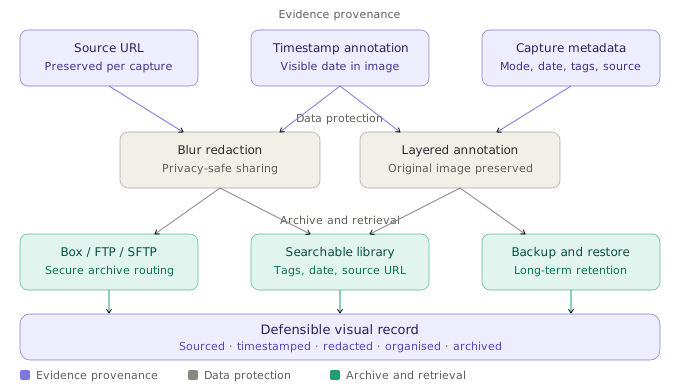
Pixtel's vector annotation system keeps original image content and annotations as separate layers until the user explicitly chooses to flatten them. This means:
- The underlying captured image is preserved in its original state as long as annotations remain unflattened
- Annotations can be shown, hidden, or removed independently of the image
- When the document is finalized, flattening produces a permanent combined image — but until that point, the annotation layer is demonstrably distinct from the captured content
For compliance reviewers or legal professionals who need to demonstrate that a screenshot has not been altered at the pixel level, this layered architecture provides an important distinction: callouts and highlights are transparently additions, not modifications to the original capture.
Blur redaction for sensitive data
Screenshots taken in production environments inevitably capture data that should not appear in documentation shared outside the immediate team — personal identifiable information, account numbers, confidential client data, internal pricing, or legally privileged content.
Pixtel's blur tool allows precise redaction of specific regions of a capture before export or sharing. This is relevant in both directions for compliance purposes: it enables compliance teams to share evidence screenshots without inadvertently exposing unrelated sensitive data, and it supports GDPR and other privacy regulation compliance by ensuring that personal data captured incidentally is redacted before images enter document workflows.
Unlike pixelation, which can sometimes be partially reversed through image processing, Pixtel's blur applies a smooth Gaussian-style blur that effectively obscures content without the visual artifacts that draw attention to what is being concealed.
OCR for extracting documented text from legacy systems
Many regulated industries run on older enterprise systems — legacy ERP platforms, industry-specific software with custom interfaces, or internal tools that predate modern copy-paste interoperability. Compliance officers working with these systems frequently need to extract specific field values, error codes, transaction identifiers, or status labels for inclusion in compliance reports.
Pixtel's OCR (Optical Character Recognition) captures text directly from any screenshot or screen region and converts it to editable text without retyping. For compliance documentation, this matters for accuracy: a compliance report that misquotes a system field value because someone retyped it is a weaker document than one where the text was extracted directly from the system's own display.
OCR is also valuable for building searchable compliance record libraries. When extracted text accompanies screenshots in a structured document, the content becomes searchable, cross-referenceable, and easier to produce in response to information requests or regulatory inquiries.
Secure storage and cloud routing for compliance workflows
Box integration for enterprise compliance
Box is the cloud platform of choice for many regulated industries precisely because of its security certifications, retention policy management, version history, and access control capabilities. Financial services firms, legal departments, healthcare organizations, and government contractors frequently mandate Box as the storage platform for sensitive documentation.
Pixtel connects directly to Box, allowing compliance screenshots to be uploaded from the capture workspace into specific Box folders without passing through intermediate storage on personal drives or unmanaged shared locations. Multiple Box accounts can be connected simultaneously — relevant for organizations that maintain separate Box environments for different client matters, regulatory programs, or business units.
FTP and SFTP for internal compliance infrastructure
Organizations that maintain internal document management systems, compliance archives, or secure internal servers accessible via FTP or SFTP can route Pixtel captures directly to those endpoints. This keeps compliance documentation within the organization's own security perimeter rather than routing through consumer cloud services.
Multiple FTP configurations can be saved in Pixtel, each with independent credentials and default remote paths — allowing compliance teams that manage multiple regulatory programs or client environments to route captures to the correct archive without manual path entry at upload time.
Email integration for regulated communication workflows
For compliance workflows that require documented communication of findings — sending an annotated screenshot to a supervisor, regulator, or external counsel — Pixtel's email integration allows captures to be sent directly from the workspace using the organization's existing email account. Multiple email accounts can be configured, supporting scenarios where different programs require communication from different organizational email addresses.
Building a searchable compliance media library
The most important capability for any compliance documentation workflow that extends beyond one-off capture is organization. A single screenshot proving a point is useful. A library of hundreds of compliance captures that can be searched, filtered by date, tagged by matter or program, and produced on demand in response to an audit or legal hold is a compliance asset.
Pixtel's built-in media library provides tag management, date filtering, source URL search, keyword search, and Grid View for visual browsing of the full capture library. Captures can be tagged at the time of capture — by matter number, regulatory program, system, or any other taxonomy relevant to the organization's compliance structure — and retrieved by those tags at any point.
For compliance teams that receive regulatory information requests or litigation holds requiring production of all documentation relating to a specific system, date range, or matter, this searchable library represents a meaningful operational advantage over an unorganized folder of files.
Backup and restore for long-term retention
Compliance documentation frequently carries multi-year retention requirements — five years, seven years, or longer depending on the regulatory framework. Pixtel's backup tool allows the full capture library, including metadata and tags, to be backed up to a specified local or network path. The backup can be restored to a new installation if needed, preserving the complete record rather than just the image files.
For organizations managing compliance records under formal retention schedules, the ability to export and archive the entire structured library — not just the images — is relevant to records management obligations.
Practical compliance workflows by industry
Legal operations and e-discovery
Legal operations teams preserving web-based evidence prior to anticipated litigation use scrolling web capture to capture entire pages — terms of service versions, public regulatory filings, competitor website states, social media content — with the source URL preserved. Timestamp annotations are applied, captures are tagged by matter number, and the resulting library is archived to Box under the matter folder. When the evidence is needed for production or expert witness preparation, the tagged captures can be retrieved, accompanied by their preserved source URLs and timestamps, and exported to PDF for formal submission.
Financial services compliance
Trading surveillance and market conduct compliance teams use Pixtel's continuous capture to document trading platform states during regulated sessions. Timed captures document specific order entries, confirmations, and system notifications. OCR extracts transaction identifiers and status codes for inclusion in compliance reports. Captures are stored to the firm's internal compliance archive via SFTP, tagged by trader ID and date, and retained per the firm's regulatory record-keeping schedule.
Healthcare IT and HIPAA documentation
Healthcare IT teams documenting system access, configuration states, and audit trail evidence for HIPAA compliance use Pixtel's window capture and region capture to document specific system screens. Blur redaction removes incidental PHI (protected health information) before images are shared with compliance reviewers. Captures are tagged by system and uploaded to Box folders maintained under the organization's HIPAA-compliant cloud storage agreement.
HR and workplace investigations
HR professionals documenting policy violations, harassment evidence, or disciplinary records use Pixtel to capture relevant communications, system logs, or application states. Source URL preservation documents where web-based content appeared. Timestamp annotations provide visible dating. Blur redaction protects the privacy of individuals not central to the matter. The resulting documented captures are stored in secure HR file locations and can be produced as exhibits in internal investigation reports or external proceedings.
What Pixtel does not replace
Pixtel is a professional capture and documentation tool. It is not a forensic imaging platform, a formal chain of custody system, or a legal hold management solution. For matters where forensic integrity is legally required — criminal proceedings, formal regulatory investigations, or any context where a court or regulator will scrutinize the technical provenance of digital evidence — the appropriate tools are forensic-grade imaging platforms with cryptographic hash verification and formally documented chain of custody procedures.
What Pixtel provides is a professional-grade capture workflow that is meaningfully more defensible than a standard screenshot, suitable for the broad range of compliance, regulatory, operational, and legal documentation work that organizations perform routinely — the kind of work where rigorous but practical documentation is the goal, rather than court-ready forensic evidence.
For many compliance scenarios, the question is not whether screenshots are forensically perfect but whether they are consistent, organized, clearly sourced, and reliably timestamped. Pixtel addresses all of those requirements in a workflow that professionals can actually sustain across high-volume documentation tasks.
Get started
Pixtel is available on the Microsoft Store with a free personal plan. Compliance-relevant features including source URL preservation, timestamp annotation, capture metadata, blur redaction, Box integration, FTP/SFTP routing, OCR, and continuous capture are available across plans.
👉 Download Pixtel
📘 Read the Documentation
🎥 Watch Tutorials
Related Articles
- Pixtel's Multi-Account Cloud Support Explained: Why It Matters for Teams →
- Unlocking Trapped Data: The Power of Advanced OCR in Screen Management →
- Mastering Scrolling Captures in Pixtel: A Complete Guide →
- Master Bug Reporting: Best Practices with Pixtel & Jira →
- The Strategic Advantage of Vector Graphics in Visual Workspaces →
'%3e%3cpath%20d='M6.49988%200.862305L0.380969%206.98121C-0.127315%207.4895%20-0.127315%208.31107%200.380969%208.81936C0.889253%209.32764%201.71083%209.32764%202.21911%208.81936L5.19992%205.83855V15.7C5.19992%2016.4176%205.781%2017%206.49988%2017C7.21875%2017%207.79984%2016.4176%207.79984%2015.7V5.83855L10.7806%208.81936C11.0341%209.07285%2011.3669%209.20024%2011.6997%209.20024C12.0325%209.20024%2012.3653%209.07285%2012.6188%208.81936C13.1271%208.31107%2013.1271%207.4895%2012.6188%206.98121L6.49988%200.862305Z'%20fill='white'/%3e%3c/g%3e%3cdefs%3e%3cclipPath%20id='clip0_1_2'%3e%3crect%20width='13.0002'%20height='16.8995'%20fill='white'%20transform='translate(-0.000244141%200.100533)'/%3e%3c/clipPath%3e%3c/defs%3e%3c/svg%3e)