

How Product Managers Use Screenshots to Move Faster in Agile Sprints
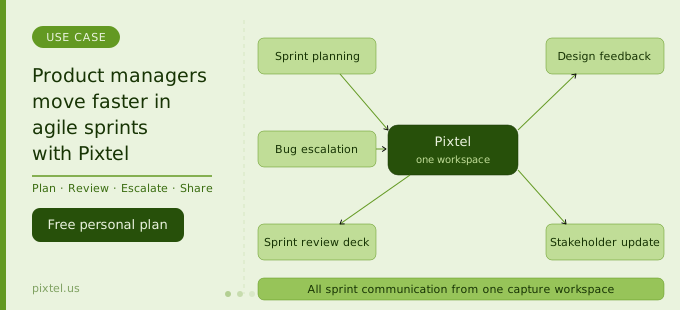
In every one of these situations, a well-chosen screenshot — annotated, contextualised, and in the right hands within minutes — communicates more clearly than a paragraph of prose, a bullet in a slide, or a verbal explanation on a call. The problem isn't that product managers don't know this. The problem is that producing a good annotated screenshot and getting it to the right destination is just slow enough that it doesn't always happen, and the team loses the clarity that visual communication would have provided.
Pixtel is a Windows-native screen capture, annotation, and media management platform that removes that friction entirely. This article walks through the specific points in an agile sprint where Pixtel makes a measurable difference for product managers — and why visual communication is one of the highest-leverage habits a PM can build.
Where screenshots matter most in a sprint
A sprint is roughly two weeks of alignment, execution, verification, and communication compressed into a tight loop. At every stage, the PM is the translation layer between what was planned, what was built, what needs to change, and what gets communicated upward. Screenshots appear at almost every one of these transition points.
Sprint planning: Capturing the current state of a feature or UI element to establish a baseline — what it looks like now versus what the ticket asks it to become.
During development: Capturing in-progress builds to compare against designs, flag deviations early, and give developers visual confirmation of the direction.
Bug identification and escalation: Capturing defects with enough annotated context for developers to reproduce them without back-and-forth.
Design review and feedback: Annotating wireframes, prototypes, and live builds to give designers precise, actionable feedback rather than written descriptions.
Sprint review preparation: Building the visual narrative of what shipped — before/after captures, feature walkthroughs, annotated highlights — for the sprint demo.
Stakeholder updates: Assembling screenshot-based summaries for executives, clients, or cross-functional partners who need to stay informed without attending every ceremony.
Pixtel addresses all of these. But rather than list features in the abstract, it's more useful to walk through each in the context of how a PM's actual day unfolds during a sprint.
Sprint planning: establishing a visual baseline
The richest sprint planning sessions start with everyone looking at the same thing. When a PM walks into sprint planning with a scrolling capture of the current state of a feature — the full page, not a crop — and annotated callouts marking what's changing this sprint, the development team has a shared reference that prose tickets alone can't provide.
Scrolling capture for full-page context
Pixtel's scrolling capture automatically scrolls and stitches any web page, application window, or scrollable panel into a single continuous image. For sprint planning, this means a PM can capture the entire current state of a dashboard, settings page, or multi-step flow in one shot — preserving all the content below the fold that partial screenshots always miss.
A scrolling capture of the current checkout flow, annotated with callouts marking the three elements changing in this sprint, gives developers a starting point that's unambiguous and complete. It eliminates the "what does it currently look like?" question that wastes the first ten minutes of every planning session.
Region capture for focused tickets
When a ticket is scoped to a specific component — a button, a dropdown, a particular form field — Pixtel's region capture lets PMs select the exact area with pixel precision. Captured immediately, opened in a tab, annotated in under a minute, and attached to the Jira ticket before the meeting ends. This is the baseline capture that gives developers the before-state reference they need.
Design feedback: annotating precisely instead of describing vaguely
Design feedback is one of the highest-stakes communication tasks a PM performs in a sprint. Getting it wrong wastes a designer's time on revisions that weren't what the PM meant. Getting it right — with specific, visual, unambiguous feedback — closes the loop in one cycle rather than three.
The difference between good and bad design feedback usually comes down to specificity. "The button doesn't look right" is not feedback. "The button is 12px too far from the input field and the label text weight is too light compared to the adjacent text" is feedback — and it's the kind of feedback that only becomes easy to give when you can point at the exact element.
Annotating designs with arrows and callouts
Pixtel's annotation toolkit is built for precisely this. PMs can capture a wireframe, prototype screenshot, or live build, then add directional arrows pointing to specific elements, callout bubbles with brief notes, and highlight rectangles marking the regions under discussion. The vector annotation layer remains separate from the underlying image until explicitly flattened, so annotations can be updated if the discussion evolves.
A single annotated screenshot replacing a three-paragraph Slack message saves time for both the PM and the designer — and produces a documented record of the feedback that the designer can refer back to throughout their revision.
Numbered sequences for multi-element feedback
When a design review covers a full screen with five or six separate issues, Pixtel's counter-based numbering tool lets PMs place sequenced numbered callouts directly on the screenshot. A numbered annotation sequence — ① too much top margin, ② icon size inconsistent with system icons, ③ this copy is truncated at 1280px width, ④ hover state not shown — gives the designer a complete, prioritised checklist in one image.
This format also makes it easy to track what has and hasn't been addressed across revision cycles. The PM keeps the numbered annotation as a reference, and when the revision comes back, each numbered item can be checked against the updated design.
Collage for before/after design comparison
For reviews that involve comparing an old design to a proposed revision, Pixtel's Collage tool combines two or more captures into a single side-by-side layout. A before/after collage — the current state on the left, the proposed change on the right — makes the delta immediately visible without requiring anyone to toggle between two separate images or tabs.
These comparison collages are also effective in stakeholder communication: showing what the design looked like last sprint alongside what's proposed this sprint lands faster than any written explanation.
Bug identification and Jira escalation
Product managers are rarely the primary bug reporters in an agile team, but they're frequently the ones who catch issues during acceptance testing, stakeholder demos, or exploratory sessions between formal QA cycles. When a PM finds a bug, the quality of the bug report they file directly affects how quickly it gets resolved.
Capturing and annotating a bug in under two minutes
The Pixtel workflow for bug capture is fast by design. Region capture selects the affected area, the image opens in a tab, a red arrow annotation points to the defect, a numbered callout marks the reproduction step sequence, and a sticky note records the environment (browser, OS, account type, feature flag state). Two minutes from discovery to fully documented capture.
Direct Jira attachment without leaving the workflow
Pixtel's Jira integration attaches the annotated screenshot directly to a new or existing Jira ticket from inside the Pixtel workspace. For a PM who has configured their Jira project with default field values — component, priority, issue type, affects version — this means filing a complete, visually documented bug ticket is a matter of selecting the project and clicking submit. The screenshot, the annotation, and the pre-populated fields arrive in Jira simultaneously.
For PMs managing multiple product areas or projects, multiple Jira configurations can be saved in Pixtel simultaneously. Escalating a bug to the right project is a dropdown selection, not a context-switch.
Continuous capture for multi-step reproduction
Some bugs only appear after a specific sequence of interactions — they're not visible in a single screenshot. Pixtel's continuous region capture fires automatically at configurable intervals, producing a timestamped sequence of captures that documents exactly what was happening on screen in the moments before, during, and after the bug appeared.
For intermittent or hard-to-reproduce bugs, this sequential capture record is often the difference between a developer being able to reproduce the issue immediately and the ticket sitting in the backlog marked "cannot reproduce."
Sprint review preparation: building the demo deck
Sprint review is the PM's primary opportunity to show the team, stakeholders, and product leadership what was accomplished in the sprint. The visual quality of this presentation shapes perceptions of the team's output — even when the actual engineering work was excellent.
Most sprint review decks are assembled manually: the PM takes screenshots, opens them in PowerPoint, resizes them, annotates in the slide editor, and tries to make everything look consistent. Pixtel compresses this into a fraction of the time.
Capturing the full sprint's visual output
During the sprint, captures accumulate in Pixtel's media library, tagged by feature, ticket number, or sprint identifier. By sprint review day, the PM already has a library of captures covering every major story delivered — initial states, in-progress builds, final polished states, edge cases. These aren't random screenshots; they're an organised visual record of the sprint.
Grid View in Pixtel displays the full capture library as thumbnails in sequence, making it easy to select the most relevant images for the review deck without hunting through folders.
Exporting directly to PowerPoint
Pixtel exports annotated captures directly to PowerPoint slides, with control over layout, slide size, borders, and how many images appear per slide. Selecting the sprint's key captures in Grid View and exporting them to a new PPTX takes one operation — the deck is pre-populated with one capture per slide, properly sized, ready for titles and context to be added.
For a sprint that delivered eight stories, this means eight clean slides in the review deck, each showing the relevant feature at its delivered state, in under five minutes. What previously took 45 minutes of copy-paste and resizing takes five.
Before/after slides for feature delivery
For stories that involved significant visual changes, a before/after slide is the clearest way to communicate the delta to stakeholders who weren't following the development day by day. Pixtel's Collage tool generates a side-by-side comparison image that lands clearly as a single slide without requiring anyone to mentally compare two separate screenshots.
Stakeholder communication between sprint ceremonies
Sprint ceremonies are where formal updates happen. But stakeholders — executives, clients, cross-functional partners — often need context outside those ceremonies: a quick status on a specific feature, confirmation that a design concern was addressed, or visual confirmation that a reported bug has been fixed.
Screenshots are the most efficient medium for these between-ceremony updates, and Pixtel makes sending them frictionless.
Direct email from the workspace
Pixtel's email integration allows PMs to send annotated captures directly from the capture workspace to stakeholder email addresses, without saving to disk or switching to an email client. The Pixtel smart contacts feature remembers frequently-used addresses, making a stakeholder email update a 30-second operation rather than a three-step process.
For a PM managing a demanding client who wants to see the fix before the next sprint review, this workflow turns a potentially long back-and-forth into a single annotated screenshot sent in under a minute.
Cloud sharing for remote and async teams
For stakeholders who prefer to review materials at their own pace, Pixtel routes captures directly to Google Drive, OneDrive, Dropbox, or Box — with multiple accounts per service supported simultaneously. A PM working across two client accounts can share captures to the correct client Drive folder in two clicks, without logging into a browser or navigating cloud storage separately.
The source URL is preserved with every web capture, so shared screenshots of web-based products carry an auditable link back to the page that was captured — useful when a stakeholder wants to verify they're looking at the right environment or build.
Collage for executive summary visuals
Executive stakeholders frequently want a summary visual rather than a sequence of individual screenshots. Pixtel's Collage and Collate tools combine multiple captures into a single organised layout — a four-up showing the sprint's four key deliverables, or a sequential three-step flow showing how a new feature works end to end.
A single well-constructed collage in a weekly stakeholder email communicates more than a bulleted list of completed stories, and it takes a fraction of the time that a manually assembled slide would require.
Maintaining a sprint capture library over time
The cumulative value of a disciplined screenshot practice compounds across sprints. A PM who tags captures consistently over six sprints has a visual product history — a searchable record of what the product looked like at every significant milestone, which features were introduced when, and how the UI evolved.
Pixtel's media library stores all captures with metadata including the source URL, capture date, capture mode, and user-applied tags. Searching for all captures tagged sprint-42 or checkout-flow retrieves the relevant images instantly, regardless of when they were taken.
This library serves multiple purposes over time:
Design archaeology. When a stakeholder asks why a design decision was made three sprints ago, the capture library provides the visual context — what the design looked like before the change and what the annotated feedback was that drove the revision.
Regression documentation. When a bug appears that looks similar to one from a previous sprint, the library reveals whether this is a known issue that was previously fixed. The original bug capture, the fix confirmation capture, and the new instance capture together tell the story.
Roadmap communication. A visual history of the product over time is a powerful tool for roadmap presentations — showing the evolution from MVP to current state lands far better than a timeline of feature names.
Onboarding new team members. A new developer, designer, or QA engineer joining the team can orient themselves with the product's visual history in minutes rather than days of discovery.
A sprint in a PM's week with Pixtel
To make this concrete, here's how Pixtel integrates across a typical sprint week:
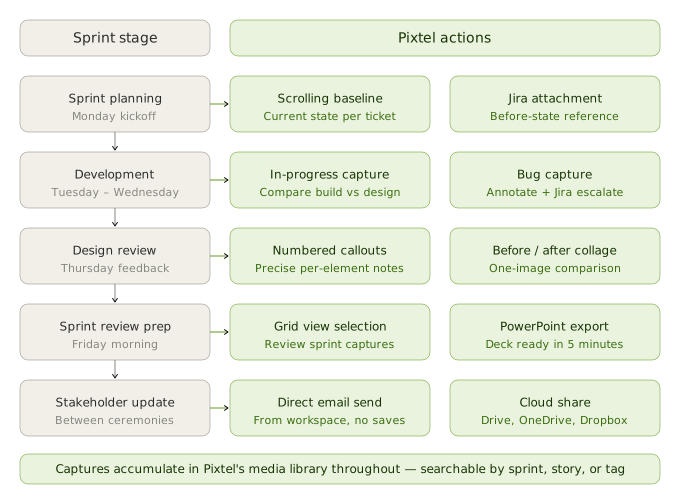
Monday — sprint kickoff. PM captures the current state of each story's affected UI with scrolling capture. Annotated baselines are attached to each Jira ticket before the first standup. Planning session starts with everyone looking at the same reference.
Tuesday–Wednesday — development. PM reviews in-progress builds with region captures, annotates deviations from design intent, and sends annotated feedback to the designer via email directly from Pixtel. Two Jira bugs filed with annotated captures during acceptance testing of the previous sprint's stories.
Thursday — design review. PM captures the revised designs, adds numbered callout feedback to three screens, and sends a collage comparison to the design lead. One round of feedback rather than three.
Friday — sprint review prep. PM opens Grid View, selects the fifteen captures accumulated during the sprint, exports to PowerPoint in one operation. Adds titles and speaker notes. Deck is ready in twenty minutes instead of ninety.
Friday — sprint review. Before/after collages land clearly with stakeholders. One executive requests a follow-up screenshot of the new API configuration screen for a client briefing; PM sends it directly from Pixtel to the executive's email before the meeting ends.
Weekend. Nothing. Because the sprint review deck was done before Friday afternoon.
Why visual communication is a PM superpower worth investing in
Product management is fundamentally a communication discipline. Everything a PM does — translating user needs into requirements, aligning engineering on priority, coordinating with design, keeping stakeholders informed — is communication. Visual communication, when it's fast and precise, is the highest-bandwidth version of that.
The friction that prevents most PMs from communicating visually as often as they should isn't a lack of understanding that screenshots are useful. It's that producing a good annotated screenshot and routing it to the right destination has traditionally taken long enough that it's easy to reach for words instead.
Pixtel removes that friction. When capturing, annotating, exporting, and sharing takes two minutes instead of fifteen, visual communication becomes the default rather than the exception — and the entire team moves faster because of it.
Get started
Pixtel is available on the Microsoft Store with a free personal plan. Features relevant to product managers — Jira integration, annotation tools, scrolling capture, PowerPoint export, multi-account cloud sharing, and email integration — are available across plans.
👉 Download Pixtel
📘 Read the Documentation
🎥 Watch Tutorials
Related Articles
- Master Bug Reporting: Best Practices with Pixtel & Jira →
- How Customer Support Teams Cut Ticket Resolution Time with Pixtel →
- The Ultimate Guide to Website Mockups: Streamlining Design Reviews with Pixtel →
- With Pixtel, Make Your Presentations Engaging →
- The Ripple Effect: Quantifying Productivity Improvements in Team Communication →
'%3e%3cpath%20d='M6.49988%200.862305L0.380969%206.98121C-0.127315%207.4895%20-0.127315%208.31107%200.380969%208.81936C0.889253%209.32764%201.71083%209.32764%202.21911%208.81936L5.19992%205.83855V15.7C5.19992%2016.4176%205.781%2017%206.49988%2017C7.21875%2017%207.79984%2016.4176%207.79984%2015.7V5.83855L10.7806%208.81936C11.0341%209.07285%2011.3669%209.20024%2011.6997%209.20024C12.0325%209.20024%2012.3653%209.07285%2012.6188%208.81936C13.1271%208.31107%2013.1271%207.4895%2012.6188%206.98121L6.49988%200.862305Z'%20fill='white'/%3e%3c/g%3e%3cdefs%3e%3cclipPath%20id='clip0_1_2'%3e%3crect%20width='13.0002'%20height='16.8995'%20fill='white'%20transform='translate(-0.000244141%200.100533)'/%3e%3c/clipPath%3e%3c/defs%3e%3c/svg%3e)