

Master Bug Reporting: Best Practices with Pixtel & Jira

Bug reporting is an art—and a science—that every software team strives to perfect. When done well, it speeds up debugging, improves communication, and ultimately leads to better software. But when bug reports are unclear, incomplete, or lack context, they become a source of frustration and delays. That’s where Pixtel and Jira come in, working together to make bug reporting smoother, smarter, and more effective.
This week, let’s dive into how you can master bug reporting by combining Pixtel’s powerful screen capture and recording tools with Jira’s robust issue tracking capabilities. Whether you’re a developer, tester, or product manager, these best practices will help you create bug reports that get noticed and resolved faster.
Why Screen Capture Matters in Bug Reporting
Words alone can only do so much when describing a bug. Context is king, and visual evidence often tells the story best. Pixtel’s screen capture and recording software lets you grab screenshots or record your screen effortlessly, capturing exactly what went wrong.
Imagine trying to explain a tricky UI glitch or an intermittent error through text alone. With Pixtel, you can create a quick video or annotated screenshot that shows the problem in action. This clarity helps your team understand the issue immediately and saves everyone from playing detective later on.
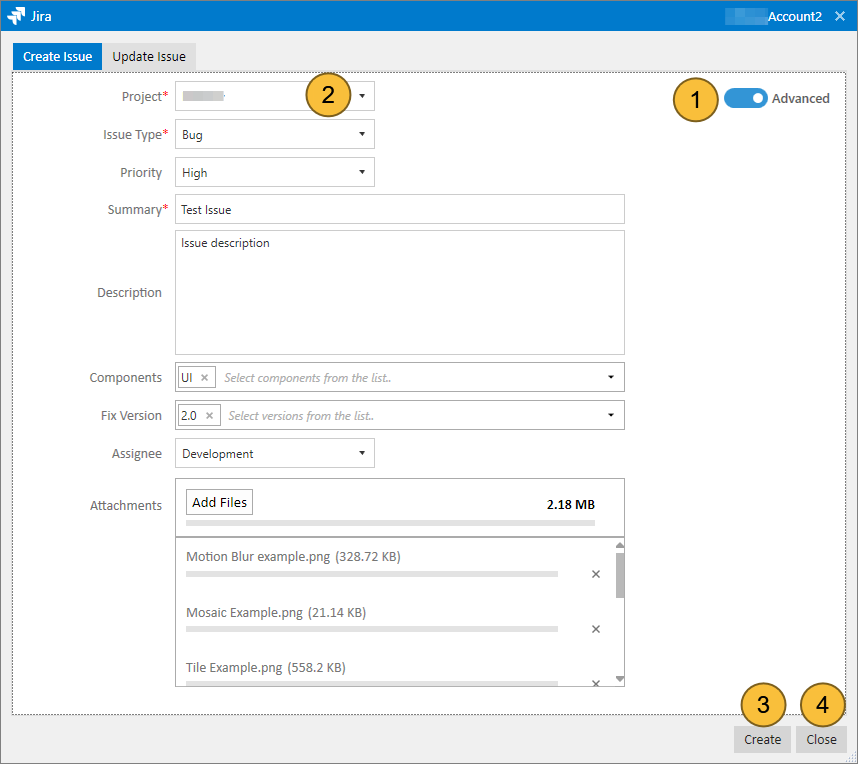
Seamless Integration: Pixtel Meets Jira
What makes Pixtel truly stand out for bug reporters is its built-in support for Jira. Instead of juggling multiple apps or manually uploading files, you can create and update Jira issues directly from Pixtel. This integrated workflow means your bug reports come bundled with all the visual context your team needs.
Here’s how this integration works in practice:
- Access the Share Interface:
In Pixtel, open the image or recording you want to share and click the 'Share' icon in the left-side menu, or select 'Window' > 'Share' from the top menu.
- Configure Jira Integration:
In the Share interface, go to the 'Applications' section and select 'Jira'. Enter your Jira instance URL and authenticate with your credentials.
- Set Default Values:
You can configure default project, issue type, and priority values to streamline issue creation.
- Create or Update Issues:
Create new Jira issues or update existing ones directly from Pixtel, with your annotated images or videos automatically attached.
This tight integration reduces friction, eliminates duplicate effort, and accelerates the feedback loop between reporters and developers.
Best Practices for Bug Reporting Using Pixtel & Jira
To get the most out of this powerful combo, keep these tips in mind:
- Be Clear and Concise:
Use a descriptive title and a brief summary that outlines the problem. Let the visuals back up your explanation.
- Show, Don’t Just Tell:
Use Pixtel to capture the bug in real time. Record the steps leading up to the bug or snap a screenshot of the error message.
- Annotate Thoughtfully:
Highlight or circle critical parts of the screen capture to guide the viewer’s attention to the root cause.
- Link to Related Issues:
If the bug is connected to other Jira issues, link them to give developers full context.
- Reproduce Steps Clearly:
In your Jira issue description, list step-by-step instructions to reproduce the bug. Supplement this with Pixtel’s recording for added clarity.
- Prioritize and Categorize:
Assign appropriate severity, priority, and labels in Jira so the development team knows how to triage your report.
- Maintain Consistency:
Use the configured default values in Pixtel to ensure uniformity across bug reports.
- Regularly Update Issues:
Keep Jira issues current with new attachments or comments as more information becomes available.
Wrapping Up
Mastering bug reporting is about clear communication and seamless collaboration. Pixtel’s screen capture and recording capabilities, paired with Jira’s powerful issue management, take the guesswork out of reporting bugs and help you deliver crystal-clear, actionable feedback.
By configuring the Jira integration inside Pixtel, you simplify the process of attaching visual context to your issues, speeding up resolution times and improving overall software quality.
Give these best practices a try on your next bug report and watch how much faster and smoother your team’s workflow becomes. Remember, effective bug reporting isn’t just a task—it’s a key part of building better software together.
Stay tuned for more tips and tricks on optimizing your software development processes with smart tools like Pixtel and Jira. Happy bug hunting!
If you're searching for the most comprehensive screen capture and management application, consider downloading and trying Pixtel. Once you start using it, you'll find it indispensable!
